6
7
EN
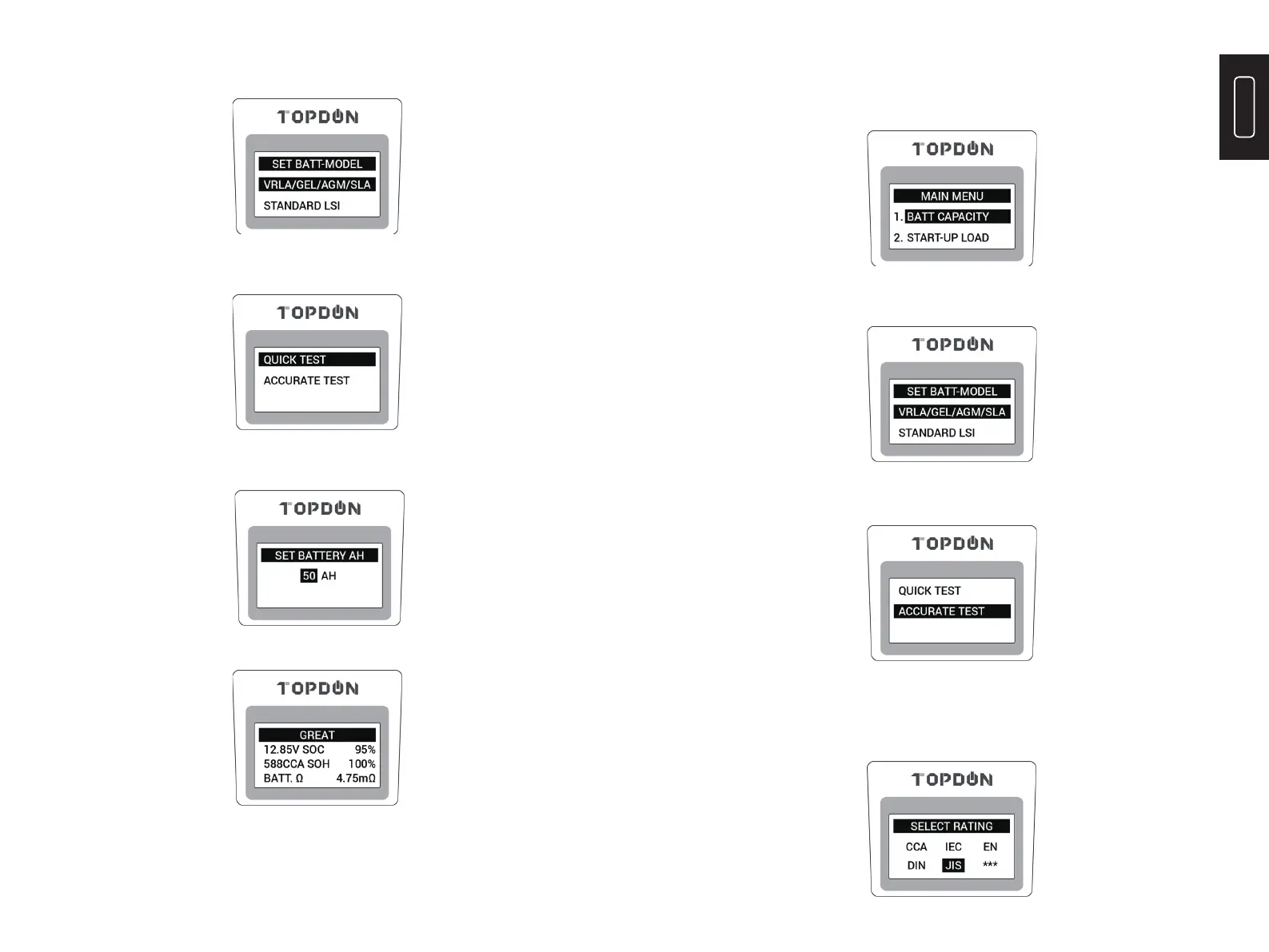
2) According to battery type, press the “
▲
” or “
▼
” button to select, then press
“ENTER” to continue.
3) Press the “
▲
” or “
▼
” button to select the “QUICK TEST”, then press
“ENTER” to continue.
4) According to the AH value marked on the battery, press the “
▲
” or “
▼
”
button to set the AH value, then press “ENTER” to start quick test;
4) After test complete, the message will display as below;
2. Accurate Test
1) On Main Menu, press the “
▲
” or “
▼
” button to select the “BATT CAPACITY”,
then press “ENTER” to continue.
2) According to battery type, press the “
▲
” or “
▼
” button to select, then press
“ENTER” to continue.
3) Press the “
▲
” or “
▼
” button to select the “ACCURATE TEST”, then press “ENTER”
to continue.
4) Press the “
▲
” or “
▼
” button to select “Rating”, then press “ENTER” to continue.
NOTE: JIS is Japanese Battery standard, which needs to be converted into CCA value
to test (Please Google “JIS to CCA”). Choose *** when your battery specifi cation is
unavailable for a rough test, with lower accuracy.


 To Next Page