NOTE: Every step for pressing button during program must be finished within 1 second to ensure success-
-full program.
“Learn” Transmitter code
Use For DK&DSR Series Sliding Gate Opener
Make sure the control board of opener is power on and in standby
mode (PWR LED flashes rapidly and REM LED is off, gate is stop).
Control Board of DK Serises
4
5 6 7 8321
ON
MIN MAX MIN MAX
DIP
Learn ButtonREM LED PWR LED
Step 1. Press and release “Learn” button of the control board, and then
REM LED will be on.
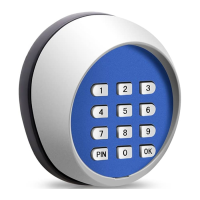
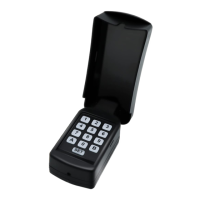
Step 2. Press the ”OK” button once on the keypad
to learn the transimitter code. If the keypad has been
learnt successfully, the REM LED will flash for 2 seconds
and then back to off. Now you can use the factory defaut code to operate the
gate (Refer to the chapter “HOW TO OPERATE DK Series Slingding Gate Opener” in manual) .
NOTE: The “OK” button should be pressed within 1 second after step 1, or you may have to
start over.
How to Operate DK&DSR Series Sliding Gate Opener
Once the keypad has been learnt successfully, you can use default code to operate the gate.
Step 1. Press and release “PIN” button on the wirelesskeypad and then enter the 6 digits entry code.(factory
defaut entry code is “888888”)
Step 2. Press the “OK” button within 1 second after step 1 to move the gate.
1. When the gate stops in some positon and the operator is in standby mode, you can make it to
move via the following steps:
2. You can press the “OK” button at anytime to stop the moving gate(Entry code is not needed).
Programming the new entry code
Make sure the control board of opener is power on and in standby mode (PWR LED flashes rapidly and
REM LED is off, gate is stop).
Step 1. Press and release “PIN” button on the keypad and then enter the 6 digits default or old entry
code. (factory default entry code is “888888”)
Step 2. Press and release “PIN” button on the keypad, REM LED of the control board is ON waiting
for user to input the new entry code.
Step 3. Enter your 6 digits new entry code and press “PIN” button to store it. The entry code has been updat-
-ed successfullu while REM LED flashed for 2 seconds on control board.
For safety reason, you may change the factory default entry code or old entry code to your new
code but the keypad must be learnt successfully with control board of sliding gate operator before
you try to change the entry code.
NOTE: Every step for pressing button during program must be finished within 1 second to ensure success-
-full program.
NOTE: The beeper of the keypad will beep at the press of any key. When you enter the entry code,
each button should be pressed within 1 second. If an error has occurred, the beep will sound for
2 seconds before returning to normal operation. Please try again.
NOTE: If the Keypad is installed outside of the gate to open the gate, and no Keypad is installed
inside of the gate, we strongly recommend you set the auto-close function in circuit board in control
box. Refer to Installation and Operation Manual.
3


 To Next Page
 Loading...