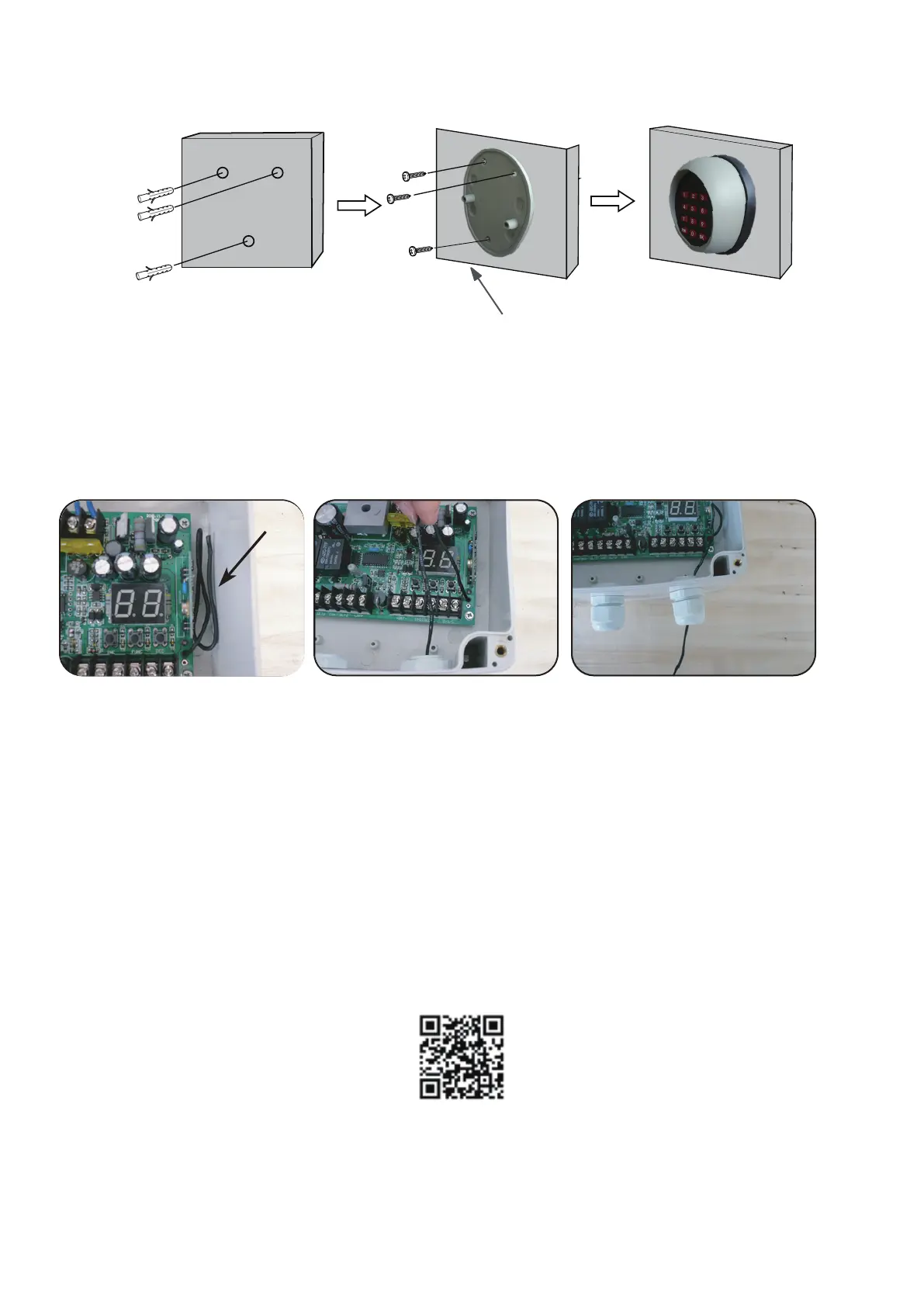
penetrate the mounting holes before you install the keypad
Wall
Installation of the keypad
Note: The mounting holes of the keypad has not been penetrated, you should use one tool with
sharp head to penetrate them. Install the keypad by the following figure.
Step 1: Open the control box, the black color antenna can be found in the side of PCB.
Step 2: Draw the antenna straight and pull it through the cable hole in the bottom of the control box.
Ref to the figure 8, 9 and 10.
Fig.8
Antenna
Fig.9
Fig.10
Trouble Shooting
1. Fail to learn the transimitter code.
a. Check if the battery is exhausted.
b. Re-learn the keypad anear the control board.
c. Once the control board is ready to learn the keypad, press the “OK” button within 1 second.
2. Fail to operate the gate with keypad.
a. Check if the battery is exhausted.
b. The distance is too far to use the keypad (Refer to the chapter ”How to increase the control distance
of keypad”).
3. Forget your own entry code.
Re-learn the keypad according to the manual. The entry code would be “888888” if the keypad has been
learnt successfully.
The designed remote range of the Keypad is 5~10 meters. If you find that the Keypad is not sensitive
enough in on-site installation, we suggest you enhance the remote range by the following method.
How to increase the control distance of keypad
TOPENS Website
http://www.topenstool.com/
TOPENS Website
www.topens.com
Any question, please do not hesitate to contact us:
E-mail: support@topens.com
Kindly include your Product Model, Purchasing Date & Site, Order #, and your contact information.
All your concerns will be replied within 24 hours.
Tel: +1 (888) 750 9899 (Toll Free USA & Canada)


 To Previous Page
 Loading...