13
TOPEX.PLTOPEX.PL
19. Calibrate the multimeter on a yearly basis.
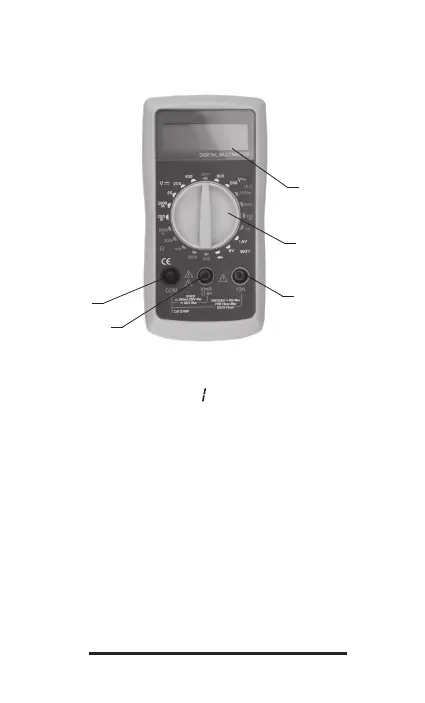
DESCRIPTION OF FRONT PANEL
1
2
3
5
4
1. LCD display
Displays 3 ½ digits. Maximum reading 1999. Automated indication of empty battery, ex-
ceeding measurement range (marked with „
„) and polarity of direct current.
2. Dial selector switch for functions and measurement range.
With this switch you can select required function (measurement of current, voltage, resist-
ance, diode test etc.), measurement range, and switch on/off the device. To prolong battery
life, the dial selector switch should be set to OFF position when the multimeter is not in use.
3. Measurement terminal 10A (positive).
Terminal for direct current measurements, up to 10A. 10A measurement range has no
overcurrent protection fuse. Connect red test lead to this terminal.
4. Measurement terminals “VmA Ω” (positive).
Terminal for measurements of AC and DC voltage, direct current up to 200mA, resistance,
diode and battery testing. Connect red test lead to this terminal.
5. Terminal “Com” (common, negative).
Connect black test lead to this terminal.
GENERAL SPECIFICATION
1. LCD display: Maximum reading 1999. Automated indication of empty battery, exceeding
measurement range and polarity of direct current.
2. Measurement method: analogue to digital converter.


 To Next Page