5
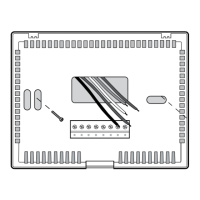
Typical Wiring Configurations
NOTE: The “Installer Switch” option will be configured in the next step.
Attach Thermostat to Sub-Base
5
1.Lineupthethermostatbodywiththesub-base.
2.Carefullypushthethermostatbodyagainstthesub-baseuntilitsnaps
intoplace.
NOTE: The thermostat hinges from the top and latches at the bottom.
User Factory Setting
No. Options Default Options Comments
1 1ststage
0.5
0.5, 1.0
Selecta1ststagetemperature
differential
or 2.0 differentialof0.5˚,1.0˚or2.0˚F
(0.2˚,0.5˚or1.0˚C)
2
2ndstage
2.0
1.0, 2.0,
Selecta2ndtemperature
differential
3.0, 4.0
, differentialof1˚,2˚,3˚,4˚,5˚or6˚F
(TT-P-421only)
5.0 or 6.0
(0.5˚,1˚,1.5˚,2˚,2.5˚or3˚C)
3
LG
Selectslong(permanent)holdmode
5H
Selects24hr.(temporary)holdmode
4
O00
Disableslterservicemonitorfeature
30, 60,
Selectsanumberofdaysbefore
90
, 180 thethermostatwillashaService
Filterreminderinthedisplay.
5 REC OF Disablesadaptive(early)
recoverymode
REC ON Enablesadaptive(early)
recoverymode
Table of User Options
3
Setting User Options
Advanced User Options
Useroptionsallowyoutocustomizesomeofyourthermostat’sfeatures.
Mostuserswillnotneedtomakeanychangestothesettingsinthissection.
To access the User Options menu, hold down the RETURN button
for
approximately 3 seconds until the screen changes and displays the
first User Option.
PresstheorbuttontochangethesettingforthedisplayedUserOption.
Afteryouhavemadeyourdesiredsetting,pressRETURNtoadvancetothe
nextUserOption.
Thethermostatwillreturntonormalmodeafteryourlastuseroptionis
madeorafternokeyshavebeenpressedfor5seconds.
Extended
HoldPeriod
LG
Filter
Service
Monitor
O00
Adaptive
Recovery
Mode(ARM
TM
)
REC OF

 To Next Page
 Loading...