AssociatingtheRemote
ControlandtheBaseUnit
Important:Readtheentireprocedurebefore
performingtheprocedure.
Theremotecontrolmustestablishcommunications
withthebaseunitbeforeyoucanusethesystem.
Theremotecontrolisassociatedtothesystem
baseunitbeforeleavingthefactoryusingthe
associateprocedure.Insituationswhereitis
necessarytore-establishremotecontrol-to-base
unitcommunications(e.g.,introducinganewor
spareremotecontroltoanexistingbaseunit),dothe
following.
Note:Associatingtheremotecontroltoadifferent
baseunitdisassociatesthatremotecontrolfromthe
originalbaseunit.
1.Removepowerfromthebaseunit.
2.Standnearthebaseunitinunobstructed,clear
line-of-sightwiththeremotecontrolinhand.
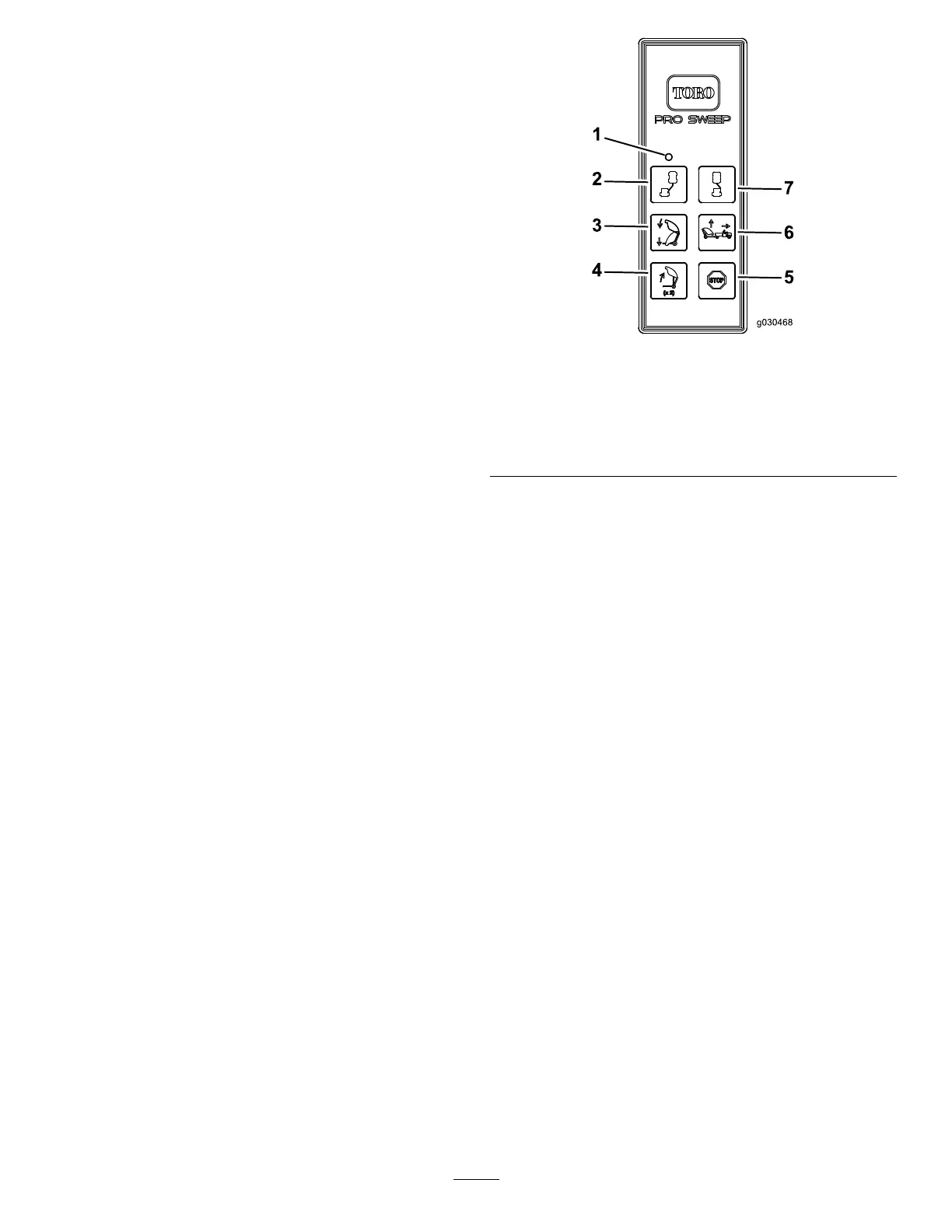
3.SimultaneouslypressandholdtheOFFSETLEFT
andOFFSETRIGHTbuttons.TheLEDblinks
aboutoncepersecond.
4.ContinuetoholdbothbuttonsuntiltheLED
beginsblinkingabouttwicepersecond.
5.Releasethebuttons.
6.PressandholdtheOFFSETLEFTbutton.The
LEDblinksabouttwicepersecond.
7.ContinueholdingtheOFFSETLEFTbuttonand
turnthekeystarttotheRUNposition.TheLED
turnssolidiftheprocedureissuccessful.
Note:Thiscouldtakeupto20seconds.
8.ReleasetheOFFSETLEFTbutton.
Thesystemisreadyforusewiththatparticular
remotecontrol.
g030468
Figure39
1.LEDlight
5.Stop
2.Offsetleft6.Sweeperup
3.Sweeperdown7.Offsetright
4.Hopperdump
32



 To Next Page