EnteringDiagnosticModeandCheckingtheCodes
1.TurnthekeytotheRUNposition.
2.Disconnectthepowerbyseparatingthevehicleharnessfromthemachineharness.
3.Removethefrontcover.
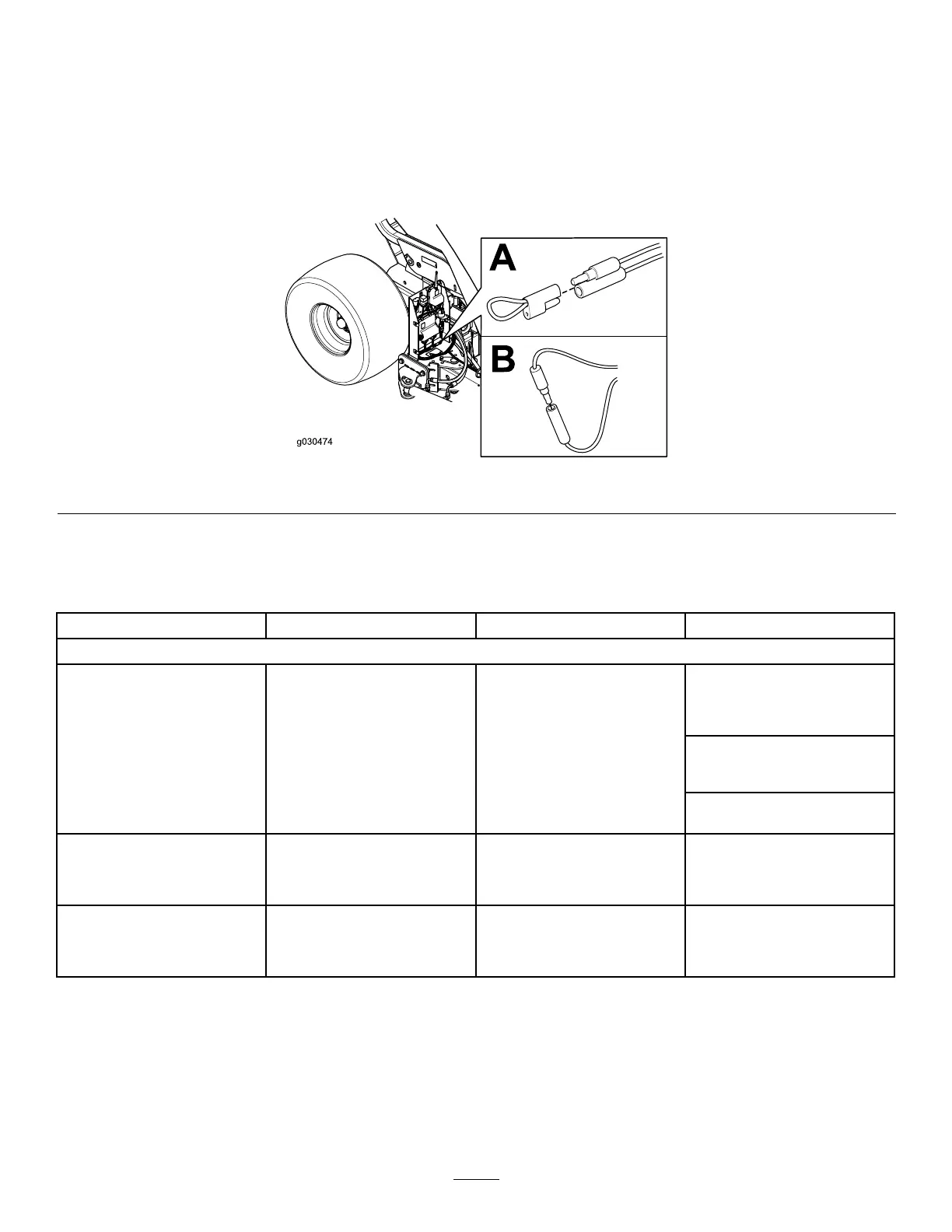
4.Pullthetetheredcapoffthe2diagnosticshuntconnectors(Figure41A).
5.Connectthediagnosticshuntconnectorstogether(Figure41B).
g030474
Figure41
6.Connectthevehicleandmachinewireharnesstogethertopowerthemachine.
7.Countthenumberofashestodeterminethefaultcode,thenconsultthefollowingtable:
Note:Iftherearemultiplefaults,bothfaultsash,alongpausefollows,thentheashsequencesrepeat.
Code
LEDFlashPatternBehaviorDetails
MachineSpecicFaults
Connectornotplugged
in;locatethelooseor
disconnectedharness
connectorandconnectit.
Somethingwronginthewiring;
contactyourauthorizedToro
distributor.
11Blinkonce,pause,blinkonce,
longpause,thenrepeat
LostcommunicationwithBASE
BASEisbad;contactyour
authorizedT orodistributor.
12Blinkonce,pause,blinktwice,
longpause,thenrepeat
Versionincompatibilityofthe
BASEand/orHH
Wrongsoftware(install
thecorrectsoftwarefrom
TORODIAG);contactyour
authorizedT orodistributor.
13Blinkonce,pause,blink3
times,longpause,thenrepeat
WrongHH—notimplemented
onRevA
Thereisanincorrectproduct
association(e.g.,tryingto
updatesoftwareonaMH-400
withaProPasshandheld)
8.Installthefrontcover.
ResettingtheFaultCodes
Aftersolvingtheproblem,disconnectandconnectthediagnosticconnectors.Thediagnosticlightashes
continuouslyoncepersecond.
35



 To Next Page