63
The T-1 Notebook : Reference & Guide
62
The T-1 Notebook : Reference & Guide
NOTESNOTES
▌ EXTENDING STEP COUNT
1. Optionally lock the step sequencer view. Double tap (STEPS). This is
not essential but is good practice to view the step state. Active steps are
displayed GREY ⬛ and active euclidean pulses DULL WHITE ⬛.
2. Extend step count. Hold [CTRL] + Turn (STEPS). The number of steps
are extended by turning clockwise, 1 step per knob ‘click’. The number
of steps are reduced by turning anti-clockwise. Inactive steps will not be
illuminated at all.
3. Step pages. While holding [CTRL] when in step sequencer view, the
current page is indicated on the page button lit WHITE ⬛. The page in
view can be selected by holding [CTRL] and pressing the associated
page button. This only selects the page in view and does not change
active / inactive steps in the pattern. Page buttons are:-
• Page 1: Steps 1-16 - Default. Selected [BANK].
• Page 2: Steps 17-32. Select with [PATTERN].
• Page 3: Steps 33-48. Select with [TEMP].
• Page 4: Steps 49-64. Select with [MUTE]
4. Quick edit step count. If the view is not locked to step sequencer view,
the step pages can be quickly displayed by [CTRL] + Press (STEPS).
To quickly select a step page, Hold [CTRL] + (STEPS) + Page button.
PAGE 1
1
16
+
PAGE 1
Illustration shows Page 1 - Steps 1-16 is selected in view on the value buttons
steps
PAGE 3PAGE 2 PAGE 4
+
Rhythmic Patterns
3
Rhythmic Patterns
3
3.6 Per Step - Manual Editing Patterns
Per Step editing makes it possible to manually enter pulses as opposed to
Euclidean pulse generation. Not only can pulses be individually placed but
also the parameter settings for each pulse can be set individually. In fact
parameters can be set per step, even without a pulse being present on the
step. Pulses entered for manual per step sequencing can be rotated but will
not be affected when changing Euclidean pulses.
In summary:
• Euclidean generated pulses can be removed and added by turning
the (PULSES) knob. Step editing has manually placed pulses.
• Per-Step editing also extends to the parameters which can be
applied to each step, irrespective of whether a pulse is placed on
the step or not. Outside of per-step editing mode, parameter
changes are applied globally to all steps.
• Parameters excluded from per-step editing mode; Tempo, Delay,
Length, Quantize.
• Pulses are added and removed from a pattern by manual per step
sequencing using the value buttons when in pulse sequencing view.
• Pulses added manually cannot be removed by the Euclidean
(PULSES) knob and can only be removed manually using the value
buttons.
• Pulses added both manually or by Euclidean generation can be
rotated using the (ROTATE) knob.
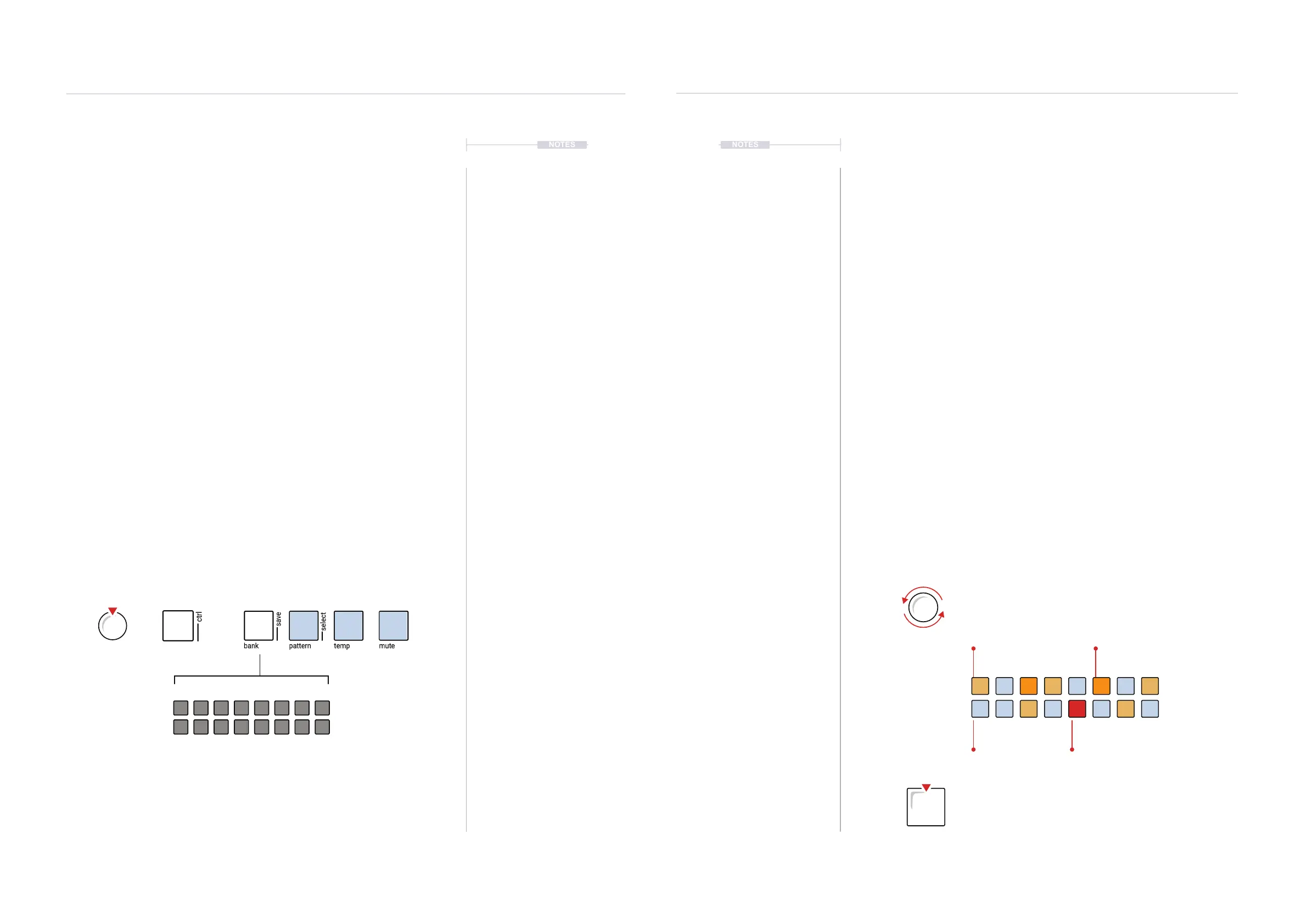
DULL ORANGE ⬛
Euclidean Pulses
BLUE GREY ⬛
Steps
RED ⬛
Parameter Edited Step
ORANGE ⬛
Per Step Pulses
Euclidean sequenced cycles created by added pulses by turning
the (PULSES) knob. Remove by turning (PULSES).
Manual - per step sequenced cycles created by pressing the
[VBx] Value buttons to add / remove pulses. Selected pulse
ashes, as does the bank button to indicate edit mode.



 To Next Page
 Loading...
