69
The T-1 Notebook : Reference & Guide
68
The T-1 Notebook : Reference & Guide
NOTESNOTES
3.8 Length
The length parameter allows the reduction of the entire track length either
as a xed adjustment or to create on the y variations and loops. The
behaviour will of course depend on the total number of steps, especially
when reducing in full bar lengths.
▌ REDUCING THE TRACK LENGTH
1. Optionally lock the length view. Double tap (LENGTH). This is not
essential but is good practice. Just holding (LENGTH) will temporarily
view the state until the knob is released or timed out.
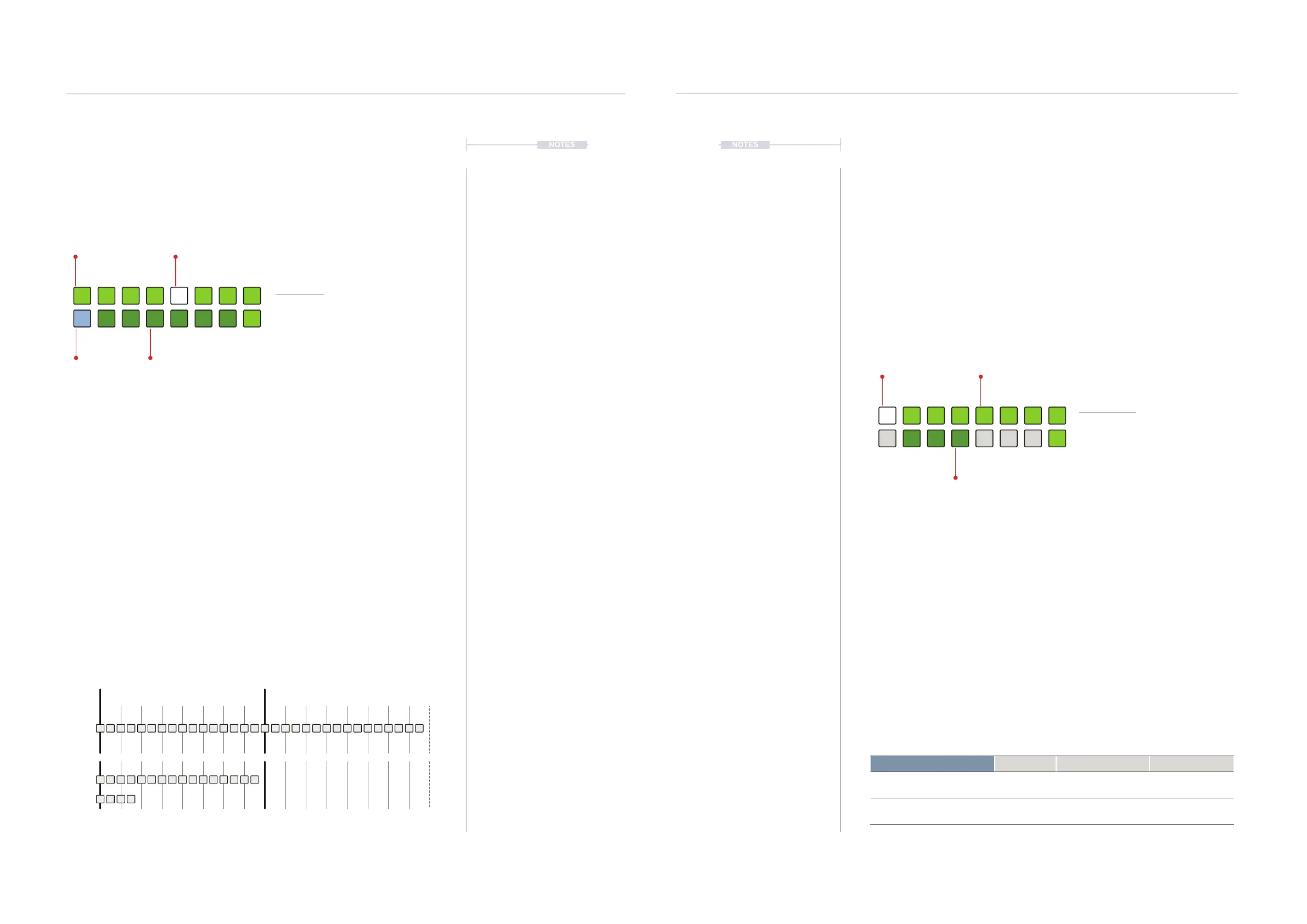
2. Value button state. The active length is displayed on a value button
illuminated WHITE ⬛. Top row GREEN ⬛ Indicates bar lengths and
bottom row DARK GREEN ⬛ available bar sub divisions. [VB9] is
innite which is the default setting.
3. The length reduction will be based on the total step count which must
be higher than the selected length in order to generate a reduced
playback length. The track will loop over the length.
4. To select a random start point for the current cycle, press [CLEAR]
while in length view. This creates glitch sequences. A random start can
also be set when changing length while holding [CLEAR].
Total
Steps
Length
1
1/4
Bar 1 Bar 2
Steps are illustrated , not Pulses
Length View
Hold (LENGTH). Double tap (LENGTH)
to retain the value button display.
WHITE ⬛
Selected Option
GREEN ⬛
Bar
DARK GREEN ⬛
Division of Bar
BLUE ⬛
Innite
1 3
1/41/2inf
6
1/32
2
5
1/16
4
1/8
7 8
161/64
Rhythmic Patterns
3
Rhythmic Patterns
3
3.9 Pattern Quantize
Quantization is a time based parameter linked to the pattern and serves
two purposes:-
• Quantize ensures synchronisation with the transport control and is
based on the time setting selected.
• Quantize determines the current pattern playback time duration
before the next queued pattern will start to play.
Quantize operates and is stored at pattern level and is part of the setup
section of the T-1 parameters.
▌ SELECTING A QUANTIZE SETTING
1. Hold [CTRL] + Press (QUANTIZE) will temporarily view the state until
the knob is released.
2. Value button state. The active quantize is displayed on a value button
illuminated WHITE ⬛. Top row and 16
th
button, GREEN ⬛ Indicates
quantize in bar lengths. Bottom row DARK GREEN ⬛ indicates
available sub divisions.
3. Selecting a quantize option. Hold [CTRL] + Turn (QUANTIZE) to quickly
view and change. When quantize is displayed, Press [VBx] Where ‘x’ is
value button 1-8, 16, 10-12.
Quantize View Mode.
Quantize View
Hold (QUANTIZE). Double tap (QUANTIZE)
to retain the value button display.
WHITE ⬛
Selected quantize
GREEN ⬛
Bars
DARK GREEN ⬛
Sub Divisions
1
3
1/41/2
6
2
5
4
1/8
7 8
16
Quantize Options Group Value Button Option Colour
1, 2, 3, 4, 5, 6, 7, 8, 16 Bars 1, 2, 3, 4, 5, 6, 7, 8,16
GREEN ⬛
1/2, 1/4, 1/8 Sub Divisions 11, 12, 13
DARK GREEN ⬛



 To Next Page