127
The T-1 Notebook : Reference & Guide
126
The T-1 Notebook : Reference & Guide
NOTESNOTES
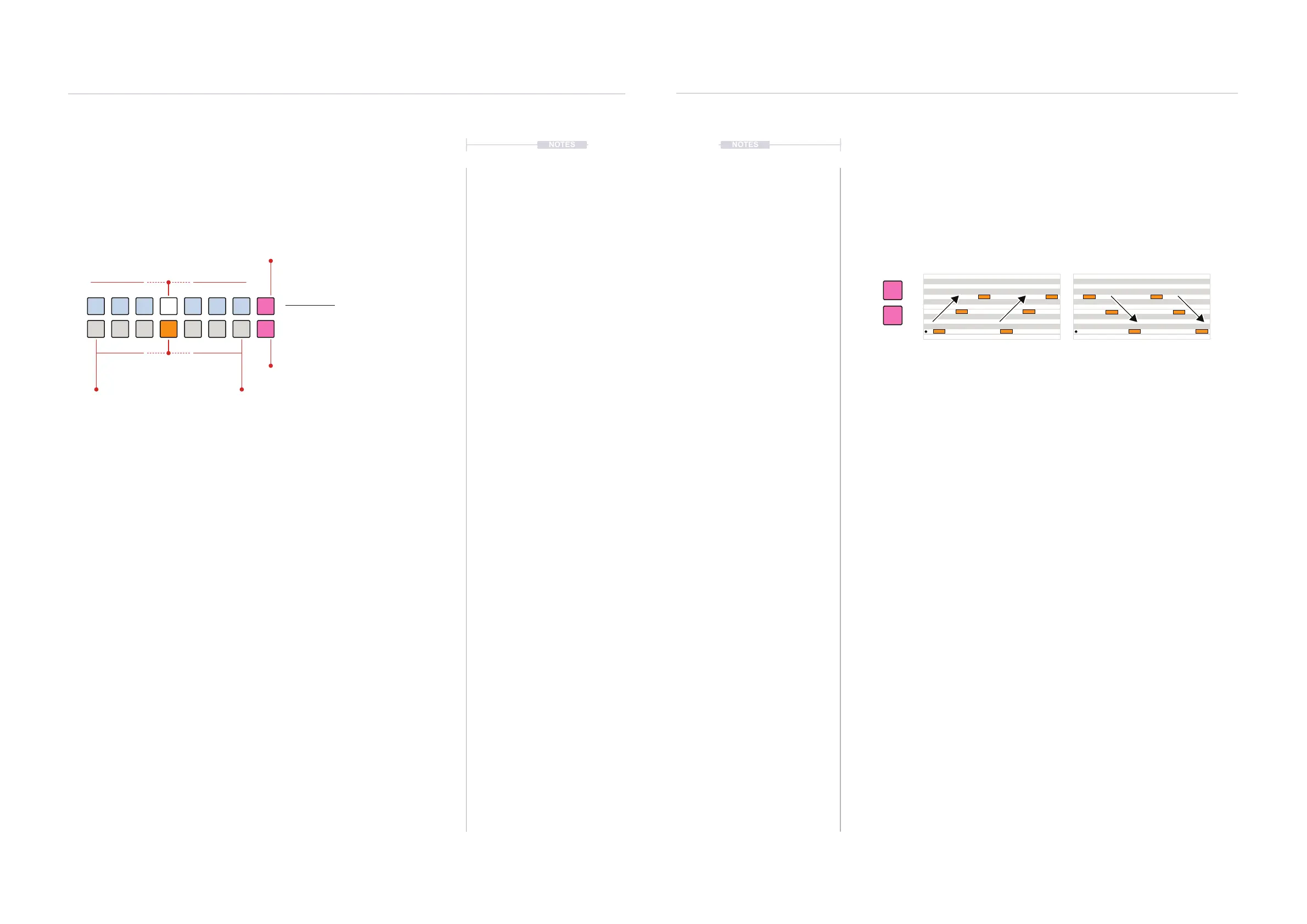
Play Direction
The style will determine the behaviour of the notes, however the direction is
set in voicing. Notes can play, similar to an arpeggio, up or down in a
sequence. Each note is played in turn on each pulse trigger.
▌ CHANGING THE PLAYBACK DIRECTION
1. Select the pattern and track.
2. To view the current style setting, Hold (VOICING). The value buttons
[VB8] and [VB16] represent the Up/Down selection,
3. Press the top button [VB8] to select UP. Both buttons are lit but the
active mode button will be brightly lit PINK ⬛. The off button is lit but
slightly dimmed.
4. Press the bottom button [VB16] to select DOWN. Both buttons are lit
but the active mode button will be brightly lit PINK ⬛. The off button is lit
but slightly dimmed.
5. The notes and arpeggio’s will play in the direction selected. This is
useful also for live sessions and ad-libs..
6.4 Voicing.
Voicing sets the amount of transformation applied by the chosen style. Also
the up or down direction of note playback can be changed in the voicing
options. Notes must be added, typically as a chord in the pitch menu.
▌ ADJUSTING THE VOICING
1. Select the pattern and track.
2. Ensure notes / chords are set in the (PITCH) menu and a desired style
is selected. The default is ‘Poly Fixed’.
3. To view the current style setting, Hold (VOICING). Default is set to off.
The WHITE ⬛ value button indicated the selected amount. The lower
value buttons adjust the amount - coarse resolution. These will be lit
ORANGE ⬛. Buttons [VB4] & [VB12] by default set to the ‘off’ state.
4. To select the amount of transformation;
• While displaying the style page, Press [VB9] - [VB11] to adjust the
transformation amount down in larger steps. Press [VB13] - [VB15]
to adjust the transformation amount up in larger steps.Press [VB1] -
[VB8] to ne tune the amount. Quick and most visual method.
• Turn (VOICING). This changes the amount on each rotary ‘click’ of
the knob.
• Press & Turn (VOICING). This changes the amount on each rotary
‘click’ of the knob. Fast method also visualises the settings.
Voicing View Mode.
Voicing View
Hold (VOICING) or Double tap (VOICING)
to lock the view.
ORANGE ⬛
Coarse
Transform
Down
Transform
Up
WHITE ⬛
Fine Tune & Select
Off
PINK ⬛
Note Direction Up
PINK ⬛
Note Direction Down
UP - Direction of Playback
Up
Down
DOWN - Direction of Playback
Progressions
6
Progressions
6



 To Next Page