167
The T-1 Notebook : Reference & Guide
166
The T-1 Notebook : Reference & Guide
NOTESNOTES
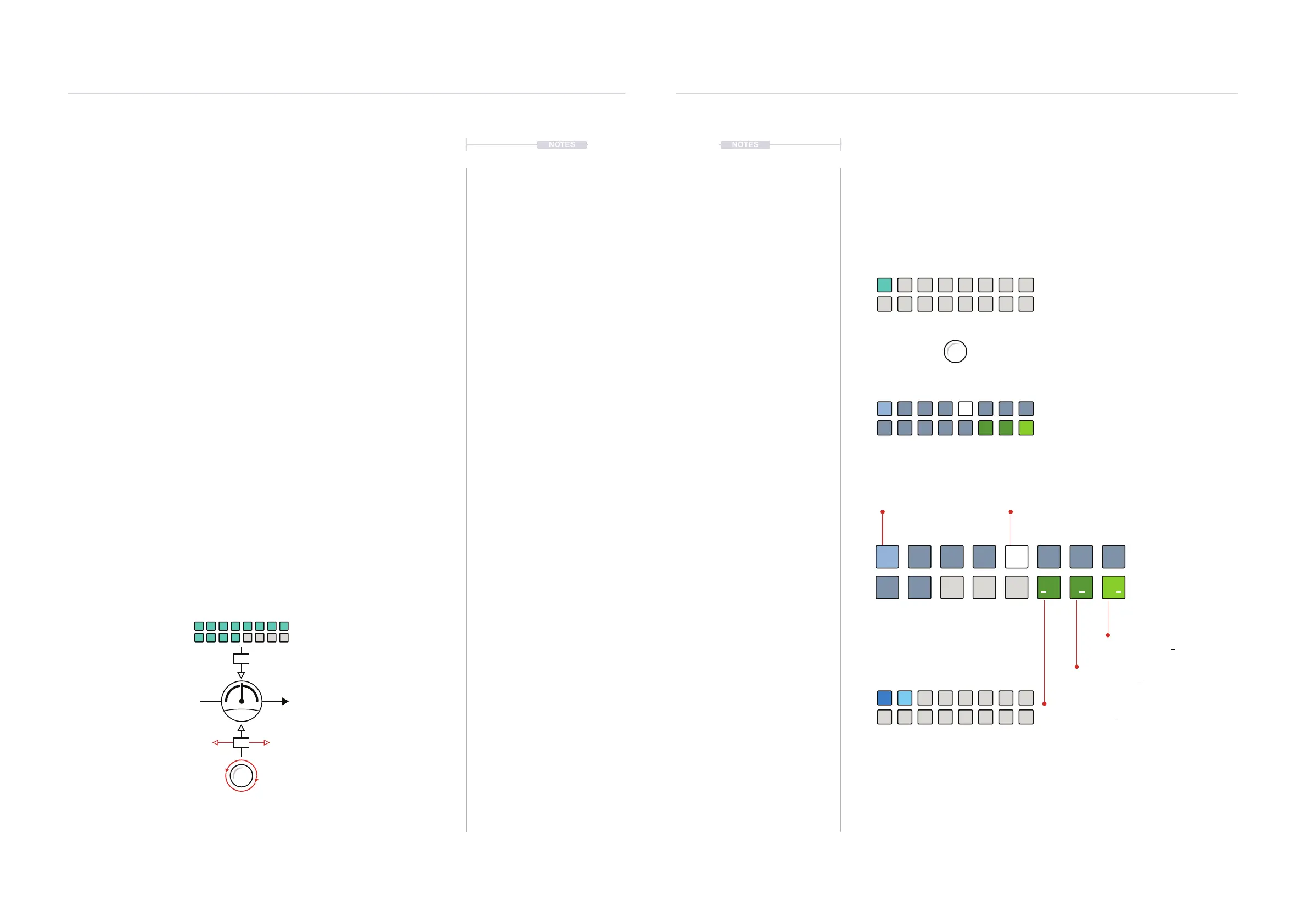
▌ MANUALLY CONTROLLING EXTERNAL GEAR CC FROM T-1
1. Ensure the T-1 and the target device are connected by MIDI USB or 5
Pin DIN. Parameters to enable T-1 to communicate to the device such
as Channel must be set. Some devices need to be set to receive CC.
2. Press [BANK] to ensure the ‘home’ track view is in focus.
3. Select a track in CC mode. Hold [CTRL] + [VBx] where ‘x’ is the value
button for the track to select. CC Tracks will illuminate CYAN ⬛. Notes
tracks will illuminate ORANGE ⬛ and FX Tracks MAGENTA ⬛.
4. The 14 rotary knobs in the Shape, Groove and Tonal section will be
preassigned to CC numbers, 70-76 Top row and 77-83 bottom row.
5. The mapping of the external device parameters is usually documented
in the manual. This is called the ‘MIDI Implementation’ of a device. As
an example, assume destination CC74 is Filter Cutoff.
6. To adjust the CC with T-1’s default CC assigned;
• Relative adjustment. Turn (VELOCITY) control knob will affect CC74
and therefore will manually adjust cutoff on the destination device.
This is a relative change and can adjust up or down from the current
parameter value.
• Absolute adjustment. Hold (VELOCITY) + Press [VBx], where ‘x’ is a
value button that represents an absolute value in the 1-127 range to
send to the destination device.
Changing a CC Assignment
While T-1 has a set of predened MIDI CC numbers per track, these can be
changed. This is useful to match up T-1 Tracks to different devices and
parameters and ensure maximum versatility in working with other CC’s.
Hundred option toggles between 1xx lit
WHITE ⬛ and 0xx BLUE ⬛
CC Edit View
WHITE ⬛
Selected Value for Digit
GREEN ⬛
Unit Digit - ‘000’ - Selected
DARK GREEN ⬛
Tens Digit - ‘000’ - Not Selected
DARK GREEN ⬛
Hundred Digit - ‘000’ - Not Selected
BLUE ⬛
Unit Numbers
CC assignments for knobs can be made in
CC mode for the track. [CTRL] + [VBx]
To select editor view, with knob selected,
Press [CTRL] + [PATTERN].
Knobs can be assigned a new CC number.
Double press (KNOB) to select for editing
and to lock the value display view.
Turn (VELOCITY)
Relative Value Adjustment
Press [VBx]
Absolute Value Setting
CC #74
96
64 65
+
63
-
Example Filter Cutoff
Sweep
Step
0
8
1
9
42 5
100
3 6
100
7
100
MIDI & WiFi Connectivity
8
MIDI & WiFi Connectivity
8



 To Next Page