171
The T-1 Notebook : Reference & Guide
170
The T-1 Notebook : Reference & Guide
NOTESNOTES
▌ CREATING CC PRESET TRACKS
1. Press [BANK] to ensure the ‘home’ track view is in focus.
2. Select a CC track. Press [VBx] where ‘x’ is the value button for the track
to select. CC Tracks will illuminate CYAN ⬛. To create a new CC track
Hold [CTRL] + [VBx].
3. The rotary knobs should be set to the CC numbers required for the
destination parameters as a pre-requisite action.
4. To create and store a CC value for a CC Parameter. Hold [CTRL] + Turn
(Knob) dened for the target CC number to store a value.
5. When holding [CTRL] + Press (Knob) a stored CC setting illuminates
the value buttons DARK BLUE ⬛ as opposed to the standard CYAN ⬛
colour. The value buttons [VB1] - [VB16] indicate the range 0-127
6. Repeat steps 4-5 to create and save more CC parameter values and
develop a collection of variables to store as a preset track.
7. The parameter state will be transmitted when:-
• A track is triggered to play. This is useful when sending the starting
parameters for the device to control.
• A pattern changes. This is useful to create on the y CC preset
changes. Patterns can be copied identically then change only the
CC preset values saved. Changing between the two will run the
same pattern but change the CC’s.
▌ CLEARING CC PRESET VALUE
1. Press [BANK] to ensure the ‘home’ track view is in focus.
2. Select a CC track to edit. Press [VBx] where ‘x’ is the value button for
the track to select. CC Tracks will illuminate CYAN ⬛.
3. Hold [CLEAR] + Press (Knob) of the CC track parameter to erase.
4. When holding [CTRL] + Press (Knob) a stored CC setting illuminates
the value buttons and will show unsaved values as standard CYAN ⬛
colour. DARK BLUE ⬛ indicates saved settings.
8.9 Random CC Sequence
The T-1 random sequence function can also be applied to each CC value
represented by a knob. The random sequence is 16 steps long with bi-polar
values that are added to the current CC value assigned to the knob.
▌ CREATING A RANDOM CC SEQUENCE
1. Press [BANK] to ensure the ‘home’ track view is in focus.
2. Select a CC track to edit. Press [VBx] where ‘x’ is the value button for
the track to select. CC Tracks will illuminate CYAN ⬛.
3. Hold (RANDOM) + Hold & Turn (Knob) of the CC track parameter to
attach the random sequencer. Also pressing the value button when
holding (RANDOM) + (Knob) will adjust the amount.
4. A slew option can be applied to smooth the sequence. Hold [CTRL] +
(RANDOM] + Turn (Knob) to apply the curve.
5. The random sequence will generate bi-polar values, step by step that
are added to the current parameter value. This can add to or subtract
from the CC value and generate a parameter change sequence.
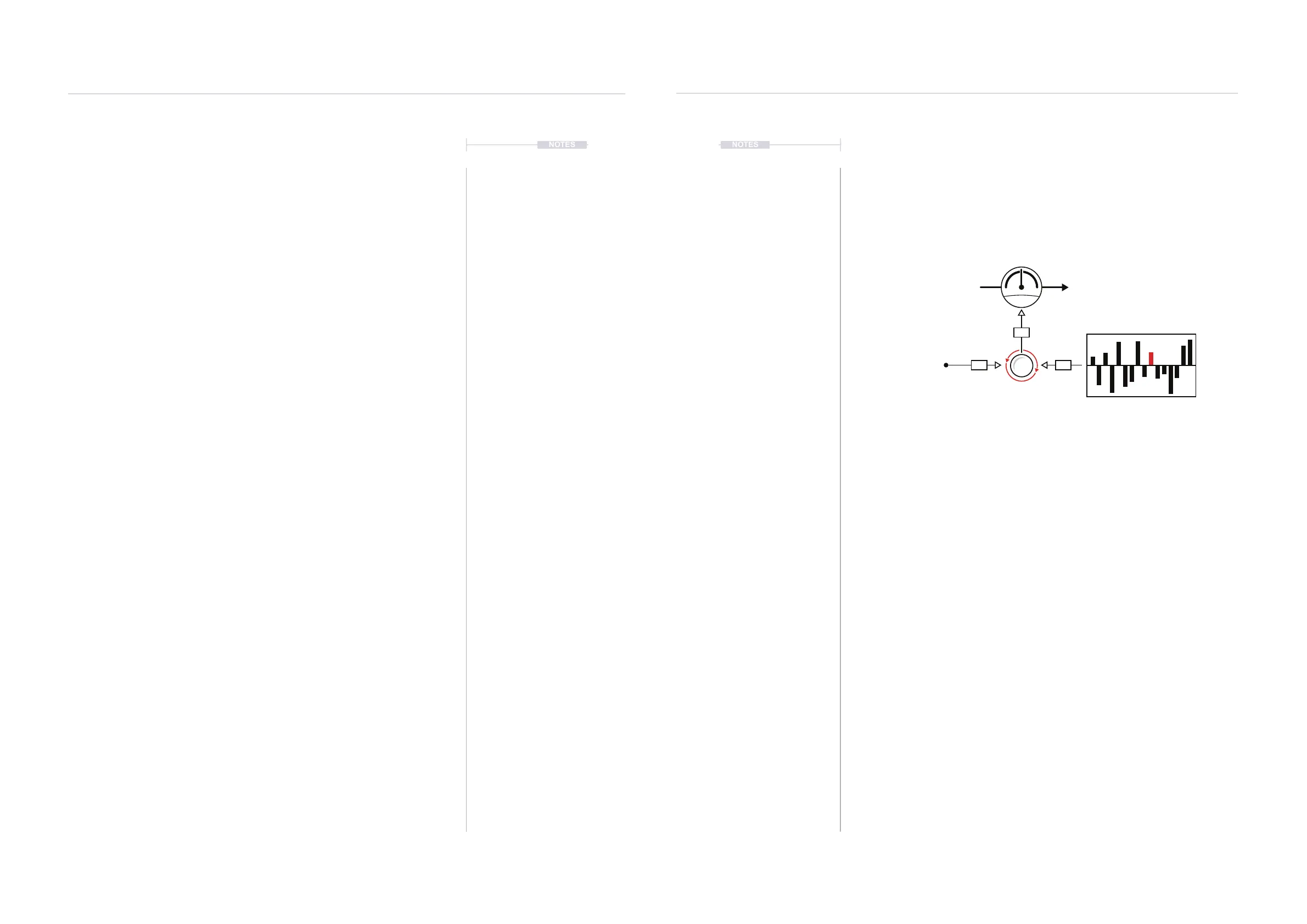
Example: CC Track Random Sequence
The default parameter will be modulated in time with the 16 step random sequence.
Each step of the random bi-polar sequence will add to or subtract from the default CC
knob value creating an evolving parameter change pattern including any slew setting.
CC #74
64
2440
+24
+
Example Filter Cutoff
Random Sequence
Knob
Default
MIDI & WiFi Connectivity
8
MIDI & WiFi Connectivity
8



 To Next Page
 Loading...
