
 Need help?
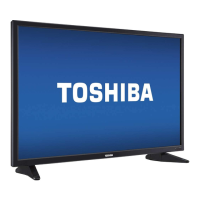
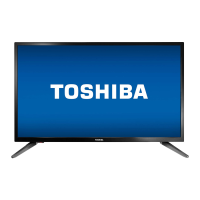
Do you have a question about the Toshiba 32L2300U and is the answer not in the manual?
Warnings about fire, shock, and proper installation to prevent injury.
Guidelines for safe TV installation and use, preventing tip-overs and entanglement.
Instructions for safely mounting the TV to a wall or ceiling.
Advice on safely moving and placing older CRT televisions.
Instructions for safe operation, cleaning, ventilation, and power handling.
Warnings regarding power plugs, liquids, flames, and potential hazards.
Instructions for setting up the TV on its included pedestal stand.
Guidance for securely mounting the TV to a wall using a bracket.
Information on optimizing TV energy efficiency and ENERGY STAR qualifications.
Technical limitations like image retention and pixel variations.
Explains the meaning of danger, warning, caution, and note icons used in the manual.
Digital tuning and multiple HDMI inputs for high-definition multimedia.
Technologies like Audyssey, ColorMaster, Cinema Mode, DNR, ClearScan for sound and picture.
Guides through reading safety info, choosing location, connecting devices, and powering on.
Location and function of power LED, remote sensor, and TV control buttons.
Description of HDMI IN, USB port, and other input connections on the TV.
Explanation of HDMI, ColorStream HD, and audio output ports.
Details on ANT/CABLE input, PC IN, and Digital Audio OUT ports.
Introduces different cable connectors required for device connections.
Explains the use of coaxial cables for antenna and cable TV connections.
Standard AV cables for composite video and component video cables for better quality.
Details on HDMI cables for digital audio and video transfer.
Use of optical audio and analog RGB cables for digital audio and PC connections.
Notes on interpreting connection diagrams and device variations.
Diagrams and instructions for connecting VCRs, antennas, and camcorders.
Selecting ANT/CABLE or VIDEO input for signals and devices.
Connecting DVD players or satellite receivers via ColorStream HD for progressive scan.
HDMI input capabilities and recommended HDMI cable usage.
Selecting HDMI inputs and connecting DVI devices with adapter cables.
Using TV remote to control HDMI CEC compatible audio receivers or playback devices.
Connecting TV's optical audio out to external Dolby Digital decoders.
Using optical cables and setting digital audio output format (Auto or PCM).
Connecting TV's analog audio out to an external amplifier for sound adjustment.
How to view PC display and hear sound through the TV speakers.
Connecting a PC using analog RGB and PC audio cables.
Listing pin numbers and signal names for PC connectors.
Instructions for connecting a computer to the TV's HDMI terminal.
Step-by-step guide for inserting batteries into the remote control.
Diagram and optimal operating distance for remote control performance.
Diagram and description of the remote control's buttons and their functions.
Detailed explanation of functions for specific remote control buttons.
Explains remaining remote control functions, including channel return and playback controls.
Overview of the TV's menu system, showing icons and items like Picture Mode, Backlight, Contrast.
Details on menu categories for Sound, Options, and Installation settings.
Steps to open menus, navigate using arrow buttons, and save settings with ENTER.
Guides through initial setup steps like language, time zone, and input source selection.
Configuring menu language and ANT/CABLE input source for initial setup.
How to perform auto tuning to store channels and optionally manage them in memory.
Steps to configure input source and initiate automatic channel scanning.
How to manually tune channels if auto tuning is insufficient or changes occur.
How to skip specific channels to prevent them from being viewed.
Managing channel options like skipping and setting the AV input mode.
Configuring audio mode for HDMI inputs (HDMI or PC audio).
Configuring time zone, viewing system status, and resetting TV to factory defaults.
How to choose the active video input source for viewing content.
Navigating the input selection screen and handling HDMI CEC device pop-ups.
Customizing names for video input sources for easier identification.
Using the Channel Browser to navigate and select channels and inputs.
Setting up a list of favorite channels and inputs for quick access.
Explanation of the different components displayed in the Channel Browser.
How to tune channels using the Channel Browser in Browse or Select modes.
Adding/clearing channels from History List and tuning channels.
Quickly switching between channels using Channel Return and SurfLock™.
Choosing from various picture sizes like Full, TheaterWide, Native, etc.
Explains Full, TheaterWide 1, and TheaterWide 2 picture size settings.
Explains TheaterWide 3 for subtitles and Native mode for HD sources.
Details on 4:3, Normal, and Dot by Dot picture size settings.
Adjusting the vertical position of TheaterWide 2 and 3 picture modes.
Automatically selecting picture size based on input source.
Displaying 4:3 programs full-screen and freezing the picture.
Choosing picture modes like Dynamic, Standard, Movie, Game, PC for optimal viewing.
Fine-tuning picture settings like Backlight, Contrast, Brightness, Color, Tint, and Sharpness.
Enabling and configuring closed captions for dialogue and information display.
Customizing closed caption display characteristics like color, opacity, and text size.
Adjusting audio levels, muting sound, and controlling mute modes.
Switching audio tracks and utilizing MTS for stereo or SAP sound.
Adjusting bass, treble, and balance for preferred audio quality.
Explains Audyssey EQ, ABX, and Stable Sound features for enhanced audio.
Choosing between PCM or Auto for optical audio output.
Compressing Dolby Digital dynamic range for consistent volume across broadcasts.
Setting, forgetting, and changing a PIN code for menu access.
Setting up parental controls and blocking programs based on V-Chip ratings.
Option to download and use an additional rating system for program blocking.
Explains the TV-MA, TV-14, TV-PG, TV-G, TV-Y7, TV-Y rating systems.
Explains movie rating systems (X, NC-17, R, PG-13, PG, G).
How to check the rating of the current program using the INFO button.
Temporarily unlocking programs that exceed rating limits using the PIN code.
Locking video inputs and channels to prevent unauthorized access.
Locking individual channels so they can only be accessed with a PIN code.
Setting a time limit for video games, after which input lock is activated.
Locking the TV's control panel to prevent accidental setting changes.
Adjusting PC image settings like position, clock phase, and sampling clock.
Details on PC settings adjustments and their effects on picture quality.
Configuring audio output for PC input (PC audio or no audio for HDMI).
Introduction to Media Player with USB, and specifications for photo/music.
Enabling auto start and methods to open the Media Player.
Overview of view modes for photos: multi view, single view, and slideshow.
Viewing photos in a grid format using thumbnail data.
Viewing photos individually and rotating them.
Watching photos in a slideshow format with playback controls.
Listening to music files, selecting lists, and controlling playback.
Controlling music playback and sorting photo/music files.
Setting the TV to turn off automatically after a specified time.
TV automatically turning off when no signal is detected.
Introduction to HDMI CEC feature for controlling connected devices.
Controlling playback devices (DVD player, etc.) using the TV remote via HDMI CEC.
Lists remote control buttons used for HDMI CEC playback control.
Controlling connected HDMI CEC players through the TV's menu.
Adjusting volume and muting sound of an Audio Receiver via TV remote.
Features like TV Auto Power, Auto Standby, Amplifier Control, and Initial Speaker Setting.
Enabling and configuring HDMI CEC control settings in the TV menu.
Selecting RGB range and displaying HDMI signal information.
Checking TV status like current input, channel number, and signal strength.
TV automatically restoring the last used mode after power interruption.
Overview of advanced picture adjustments available.
Adjusting standard colors and base colors for better picture quality.
Selecting preset color temperatures and adjusting black levels.
Optimizing backlighting and enhancing dark areas in the video.
Features for adjusting contrast, improving motion, and reducing video shaking.
Reducing visible interference and softening weak signals to improve picture clarity.
Adjusting levels for sharper picture settings.
Initial steps before calling service, including unplugging and replugging the TV.
Solutions for common problems like black screen, unresponsive controls, or static discharge.
Resolving demo pop-ups, power issues, and common picture problems.
Addressing picture size changes and inability to view external signals or specific channels.
Solutions for noisy pictures, color issues, sync problems, and composite picture quality.
Troubleshooting no sound, muted sound, or incorrect audio issues.
Addressing issues with station reception, sound modes, and channel scanning.
Troubleshooting remote control issues, including battery replacement and feature operation.
Resolving issues where captions do not appear or rating blocking is problematic.
Addressing issues with HDMI CEC functionality and connected devices.
Troubleshooting HDMI cable, legacy sources, and media player issues.
Details on NTSC, ATSC, Digital Cable standards and channel frequency ranges.
Specifications for power source, maximum current, consumption, and audio power output.
Specifications for speaker type and details on video/audio input terminals.
Specifications for HDMI input, audio output, PC input, dimensions, and weight.
Environmental conditions for operation and list of included accessories.
Table showing acceptable signal formats (VGA, SVGA, XGA) for PC input.
Detailed table of acceptable signal formats for HDMI inputs, including resolution and frequency.
Details on software components, EULAs, and copyright notices.
Information regarding software components subject to EULAs and GPL/LGPL.
License terms for the JPEG library used in the software.
License terms for the FreeType Project software component.
License terms for the scalefactors software component (GNU GPL).
 General
| Screen Size | 32 inches |
|---|---|
| Resolution | 1366 x 768 |
| Display Type | LED |
| Refresh Rate | 60 Hz |
| HDMI Ports | 2 |
| USB Ports | 1 |
| Display Technology | LCD |
| Aspect Ratio | 16:9 |
| Built-in Wi-Fi | No |
| Smart TV | No |




 To Next Page
