Basic Scanning Operation
29
To store the scanned data of a shared folder in a Windows
computer
Start up Windows Explorer.
1
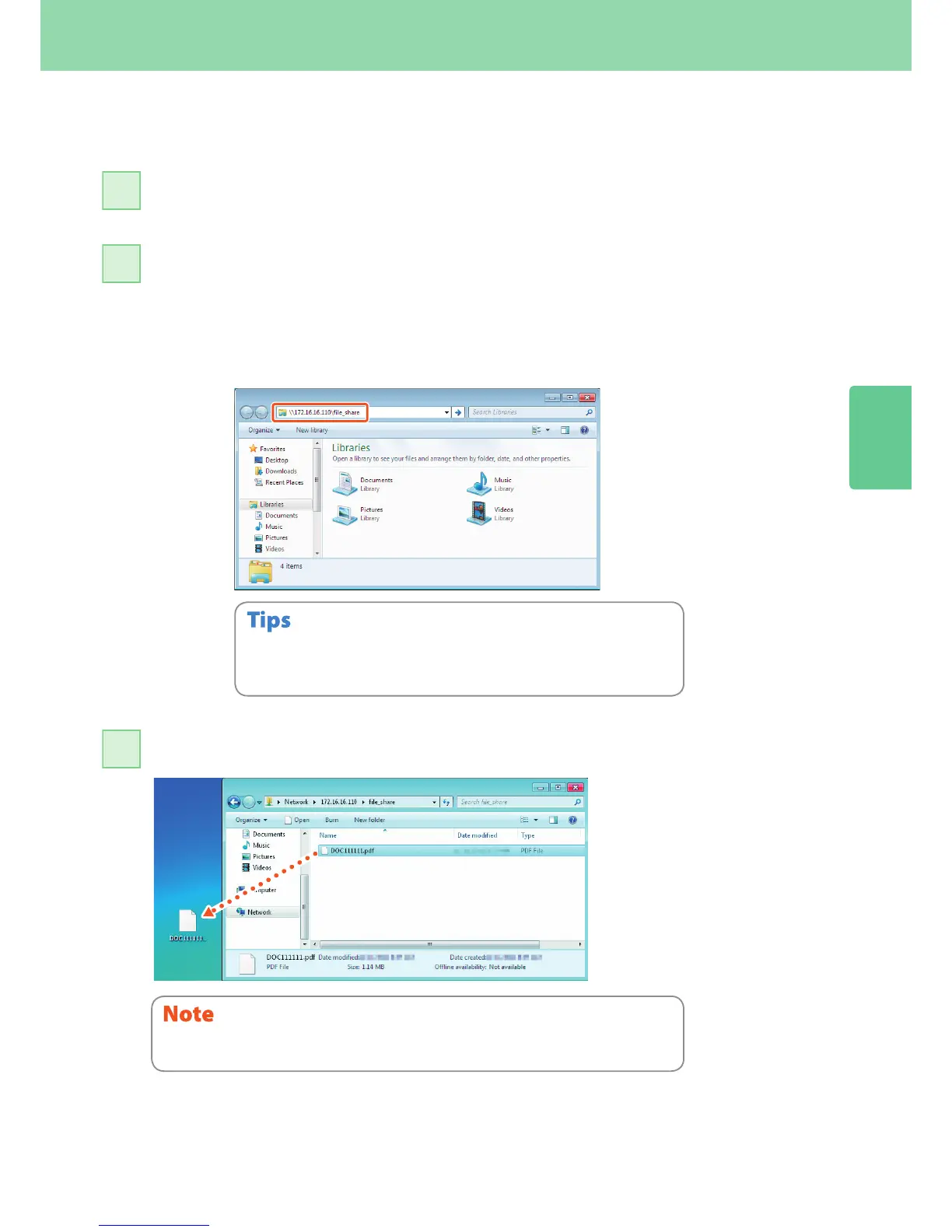
Enter the name of the shared folder, in which the IP address of the equipment and the
scanned data are stored, in the address bar with the following format, and then press the
[Enter] button.
Format: \\[IP address of the equipment] \le_share
e.g.) When the IP address of the equipment is 172.16.16.110, enter
\\172.16.16.110\le_share in the address bar of Windows Explorer.
2
Store the scanned data in a Windows computer.
3
• For the IP address of the equipment, ask your network administrator.
• It is convenient to make a shortcut of the “le_share” folder, since step 2 can
be omitted.
The scanned data stored in the shared folder will be automatically deleted in 30 days by
default. Be sure to store them in a Windows computer before that.



 To Next Page
 Loading...


