3.Setting the IP Fax Function
26 Setting the IP Fax Function from TopAccess
Gateway Setting
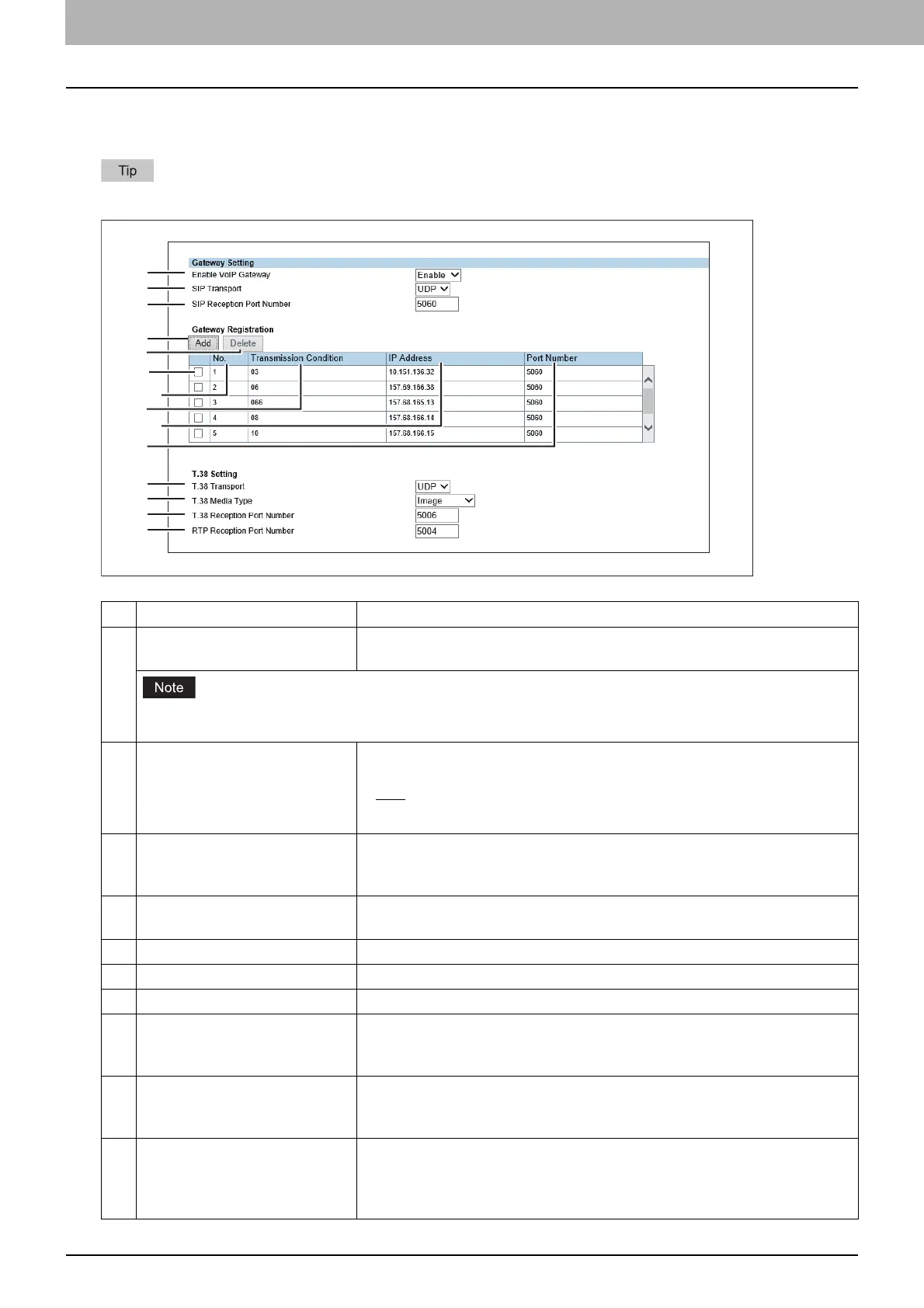
Set the necessary settings when a T.38 supporting gateway is used.
Up to 50 units of T.38 supporting gateway can be registered.
Item name Description
1 Enable VoIP Gateway Selects whether enable or disable a T.38 supporting gateway. [Disable] is set
as the default.
When [Enable] is selected for [Enable SIP Server], set [Disable] in [Enable VoIP Gateway] in Gateway Setting.
When [Enable] is selected for [Enable VoIP Gateway], transmission not using a SIP server is also accepted.
2 SIP Transport Selects the transport protocol for sending a request from SIP to a T.38
supporting gateway.
UDP — Select this to use UDP.
TCP — Select this to use TCP.
3 SIP Reception Port Number Enters the port number which receives SIP packets for a T.38 supporting
gateway. You can enter a value in the range from 1 to 65535. Generally the
default value “5060” is used.
4 Add Select this to add a new T.38 supporting gateway.
P.27 “[Add Gateway] screen”
5 Delete Select this to delete the T.38 supporting gateway from the list.
6 Check box Selects the check box for the T.38 supporting gateways to be deleted.
7 No. The registration number of the T.38 supporting gateway is displayed.
8 Transmission Condition The number registered in [Transmission Condition] in the [Add Gateway]
screen is displayed.
P.27 “[Add Gateway] screen”
9 IP Address The host name or the IP address of the T.38 supporting gateway registered
in [IP Address] in the [Add Gateway] screen is displayed.
P.27 “[Add Gateway] screen”
10 Port Number The number registered in [Port Number] in the [Add Gateway] screen is
displayed. You can enter the port number in the range from 1 to 65535 for
sending packets to the T.38 supporting gateway. Generally the default value
“5060” is used.



 To Next Page
 Loading...



