Introduction Connections
Playback
(Basic)
Playback
(Advanced)
Others
3
Chapter
3
Playback (Basic)
31
Internet
connection
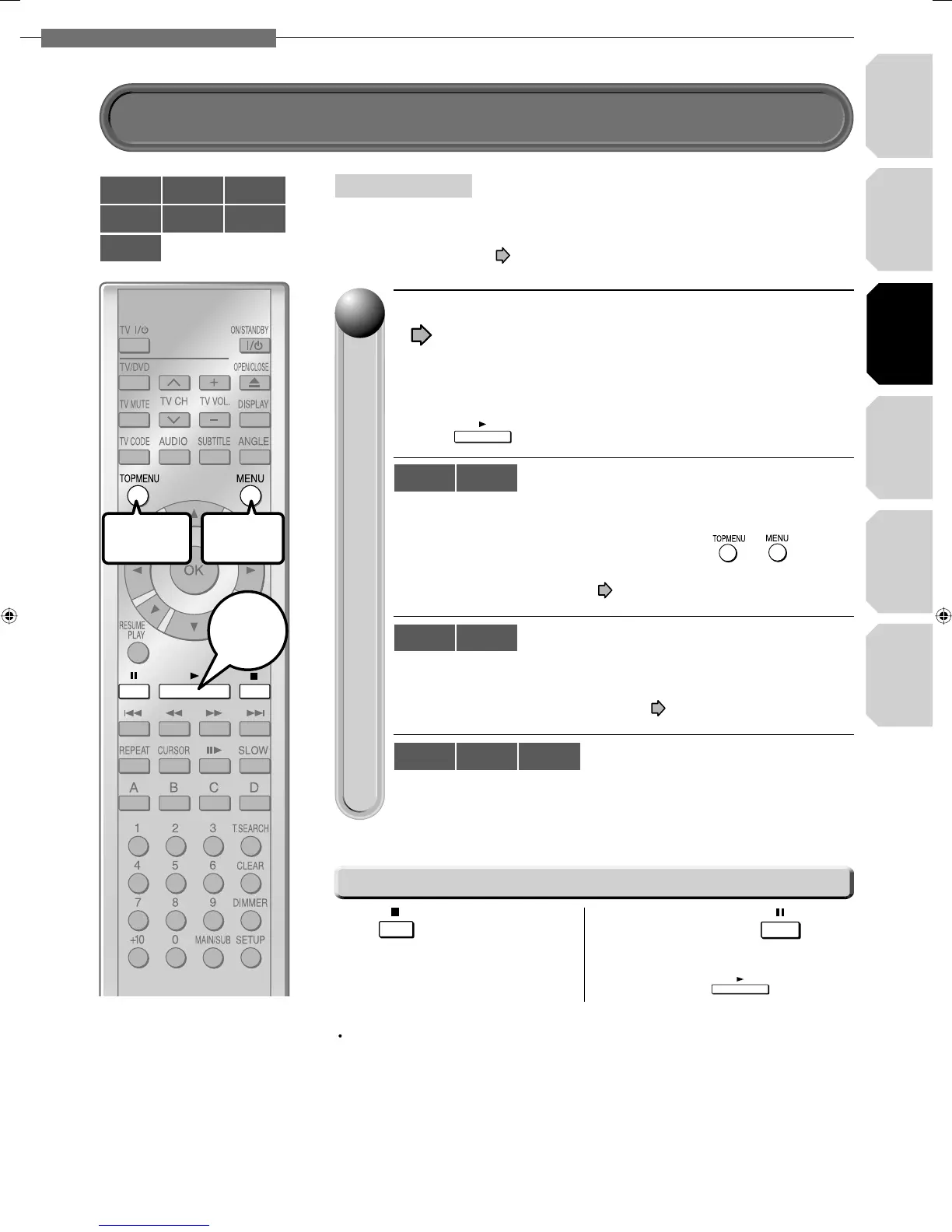
Load a disc and close the disc tray.
(
page 30)
Playback starts.
•
If playback does not start
Press
.
If a loaded disc contains a top menu, a top menu appears when
you start playback.
Depending on the disc, you may need to press
or
to
display a top menu.
(“Playing from the top menu”,
page 32)
If a loaded disc contains a title menu, you can display it to select a
desired title.
(“Playing from a recorded title menu”,
page 32)
Playback starts automatically.
11
yg
Stopping playback / Pausing playback
HD DVD
DVD-Video
DVD-RW
DVD-R CD
CD-RW
(CD-DA)
CD-R
(CD-DA)
Press
.
Playback stops.
During playback, press
.
Playback pauses.
To resume, press .
Start
To display a
top menu
To display
a menu
HD DVD
DVD-Video
DVD-RW DVD-R
CD
CD-RW
(CD-DA)
CD-R
(CD-DA)
1 Turn on the TV or audio system and select the corresponding input
source that the player is connected to.
2 Turn the power on. (
page 30)
Preparation
Playing a disc
Note
If absence of operation or picture pausing continues for about 20 minutes, this player
turns itself off. To operate again, press ON/STANDBY button to turn the player on.
HD-E1_03_E 31HD-E1_03_E 31 10/12/06 2:01:50 AM10/12/06 2:01:50 AM


 To Next Page