Notes
Some discs may not permit repeat playback operation.
You can cancel repeat playback also by pressing
.
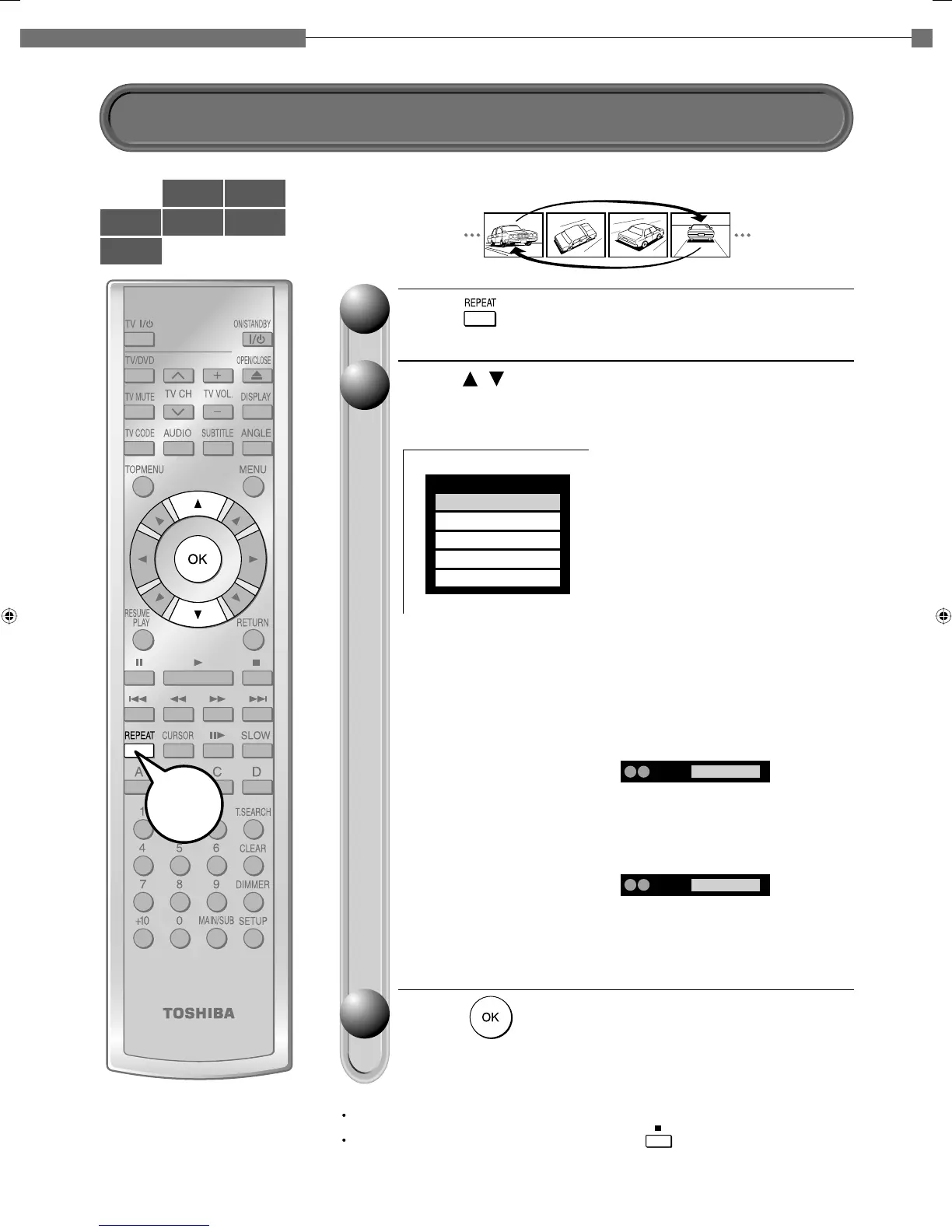
You can repeat a desired section.
Press
.
The repeat modes are listed.
Press
/
to select the repeat mode.
(The selections on the list vary depending on category or status of a disc.)
Press
.
Repeat playback starts.
11
22
33
Repeat
All Repeat
Title Repeat
Chapter Repeat
A-B Repeat
Cancel
RepeatA B A Point
RepeatA B B Point
All Repeat:
Repeats the entire disc.
(Not available in playback of a disc recorded in
DVD VR mode.)
Title Repeat:
Repeats the same title.
Chapter Repeat:
Repeats the same chapter.
Track Repeat:
Repeats the same track.
Disc Repeat:
Repeats the entire disc.
A-B Repeat:
Repeats the specified segment.
Select and press OK.
Perform step 1) and 2) below and skip
step 3.
1) While the above display appears,
press OK at a start point of a
segment where you want to repeat.
The display changes to “B Point”.
Playback returns to the point A and
repeats between A and B.
2) Press OK at an end point of a
segment where you want to repeat.
e.g.


 To Next Page