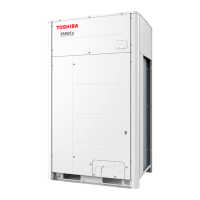
This document is an Owner's Manual for TOSHIBA AIR CONDITIONER (MULTI TYPE) Outdoor Units, specifically for Heat Pump Models. It provides essential information for installation, operation, maintenance, and safety for commercial use. The refrigerant used is R410A, an environmentally friendly type.
Function Description
The Toshiba Multi-Type Air Conditioner system is designed for commercial use in shops, light industry, or by trained users. It operates as a heat pump, capable of both cooling and heating. The system consists of an outdoor unit and various connectable indoor units, including 4-Way Cassette, Compact 4-Way Cassette, 2-Way Cassette, 1-Way Cassette, Concealed Duct (Standard, High Static Pressure, Slim), Under Ceiling, Floor Standing (Cabinet, Concealed, Standard), Fresh Air Intake, Air to Air Heat Exchanger with DX Coil Unit, High-Wall, Console, and Hot Water Module types. The outdoor unit is responsible for the main refrigeration cycle, while indoor units distribute conditioned air.
Important Technical Specifications
Outdoor Unit Model Names:
- MMY-MUP0801HT8P-E, MMY-MUP1001HT8P-E, MMY-MUP1201HT8P-E, MMY-MUP1401HT8P-E, MMY-MUP1601HT8P-E, MMY-MUP1801HT8P-E, MMY-MUP2001HT8P-E, MMY-MUP2201HT8P-E, MMY-MUP2401HT8P-E
- MMY-MUP0801HT8JP-E, MMY-MUP1001HT8JP-E, MMY-MUP1201HT8JP-E, MMY-MUP1401HT8JP-E, MMY-MUP1601HT8JP-E, MMY-MUP1801HT8JP-E, MMY-MUP2001HT8JP-E, MMY-MUP2201HT8JP-E, MMY-MUP2401HT8JP-E
Refrigerant: R410A
Sound Power Level (dBA) and Weight (kg) for Outdoor Units:
- MMY-MUP0801HT8P/JP-E: Cooling 75, Heating 76, Weight 228
- MMY-MUP1001HT8P/JP-E: Cooling 77, Heating 77, Weight 228
- MMY-MUP1201HT8P/JP-E: Cooling 79, Heating 81, Weight 228
- MMY-MUP1401HT8P/JP-E: Cooling 79, Heating 82, Weight 228
- MMY-MUP1601HT8P/JP-E: Cooling 83, Heating 86, Weight 312
- MMY-MUP1801HT8P/JP-E: Cooling 84, Heating 89, Weight 312
- MMY-MUP2001HT8P/JP-E: Cooling 86, Heating 90, Weight 334
- MMY-MUP2201HT8P/JP-E: Cooling 86, Heating 90, Weight 356
- MMY-MUP2401HT8P/JP-E: Cooling 86, Heating 90, Weight 356
Operating Temperature Conditions:
- Cooling Operation:
- Outdoor temperature: -5°C to 52°C (Dry-bulb temp.)
- Room temperature: 21°C to 32°C (Dry-bulb temp.), 15°C to 24°C (Wet-bulb temp.)
- Room relative humidity: less than 80%. Operating above this may cause dewing on the air conditioner surface.
- Heating Operation:
- Outdoor temperature: -25°C to 15.5°C (Wet-bulb temp.)
- Room temperature: 15°C to 28°C (Dry-bulb temp.)
Remote Controller: Model RBC-ASCU11-E, with LCD backlight that lights for 15 seconds during operation.
Usage Features
Operation Modes: The remote controller allows selection of Heat, Dry (Dehumidify), Cool, and Fan modes. Note that "Dry" mode is not available for Concealed Duct High Static Pressure Type.
Temperature Setting: Temperature can be set from 18.0°C to 29.0°C in 0.5°C steps.
Fan Speed: Multiple fan speed settings are available, though "Auto" cannot be selected in Fan mode.
Louver Direction: Louvers can be adjusted horizontally (4 steps for cooling) and downward (6 steps for heating) to optimize air distribution. Auto swing function is also available.
OFF Timer: Allows setting the unit to stop after a specified time (0.5h to 24h). The timer continues even if the unit is turned on/off with the ON/OFF button.
Central Control: The system can be centrally controlled, which may limit remote controller functions.
Protective Devices: The unit includes a high-pressure switch that stops operation automatically under excessive load, with indicators blinking on the remote controller.
Defrosting: During heating, if frost forms on the outdoor unit, defrosting is automatically performed (2-10 minutes) to maintain heating efficiency. The indoor fan stops during defrosting.
3-Minute Protection: The outdoor unit will not operate for approximately 3 minutes after restarting or power-on to protect the system.
Power Failure: In case of power failure, all operations stop. To resume, the ON/OFF button must be pushed.
NFC Function: NFC communications are enabled by default for test run with a smartphone, but can be disabled.
Maintenance Features
Air Filter Cleaning:
- Clean air filters regularly, especially when the filter indicator is displayed on the remote controller. Clogged filters reduce performance.
- For specific indoor unit types (4-way cassette, compact 4-way cassette, 2-way cassette, 1-way cassette, under ceiling, concealed duct, fresh air intake, slim duct, floor standing), cleaning should be performed by a qualified service person.
- For floor standing cabinet type: Push down the upper part of the air intake grille, pull it to remove, take out the air filter, vacuum dust or brush clean. If heavily stained, wash in lukewarm water with neutral detergent, rinse, dry in shade, and reinstall.
- For floor standing concealed type: Push down hook of the air filter on the front panel, pull to remove, vacuum dust or brush clean. If heavily stained, wash in lukewarm water with neutral detergent, rinse, dry in shade, and reinstall.
Indoor Unit and Remote Controller Cleaning:
- Wipe with a dry, soft cloth. Do not use acidic or alkaline detergents. For heavy stains, use a cloth soaked in lukewarm water.
- Do not use water to wipe the remote controller.
- Avoid benzine, thinner, scouring powder, or chemical cloth, as these may cause deformation or breakage.
- Ask the dealer for cleaning the air conditioner. Improper cleaning can damage plastic parts, insulation, and lead to malfunction, water leakage, electric shock, smoke, or fire.
Drain Pan Cleaning:
- Ask a qualified service person to clean the drain pan before the cooling season. Without cleaning, the drain pan may fill with waste, leading to water overflow.
Periodic Inspection:
- After long periods of use, parts may deteriorate or malfunction. Regular inspections (charges apply) by the dealer are recommended.
High-Pressure Cleaning for Heat Exchanger:
- If commercially available strong alkaline or acid cleaning agents are used, the surface treatment of the heat exchanger may deteriorate, degrading self-cleaning performance. Consult the sales department or dealer for details.
Preparation for Long Disuse (over 1 month):
- Operate in "Fan" mode for about half a day to dry the inside of the unit fully.
- Stop the air conditioner and turn off the main power switch.
- Clean the air filter and reattach it.
Checks Before Operation (after long disuse):
- Check that air filters are installed.
- Check that air discharge or intake is not blocked.
- Turn on the main power switch.
Safety Precautions:
- Installation, maintenance, repair, and removal must be performed by a qualified installer or service person.
- Always wear protective gloves and safety work clothing when handling the unit. Specific tasks require additional protective gear (e.g., electrician's gloves, insulating shoes, helmets, protective toecaps).
- Do not use refrigerants other than R410A.
- Ensure correct earthing.
- Disconnect all remote electric power supplies before servicing.
- Do not operate the unit with the grille removed due to moving parts.
- Avoid touching aluminum fins due to injury risk.
- Do not climb onto the fan guard.
- Open service valves before operation to prevent burst hazard.
- Do not install in locations with combustible gas risk or where operation sound may cause disturbance.
- Ensure proper ventilation when used with combustion appliances in a closed room to prevent oxygen shortage.
- Do not expose the body to cool air directly for prolonged periods.
- Do not insert fingers or sticks into air intake or discharge.
- Turn off the main switch or circuit breaker if the unit will not be used for a long time or before cleaning.
- Do not wash the air conditioner with pressure washers.
- If any error occurs (error display, burning smell, abnormal sounds, failure to cool/heat, water leakage), turn off the circuit breaker and contact a qualified service person.
- Do not customize the unit.
- Do not relocate the unit yourself; contact a qualified installer or service person.



 To Next Page


 General