Installation Manual
‒ 32 ‒
32-EN
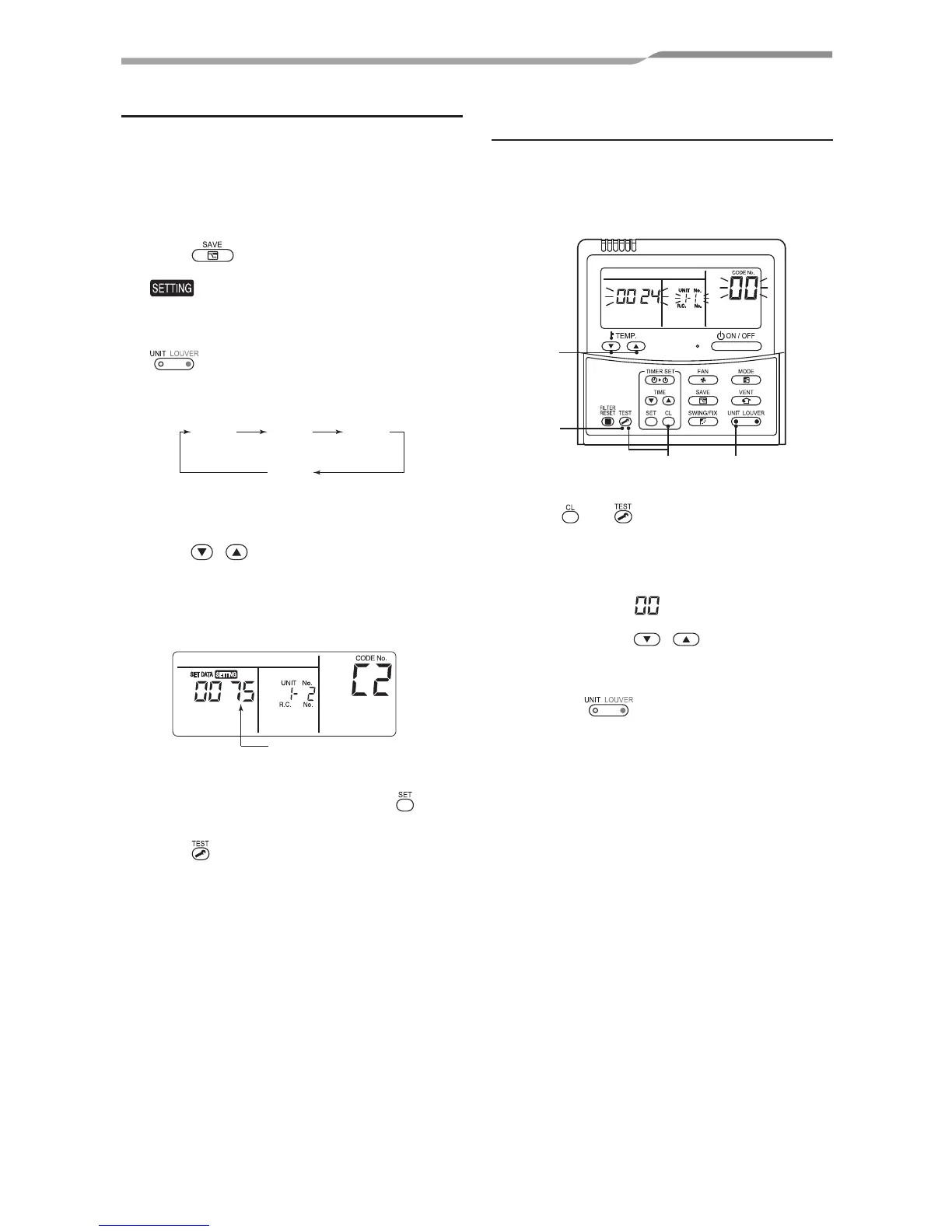
Power saving mode
¿ Performing settings of the power
saving mode
* When an outdoor unit is used, the power level
is fixed to 75 % regardless of the value on the
display.
1
Push button for 4 seconds or more
when the air conditioner is not working.
flashes.
Indicates CODE No. “C2.”
2
Select an indoor unit to be set by pushing
(left side of the button).
Each time the button is pushed, unit
numbers change as follows:
UNIT No.
1-1
UNIT No.
1-2
UNIT No.
1-3
UNIT No.
1-4
The fan of the selected unit runs.
3
Adjust the power save setting by pushing
TIME / buttons.
Each push of the button changes the
power level by 1 % within the range from
100 % to 50 %.
* The factory default is 75 %.
Setting of power level
in power saving mode
4
Determine the setting by pushing
button.
5
Push button to complete the setting.
Remote controller switch
monitoring function
This function is available to call the service
monitor mode from the remote controller during a
test run to acquire temperatures of sensors of the
remote controller, indoor unit, and outdoor unit.
13
4
2
1
Push and buttons simultaneously
for at least 4 seconds to call the service
monitor mode.
The service monitor indicator lights up and
the header indoor unit number is displayed
first. CODE No. is also displayed.
2
Pushing TEMP. / buttons, select
the number of sensor (CODE No.) to be
monitored. (See the following table.)
3
Pushing (left side of the button),
select an indoor unit to be monitored. The
sensor temperatures of indoor units and
their outdoor unit in the control group are
displayed.




 To Next Page