Installation Manual
‒ 44 ‒
44-EN
13
MAINTENANCE
¿ Daily maintenance
Cleaning of air filter
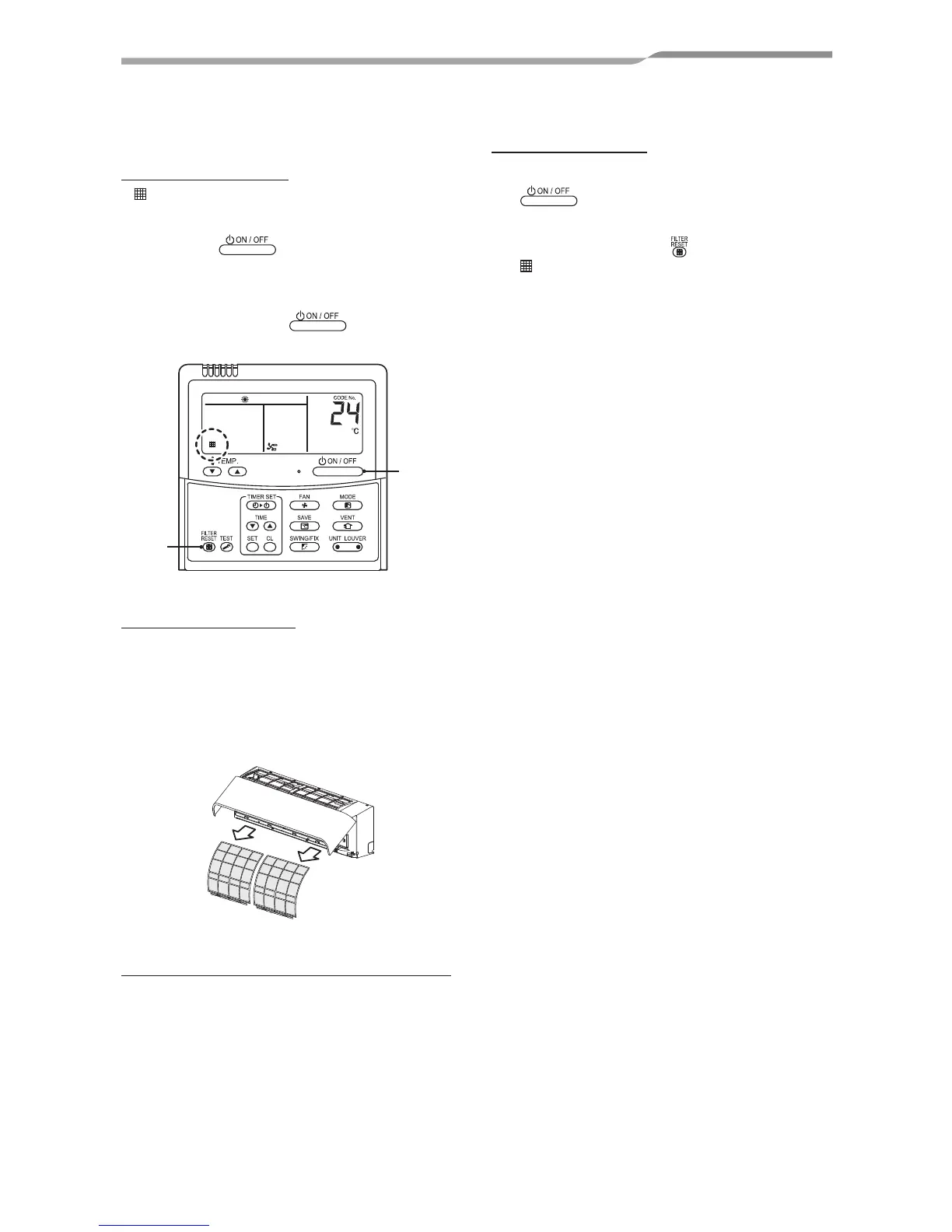
If is displayed on the remote controller, maintain
the air filter.
1
Push the button to stop the
operation, then turn off the circuit breaker.
After the cooling or dry operation, the
ventilation fan keeps running for self-
cleaning. Push the
button twice to
stop the operation.
3
1,2
Take out the air filter
1
Open the air intake grille until it stops, and
slightly raise the hook on the lower centre
of the air filter.
The air intake grille should not be opened
further; otherwise, the arms may come off and
the air intake grille may fall down.
Air filter
Cleaning with water or vacuum cleaner
• If dirt is heavy, clean the air filter by tepid water
with neutral detergent or water.
• After cleaning with water, dry the air filter
sufficiently in a shade place.
Mount the air filter
2
Turn on the circuit breaker, then push the
button on the remote controller to
start the operation.
3
After cleaning, push .
display disappears.




 To Next Page