EasyManua.ls Logo

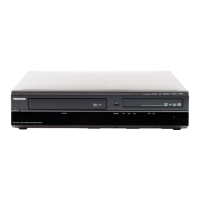
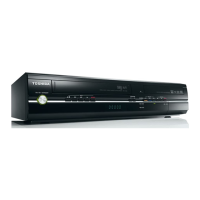
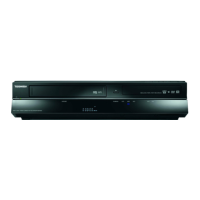
Toshiba RDXV60KB - User Manual

Toshiba RDXV60KB
84 pages
Print Icon
To Next Page IconTo Next Page
Loading...
1
EN
PA L
DUBBING
VCR REC
VCR HDD DVD HDD DVD
HDD & DVD / VIDEO CASSETTE RECORDER
RDXV60KB
OWNER’S MANUAL
Introduction Connections Playback Editing OthersFunction SetupRecording VCR Functions
Basic Setup /
TV View Operation
© 2010 Toshiba Corporation
For Customer Use:
Carefully read the Model No. and Serial No. located at the
back of the unit and enter the information below. Retain
this information for future reference.
Model No. __________________________
Serial No. __________________________
E3TK6BD_EN.book Page 1 Wednesday, February 17, 2010 10:18 AM

Table of Contents

Questions and Answers

  • D
    David MartinezJul 29, 2025
    Why doesn't the clock display appear on my Toshiba RDXV60KB DVD VCR Combo?
    • C
      carla60Jul 29, 2025
      If the clock display isn't showing on the front panel of your Toshiba DVD VCR Combo, first ensure the AC power cord is securely connected. Also, check the breaker and "Clock" setting, especially after a power failure. Note that when the unit is in standby mode, the front panel display is off due to the Power Saving mode.
  • P
    Peter PerezAug 2, 2025
    Why is there no image from HDMI connection on my Toshiba RDXV60KB?
    • A
      Andrew MeltonAug 2, 2025
      If you're not getting a picture from your Toshiba DVD VCR Combo's HDMI connection, first, ensure the HDMI cable is securely connected. Then, verify that the connected monitor or device supports HDCP, as the unit requires it to output video. Also, check the HDMI settings and confirm that the unit's HDMI output format matches the input format supported by the connected device. Finally, be aware that commercial DVD-video playback may be restricted if connected to an unauthorized display device.
  • J
    Julie BriggsAug 7, 2025
    How to fix Toshiba DVD VCR Combo when the power does not turn on?
    • J
      James VangAug 7, 2025
      If your Toshiba DVD VCR Combo isn't turning on, make sure the AC power cord is securely connected. Also, check the batteries in the remote control to ensure they aren't weak.
  • D
    Dr. Rachel MartinAug 10, 2025
    Why is there no picture, sound or menu on my Toshiba RDXV60KB DVD VCR Combo?
    • D
      David PadillaAug 10, 2025
      If you're not getting any picture, sound, or menu on the screen of your Toshiba DVD VCR Combo, check that all connections are securely and correctly made, and inspect the cables for any damage. Ensure that you've selected the correct external input channel on your TV and completed the “Channel” setting.
  • P
    Patricia JonesAug 15, 2025
    Why can't I switch the DV audio signal on my Toshiba RDXV60KB?
    • S
      shawna45Aug 15, 2025
      When using a DVC with your Toshiba DVD VCR Combo, remember that the recording audio signal can be set to 12 bits or 16 bits. However, if 16-bit recording mode is selected, the audio signal cannot be switched. To record an audio signal, set it to 12 bits.
  • S
    Sherry GuerreroAug 19, 2025
    Why the DVC cannot be operated with my Toshiba RDXV60KB?
    • K
      Kim ReynoldsAug 19, 2025
      When using a DVC with your Toshiba DVD VCR Combo, signal input or DVC operation from this unit may be disabled depending on the type of DVC. If a DVC signal cannot be input, use an external input (AV2) for analogue connection via audio/video cables, using a Scart adaptor for connecting to AV2. DVC control may be disabled depending on the type of DVC, even in a mode other than camera mode. In this case, switch to DVD control and execute the normal recording procedure while operating the DVC.
  • K
    Kelly MitchellAug 25, 2025
    Why can't I input a DV signal into my Toshiba DVD VCR Combo?
    • A
      Amber GuerraAug 25, 2025
      Before connecting a DVC to your Toshiba DVD VCR Combo, turn on the power supplies for both units and ensure they have stopped. Only a “DVC-SD” signal can be input from the DVC to this unit; other signal types are not supported. Do not connect any device other than the DVC. If the DVC is not recognized after connection, turn off the power supply for the unit and reconnect the DVC.

Summary

Introduction

Functional Overview

Identifies and describes the buttons and indicators on the front and rear panels.

Front Panel

Identifies and describes the buttons and indicators on the front panel.

Rear Panel

Identifies and describes the jacks and connections on the rear panel.

Remote Control

Details the functions and buttons of the remote control.

Guide to On-Screen Displays

Explains how to display information such as title, file name, and HDMI details.

Connections

Connecting to a TV

Instructions for connecting the unit to a TV via antenna, scart, component, or HDMI.

Using an HDMI Compatible Port

Instructions for connecting the unit to a TV using an HDMI cable.

Basic Setup; TV View Operation

Initial Setting

Step-by-step guide for first-time setup, including tuning and clock setting.

Recording

Timer Recording

Steps for setting up scheduled timer recordings.

Playback

Function Setup VCR Functions

Function Setup

Overview of setup functions including Playback, General Setting, Display, and Video.

VCR Functions

Basic operations for VCR functions, including playback and recording.

Basic Recording and One-touch Timer Recording (OTR)

Guide to basic recording and one-touch timer recording for VCR.

Others

Troubleshooting

Common problems and their remedies for power, general, and DV signal issues.

Troubleshooting for Error Messages

Error messages related to disc, USB, region, parental lock, recording, and disc protection.

Specifications

General, recording, tuner, and input/output specifications of the unit.

Toshiba RDXV60KB Specifications

General IconGeneral
Video FormatNTSC
DVD PlaybackYes
VCR PlaybackYes
VHS PlaybackYes
Video Output SystemNTSC
Progressive ScanYes
Parental ControlYes
TypeDVD VCR Combo
Product TypeDVD Recorder/VCR Combo
DVD Recorder TypeDVD recorder
VCR TypeVCR
Playable Disk TypesCD-R, CD-RW, DVD+R, DVD+RW, DVD-R, DVD-RW
DVD Playback FormatsMP3
Recordable Disk TypesDVD-R, DVD-RW, DVD+R, DVD+RW
Tuner TypeNTSC
ConnectionsComposite video, S-Video, Component video, Coaxial audio, Optical audio
OutputsComposite video, S-Video, Component video, Coaxial audio, Optical audio
InputsComposite video
Width17.1 in

Related product manuals