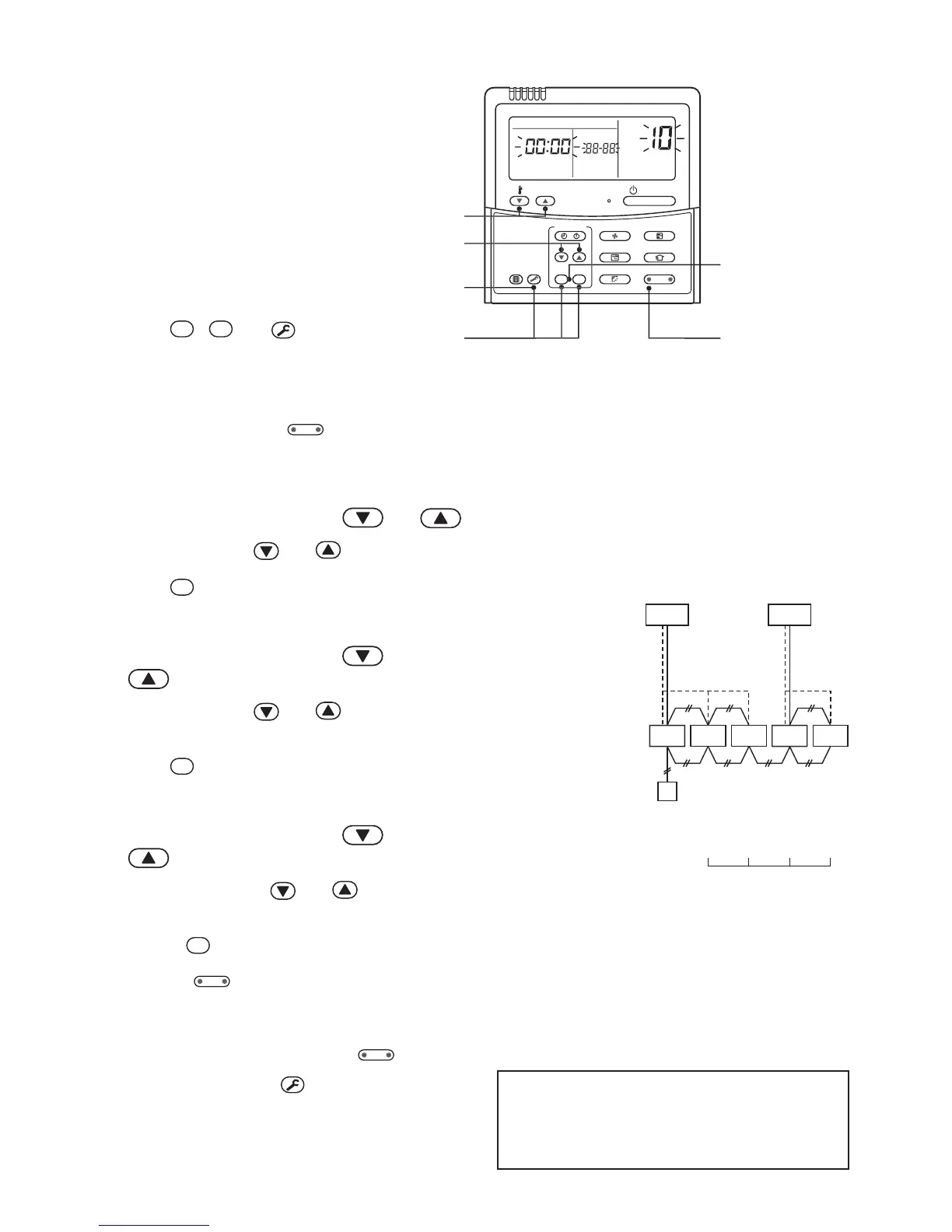
<Procedure>
1 Push
SET
,
CL
and
TEST
buttons
simultaneously for 4 seconds or more.
LCD changes to flashing.
(The firstly displayed unit No. is the header indoor unit No. in the group control.)
2 In group control, use
button (left side of the button) for change.
Select the indoor unit No. (The fan of the selected indoor unit is turned on.)
<Line address>
3 Using the setup temperature and buttons, select CODE No. “12”.
4 Using timer time and buttons, set up the line address.
5 Push
SET
button. (OK when display goes on.)
<Indoor unit address>
6 Using the setup temperature and
buttons, select CODE No. “13”.
7 Using timer time and buttons, set up
the indoor unit address.
8 Push
SET
button. (OK when display goes on.)
<Group address>
9 Using the setup temperature and
buttons, select CODE No. “14”.
10 Using timer time and buttons, set up Individual
= 0000, Header unit = 0001, and Follower unit = 0002.
11 Push
SET
button. (OK when display goes on.)
12 Using
button (left side of the button), select an indoor unit No. to be changed at the next
time.
Repeat procedure from
3 to 12 and change setup so that addresses are not overlapped.
13 After the above change, push




 To Next Page