Menu Operation
10
5. Radio Bind
For the TF520, each SonarBox has an "Identity Card". It only can be
connected with one monitor. And for all the TF520 we sold, the
autorization process has been done in advance by our factory.
However, in some cases you may mix the monitor and the SonarBox.
Then you need do the radio bind as following instruction:
How to make Radio Bind?
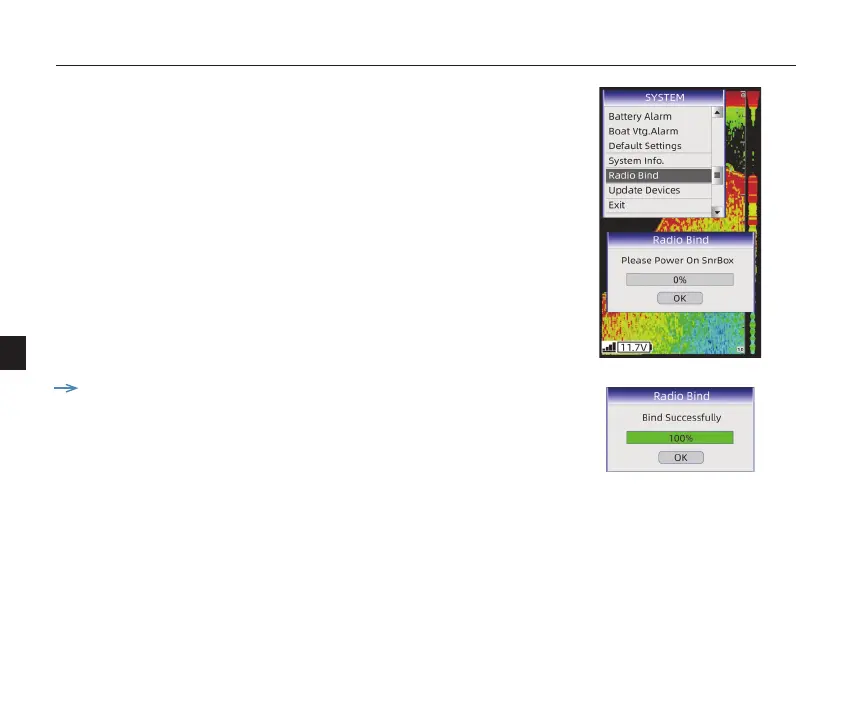
1) Enter【Radio Bind】menu, a message shown to remind you to
power on the SonarBox.
2) Power on the SonarBox, device will make radio bind automatically.
Note: before making Radio Bind, please power o the SonarBox in
advance.


 To Next Page