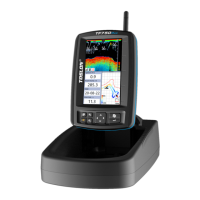
The TF520 is a fish finder system designed to assist anglers in locating fish and understanding underwater structures. It consists of a monitor, a SonarBox, and a transducer, working together to provide detailed sonar readings.
Function Description
The core function of the TF520 is to detect and display underwater information, including depth, water temperature, fish presence, and bottom structure. The transducer, typically mounted on a bait boat, emits sonar signals into the water. These signals bounce off objects like fish and the bottom, and the echoes are received by the transducer. The SonarBox processes these signals and transmits the data wirelessly to the monitor.
The monitor then translates this data into a visual representation on its screen. Key readouts include:
- Depth readout: Shows the current water depth.
- Water temperature: Displays the water temperature at the transducer's location.
- Voltage of bait boat: Indicates the battery voltage of the bait boat, crucial for monitoring power levels during operation.
- Fish symbol: Represents detected fish, often with an associated depth.
- Fish-arc: Shows raw sonar returns from fish, providing more detail than just a symbol.
- Real-time echo window: Displays the most recent sonar data as it's received.
- Bottom structure: Illustrates the contours and composition of the lakebed or riverbed.
- Voltage of monitor: Shows the battery voltage of the monitor itself.
- Signal indicator: Displays the strength of the wireless connection between the SonarBox and the monitor.
The system operates on a 2.4 GHz radio frequency for wireless communication between the SonarBox and the monitor, ensuring a stable connection.
Usage Features
The TF520 is designed for ease of use with several features to enhance the fishing experience:
Installation:
- Transducer Installation: The transducer can be installed in various ways depending on the bait boat type. For general boats, a hole needs to be drilled in the boat bottom. For boats with a pre-existing transducer groove (like Carplounge, Waveruner, Vegaboat, Carpboat, or Anatec catamaran bait boats), the transducer simply matches the groove with a rubber fitting.
- Antenna Installation: A 5mm hole is drilled on the boat for the SMA cable, which is then secured with a nut and washer. The antenna is then screwed onto the boat.
- Wiring: After installation, the transducer, antennas, and battery are connected to the SonarBox, which is then fixed inside the boat.
Powering:
- The monitor and SonarBox have recommended voltage ranges (9-15V for monitor, 9-12V for SonarBox) and absolute maximum voltage limits (16.0V for monitor, 14.8V for SonarBox).
- The system supports various battery types, including 12V lead-acid, 8AA NiMH, 8AA Alkaline, 2S Lithium, and 3S Lithium. A 4S Lithium battery is not permitted for use with the system due to overvoltage risk.
Operation:
- Monitor Placement: It is recommended to install the monitor on a tripod, at least 1.2 meters above the ground, to ensure optimal R/C distance. Placing it on the ground can shorten the R/C range.
- Antenna Tightness: Ensure the boat's antenna is tightened to prevent a significant reduction in R/C distance.
- Key Functions: The monitor features intuitive controls:
- Menu: Opens menu settings and switches between menus.
- Ent: Finalizes menu selections and confirms settings.
- Up arrow: Moves up to select menus or increases a value.
- Down arrow: Moves down to select menus or decreases a value.
- Power & Exit: Turns the unit on/off and also serves to quit menu settings.
The TF520 offers a range of adjustable settings to optimize performance:
- Sensitivity: Controls how echoes are displayed. Increasing sensitivity shows more details, useful in deep water, while decreasing it is better for shallow water.
- Surface Clarify: Reduces screen clutter caused by wave action, boat wakes, and temperature inversion by decreasing receiver sensitivity near the surface.
- Fish ID Sens.: Adjusts the threshold for fish size display. A higher setting shows weaker returns as fish (good for smaller fish/bait fish), while a lower setting prevents weak returns from being displayed (good for large species).
- Sonar Gain: Controls the sensitivity of the hardware receiver. Higher gain makes the sonar more sensitive to weak echoes, but too high can lead to background noise.
- Depth Range: Determines which portion of the bottom is displayed on the screen.
- Shallow Alarm: Sounds an alarm when the depth falls below a set value.
- Measure Units: Selects units for distance and temperature readouts.
- Fish Alarm: Sounds an alarm when fish are detected.
- Simulator: Allows practicing with the fish finder as if on the water.
- Backlight: Adjusts display brightness.
- Key Tone: Sets whether the unit sounds a tone when a key is pressed.
- Language: Selects the display language.
- Battery Alarm: Sounds an alarm when the display's input battery voltage drops below a set value.
- Boat Vtg. Alarm: Sounds an alarm when the SonarBox's input battery voltage drops below a set value.
- Default Settings: Restores original factory settings.
- System Info.: Displays system information.
- Radio Bind: Authorizes communication between the monitor and SonarBox. This process is usually done at the factory but can be re-done if the monitor and SonarBox are mixed. It involves powering on the SonarBox after entering the "Radio Bind" menu on the monitor.
- Update Devices: Allows updating the monitor or SonarBox with the latest software.
Maintenance Features
While the manual doesn't explicitly detail "maintenance features" in a separate section, several aspects contribute to the device's longevity and performance:
- Voltage Monitoring: The system provides real-time voltage readouts for both the bait boat battery (via the SonarBox) and the monitor's battery. This allows users to proactively manage power and avoid unexpected shutdowns, which can prevent data loss or operational interruptions.
- Overvoltage Protection Warning: The manual explicitly warns against overvoltage, stating it "may burn the elements in the device." This highlights the importance of using compatible batteries and staying within the specified voltage ranges, which is a crucial aspect of preventing damage and ensuring the device's lifespan.
- Software Updates: The "Update Devices" feature allows for software updates for both the monitor and SonarBox. Regular software updates can improve performance, fix bugs, and potentially add new features, contributing to the device's long-term usability and relevance.
- Factory Reset: The "Default Settings" option allows users to restore the original factory settings. This can be a useful troubleshooting step if settings become corrupted or if the device is not performing as expected, effectively "resetting" it to a known good state.
- Two-year warranty: The device comes with a full two-year warranty, with extended warranties available, indicating manufacturer support and confidence in the product's durability.
By adhering to the recommended power guidelines, ensuring proper installation, and utilizing the available software updates and troubleshooting options, users can effectively maintain the TF520 for reliable and consistent performance.

 Need help?
 General

 To Next Page