Menu Operation
8
In most time the default setting is enough. However in some situation, to
achieve the best performance of the system, you need adjusting the menu
setting.
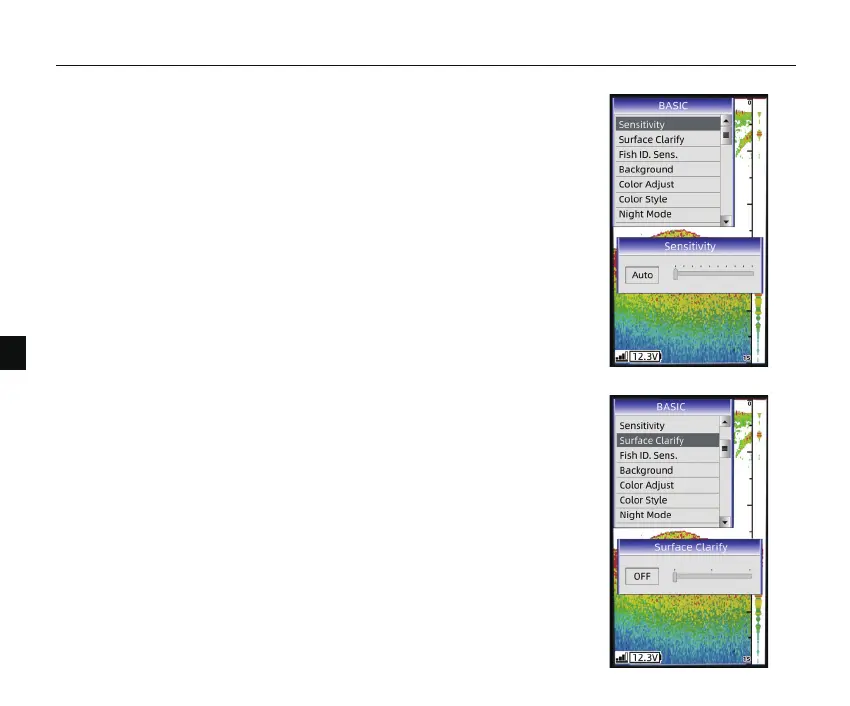
Determines how echoes will be displayed on the screen. Increasing the
sensitivity will make you see more details on the screen.
In deep water, increasing the sensitivity. whereas in shallow decreasing the
sensitivity.
1. Sensivity
Wave action, boat wakes, and temperature inversion can cause on screen
clutter near the surface. The surface clarify option reduces surface clutter by
decreasing the sensitivity of the receiver near the surface.
2. Surface Clarify
How to set the Sensivity?
1) Press MENU Key, and use keypad to choose【Sensivity】
2) Press ENT key to conform the selecon.
3) Press UP arrow/Down arrow key to increase/decrease the value.
4) Press ENT key to confirm the seng.


 To Next Page