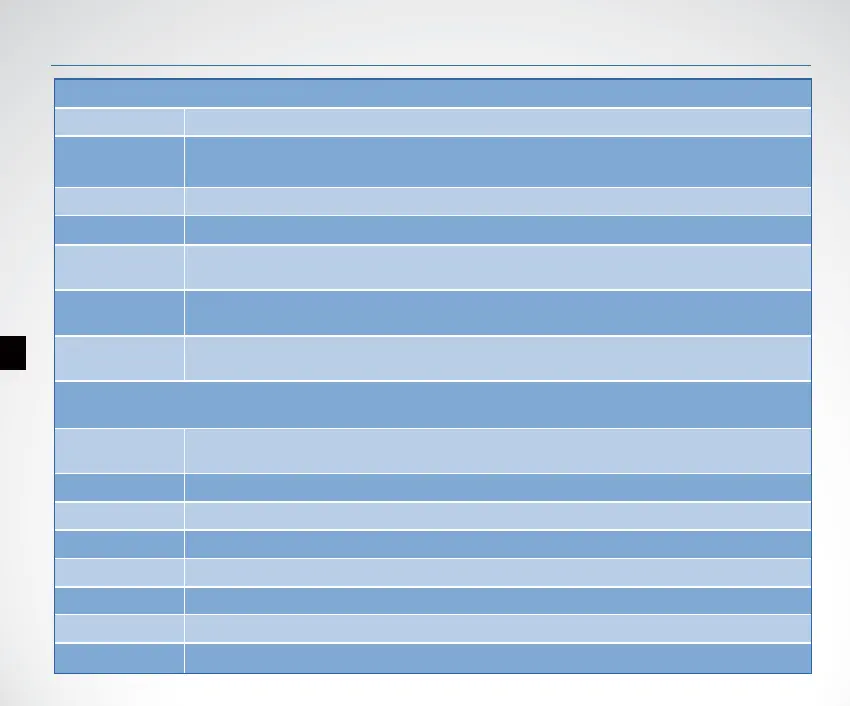
Menu List
9
Basic
Fish ID. Sens
Adjust the threshold of sh size display. higher setting allows weak returns being displayed
as sh, while a low setting will prevent weak sonar returns being displayed as sh.
Sensitivity Controls the level of details shown on the display.
Shallow Alarm
Shallow Alarm sounds when the depth becomes equal to or less than the menu setting.
Battery Alarm
Battery Alarms sounds when the input battery voltage of display is equal to or less than
the menu setting.
Boat VTG.
Alarm
Battery Alarms sounds when the input battery voltage of display is equal to or less than
the menu setting.
RF Channel
Set dierent RF channel to allow more than one users operating the device in the same
region without any radio interference.
Sonar Setting
Color Line
Separates strong sonar echoes from weak sonar echoes. That makes it easier for you to
distinguish sh for structure from the bottom.
Keel Oset Adjust the digital depth readout to indicate depth from the waterline or boats keel.
Backlight adjust the brightness of backlight.
Screen BkGnd Set the display mode of screen (blue, white, black).
Beeper Set if the sonar unit sound a tone or not when a key is pressed.
Units set the units of measure for all depth-related readouts.
Language Select the display language for menus.
Overlap Data Used to select data shown on the sonar page (water depth, temperature, voltage).
Fish Alarm Fish Alarm sounds when the shnder detects what it determines to be a sh.


 To Next Page