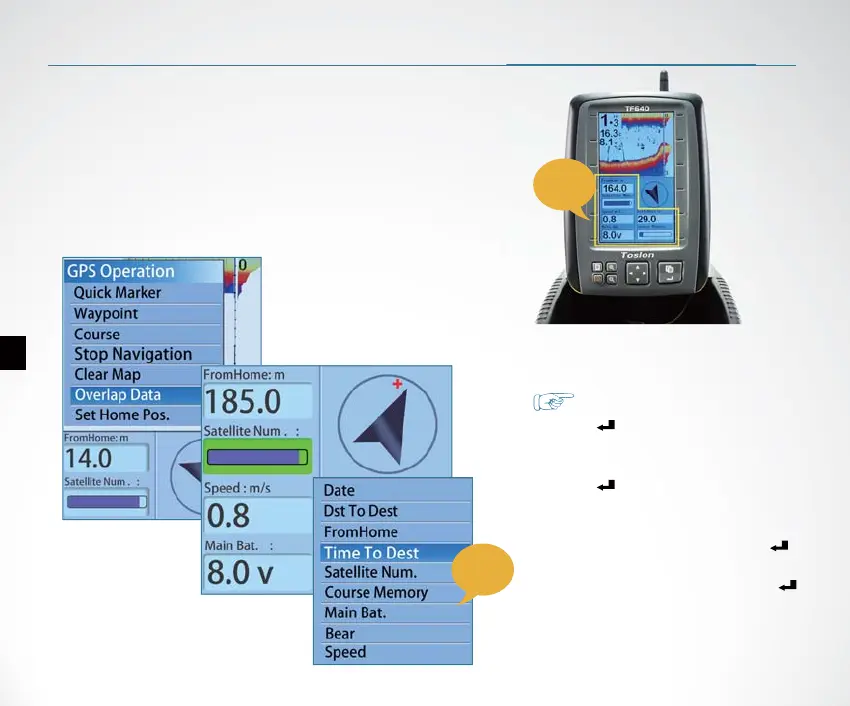
Overlap Data
5
In the GPS data area of the display, you can
choose to show any of the following options:
FromHome, Distance to Home, Speed of boat,
Time to Board, Satellite number,
Latitude/longitude of boat, Heading, Bear,
Course memory, Time of day, Main battery, etc.
Overlap Data determins which option will be displayed.
GPS
data
area
GPS
option
How to set the Overlap Data?
1)Press Key, appears
【GPS Operation】 menu.
2)Use keypad to choose【Overlap Data】
3)Press Key, you will nd one of
option become Green.
4) Use keypad to choose an option which
you hope to change, then press key,
the GPS option menu appears.
5)Choose an GPS option and press
Key , then the selected opition is
successfully changed to new option.


 To Next Page