Key Function
[Autopilot]
1) Start / Stop autopilot mode
2) Switch between pages in the waypoints list
[Power / Exit]
1) Power on / off the unit
2) Exit the selection or menu
[Menu / Enter]
1) Confirm a setting / selection
2) Enter the menu settings
[Up]
1) Shortcut to enter waypoints list
2) Move up menu or increase value of an option
1) Shortcut to mark current pisition as Home point
2) Move down menu or decrease value of an option
[Down]
X-Pilot
Waypoints
4 deg
1.1 m/s
86.5m
2
Home
10
1
5
4
7
8
9
10
12
12.1V
11
6
2
H 0427-161201
2 0615-161004
3 0618-150904
4 0618-152206
5 0930-160842
275.2
m
Home
Waypoints
1.2
m/s
18
deg
11.6
v
10
13
14
16
0427-161201
0615-161004
0930-160842
XXXX - XXXX
XXXX - XXXX
H
2
3
4
5
3
15
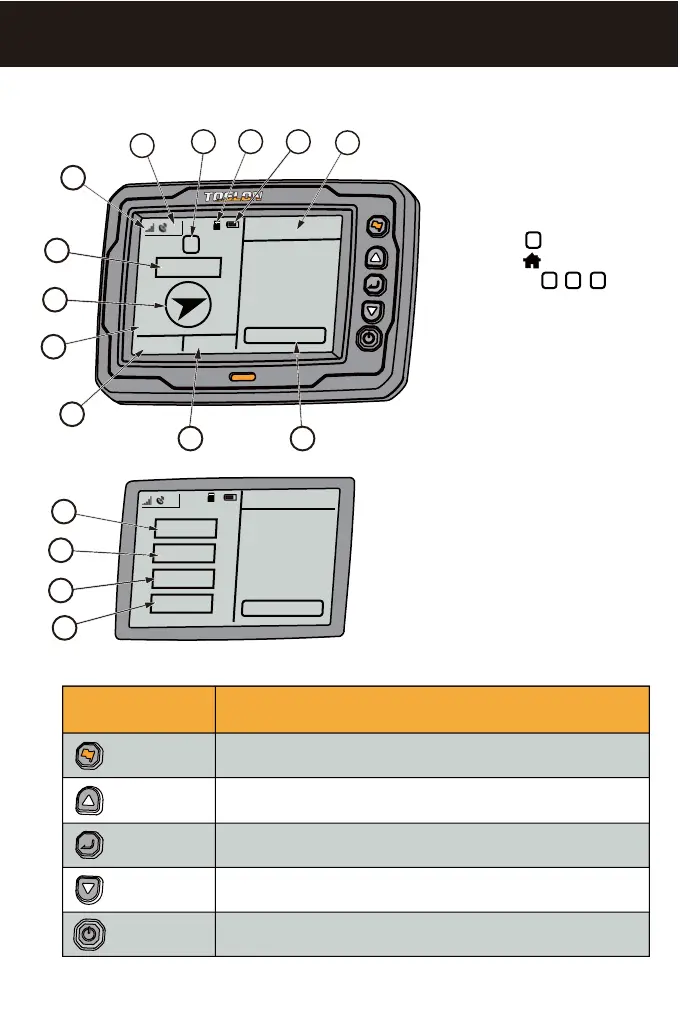
1. What’s on the display & Keypad instruction
6) Strength of radio signal
7) Distance to target (or HOME
Point)
8) Boat heading
9) Voltage of X-Pilot CCU
10) Speed of the boat
11) Angle between boad heading
direction and the north
12) Home position
13) The distance to Target (or
HOME Point)
14) Speed of the boat
15) Angle between boad heading
direction and the north
16) Voltage of X-Pilot CCU
1) Waypoint list
2) Strength of display battery
3) SD card is ready
4) Instruction icon of autopilot
condition ( means North
direction; means backing to
HOME point; , , means
the Quick Reach Target which
the boat is running toward)
5) Number of GPS Satellites
N
1 2 3


 To Next Page