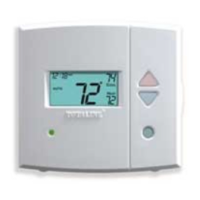
KEYPAD LOCK — The thermostat has a keypad lockout feature which will
not allow anyone to change the settings of your thermostat unless the correct
button sequence is pressed. To disable or lock the keypad, press and hold the
Mode button. While holding down the Mode button, press the UP and DOWN
ARROW buttons simultaneously. The ‘‘Locked’’ icon will appear on
the display.
The thermostat is unlocked by performing the same procedure. Press and
hold the Mode button. While holding down the Mode button, press the UP
and DOWN ARROW buttons simultaneously. The ‘‘Locked’’ icon will be
removed from the display.
PROGRAM — The Mode and UP ARROW buttons are used to set the daily
schedules for the thermostat to follow. Refer to the Programming Thermostat
Schedules section on page 7 for more information.
SET CLOCK — The Mode and Override buttons are used to set the ther-
mostat time of day and day of the week. Refer to the Set Clock section on
page 7 for more information.
OVERRIDE BUTTON — The Override button is used to force the thermo-
stat from Unoccupied mode into the Occupied 1 mode comfort settings. The
Override period will be set at 30 minutes. The thermostat will then return to
Unoccupied mode. To increase the amount of time in Override mode, press
the Override button again. Thirty minutes of override time will be added for
each time the Override button is pressed up to a maximum of 4 hours. After
the 4-hour limit has been reached, press the Override button again to cancel
Override mode.
While in Override mode, the Override icon and the Occupied 1 icon will
be displayed on the thermostat. The time of day and the minutes remaining
in Override mode will alternate on the thermostat display.
The set points are adjustable with the UP ARROW and DOWN ARROW
keys during Override mode.
NOTE: If the thermostat is in Occupied mode and the Override button is
pressed, the thermostat will go into Unoccupied mode immediately. The ther-
mostat will remain in Unoccupied mode until the next Occupied start time.
6




 To Next Page