Connecting the Ovation to the Telephone or Broadband Network
17
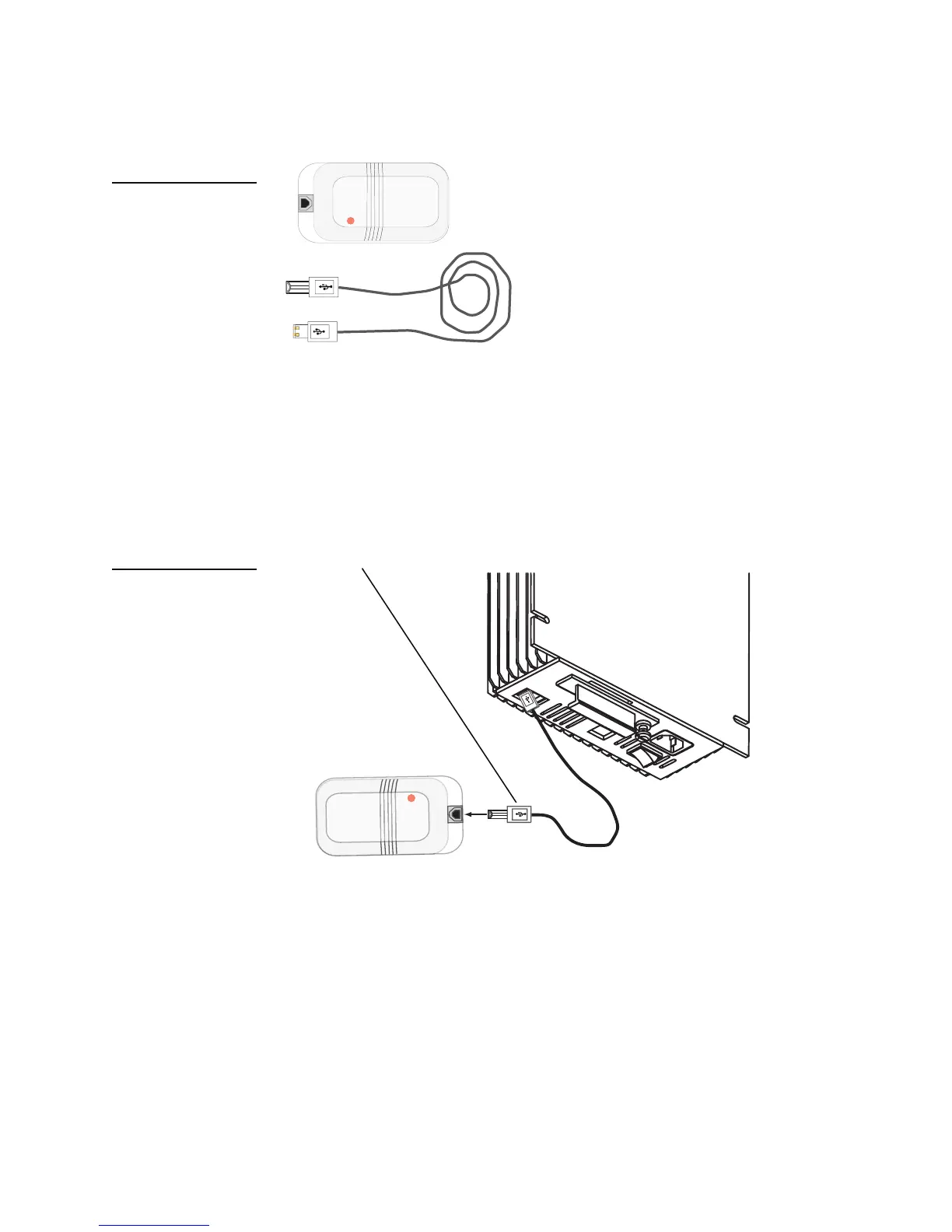
The USB Modem includes a USB cable and the modem itself.
Note: The USB modem is an optional jukebox component. If a USB modem was not included
with the jukebox, you must request it from your distributor or TouchTunes.
2. Connect the flat connector at one end of the USB cable to any of the USB ports on the bottom
panel of the MJS.
3. Connect the barrel-like connector (also called the B-Type connector) at other end of the USB
cable to its associated port on the USB modem.
The modem is now installed. Next, connect a phone line to the USB modem so the Ovation
can access the telephone network.
To connect the jukebox to the telephone network:
1. Locate the phone line for the dial-up connection.
2. Attach one end of the phone line to the phone jack for the Ovation.
3. Route the free end of the phone line in to the jukebox through the cable channel and then
pass it through the opening underneath the wire-relief strain bracket.
Figure 12
USB Modem and cable
Figure 13
Attaching the USB Modem
to the MJS
Radicom®
USB Modem
Radicom®
USB Modem
USB B-Type connector



 To Next Page