5 of 12
Step 5: Access the Cable Channels
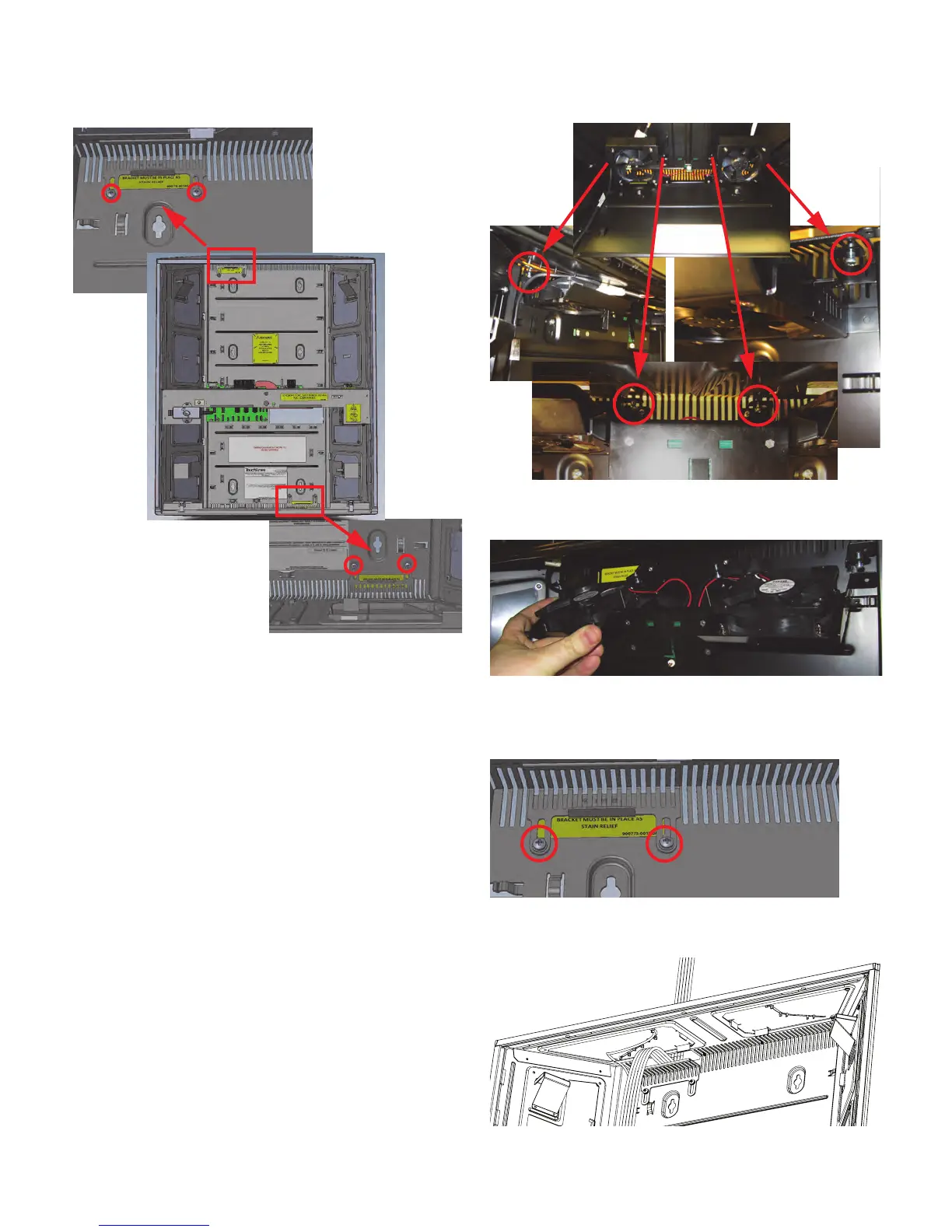
Playdium is designed with two cable channels that let you
route outside cables into the jukebox.
Note: Route cables into and out of Playdium only through
the provided cable channel openings. Do not route
cables through any other openings in Playdium, such as
air vents.
The bottom cable channel is more readily accessible, so it
will mean less work if you can run all cables through the
bottom channel.
To access the top cable channel, you must first unfasten
the airflow assembly and pull it out of place. The airflow
assembly is held in place by two hooks and four screws.
1. To remove the Airflow Assembly, first loosen the four
screws until they are no longer pushing against the
metal of the chassis.
2. Now that the assembly is loose, push the back part up
to unhook it from the chassis, then pull the assembly
out.
3. Lay the airflow assembly down on the middle support
bar.
4. Loosen the screws that hold the strain relief bracket in
place, and slide the bracket down.
5. Route any cables that need to be routed through the
top cable channel. The cables should be routed along
the middle of the bracket, and laid as flat as possible.



 To Next Page