2
BASIC OPERATION
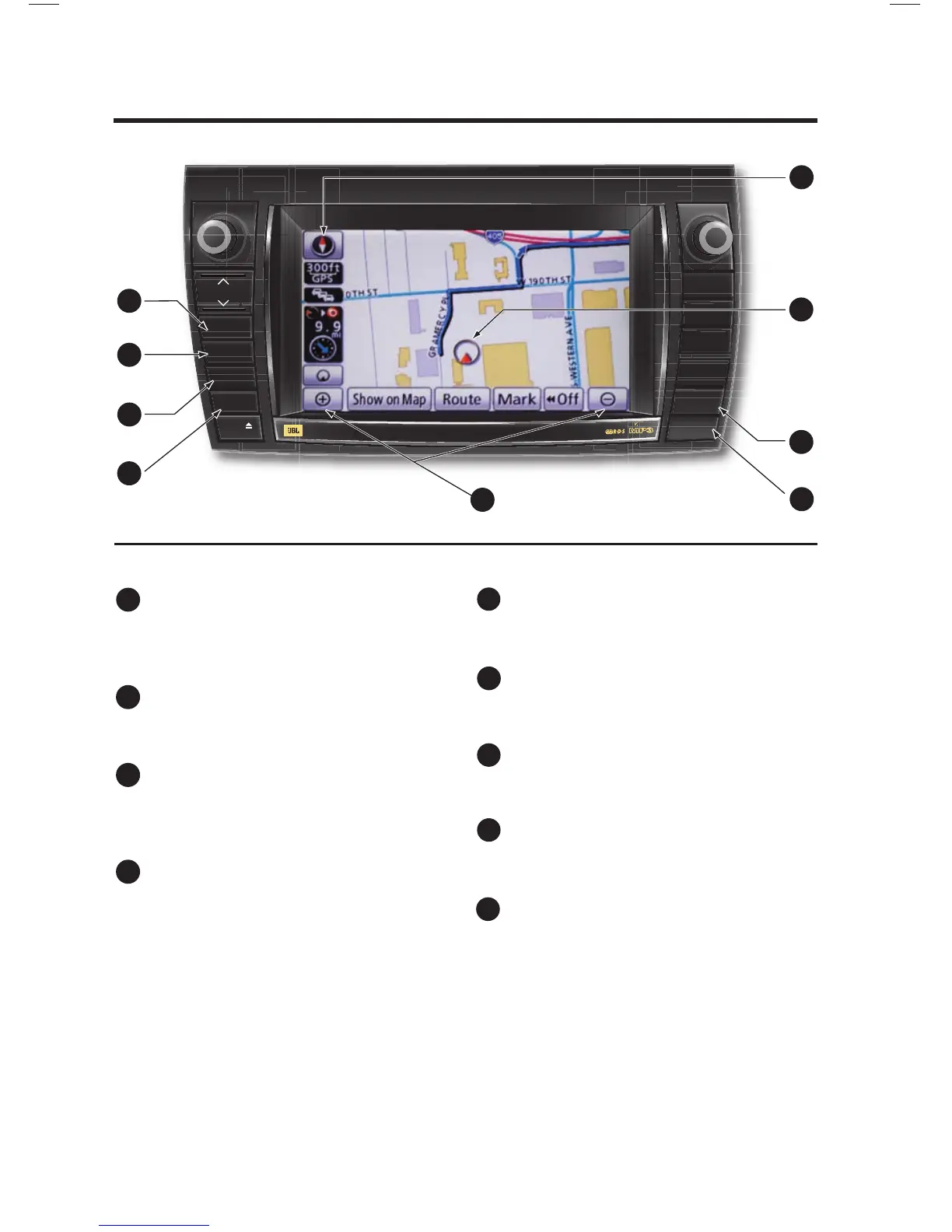
MAP/VOICE Button
Repeat the last voice guidance prompt,
cancel the map scrolling feature, or
display the current position.
DESTINATION Button
Input the destination by one of several
methods.
SETUP Button
Adjust Preferences for: General Settings,
Clock, Voice, Navigation, Phone, Audio,
and Vehicle Maintenance.
INFO/PHONE Button
Access Phone, Map Data, and Calendar.
ZOOM IN/ZOOM OUT Icons
Touch to magnify or reduce the map
scale.
DISPLAY Button
Adjust the contrast, brightness or turn off
the screen.
AUDIO Button
Set the radio station presets, adjust the
balance and tone controls.
CURRENT VEHICLE POSITION Mark
Indicates the current position of the
vehicle and its directional heading.
NORTH-UP OR COMPASS MODE Icon
Touch to change the map display between
North-up or Head-up perspectives.
£
Ó
Î
{
x
È
Ç
n
WMA
TOY OTA








 To Next Page