To Next Page
J
Joseph ClarkAug 2, 2025
How to check what triggered my Toyota Car Alarm?
- PPaul SimpsonAug 2, 2025
The LED indicator will show what activated the Toyota Car Alarm until you start the vehicle.

How to check what triggered my Toyota Car Alarm?
The LED indicator will show what activated the Toyota Car Alarm until you start the vehicle.
Details button actions, blinker indications, and LED status for arming/disarming.
Procedure to disable sensors for false alarm prevention, including LED feedback.
Explains the automatic re-arming function for smart key models, preventing accidental unlocking.
Lists common causes for false detection by the vehicle's intrusion sensor.
Information about the PIN code card for manual alarm system override.
Defines the meanings of different LED states (off, on, slow blink, fast blink).
Explains LED blink codes indicating the specific trigger event that activated the alarm.
Step-by-step procedure for disarming the alarm system using the PIN code.
Step-by-step procedure for arming the alarm system using the PIN code.
Lists common alarm issues, their causes, and potential solutions or references.
Procedure to temporarily deactivate all alarm functions during garage use.
Details limitations on warranty coverage and liability for product misuse.
Guidance on the proper disposal of the alarm system and its battery.
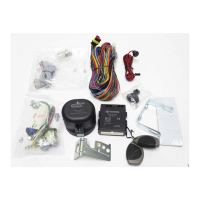
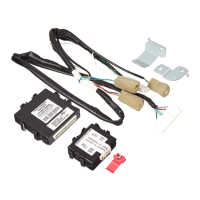
This document describes the Vehicle Security System VSS4, an alarm system designed to protect your vehicle from intrusions and theft. It offers various features for monitoring, arming, disarming, and troubleshooting, along with specific modes for different scenarios.
The VSS4 alarm system is designed to provide comprehensive protection for your vehicle. Its primary function is to detect intrusions and deter potential thieves through a combination of audible and visual alerts. The system monitors several critical points of the vehicle, including the bonnet, doors, and boot. A key feature is the intrusion sensor, which detects movement within the vehicle's cabin, adding an extra layer of security. For enhanced protection, especially against towing or wheel theft, the system can also detect if the car is lifted, provided it includes an inclination sensor. The alarm is also self-protected against tampering, such as wiring attacks or battery disconnection, ensuring its integrity even when under direct assault.
In the event of an intrusion, the VSS4 activates a powerful deterrent sequence. This includes generating a loud sound, activating the vehicle's horn, flashing the blinkers, and illuminating the dome lamp, all designed to draw attention and scare off intruders. To prevent attacks before they even begin, the system incorporates an LED indicator and stickers. The LED serves multiple purposes: it indicates the alarm's current status (armed, disarmed, pre-arming), and crucially, it can signal if the alarm was triggered during your absence, providing information on what specifically caused the trigger.
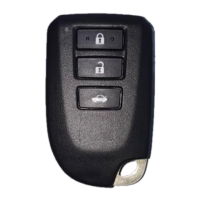
The system's operation is primarily managed through the vehicle's original remote control or smart key system. This integration ensures seamless interaction with your car's existing locking mechanisms. For situations where the remote control is unavailable or lost, an emergency override procedure is available, utilizing a personal PIN code. This PIN code, provided on a credit card-sized card, allows for manual arming and disarming of the alarm system.
Arming and Disarming: The VSS4 is armed by pressing the lock button on your remote control once. The blinkers will flash once to confirm the car is locked, and the LED will illuminate, then start blinking slowly after 30 seconds to indicate the system is armed. To disarm, press the unlock button once. The blinkers will flash twice, and the LED will turn off. It's crucial to ensure all windows and the sliding roof are closed, and no one is inside the car, to prevent false alarms when arming.
PIN Code Card: Your unique four-digit PIN code is essential for manual operation (emergency override). This card should always be kept with you but never left inside the car to maintain security. If the PIN code card is lost, contact your authorized retailer for assistance.
Arming without Intrusion Sensor and/or Inclination Sensor: There are specific scenarios where disabling certain sensors is necessary to avoid false alarms. If you need to lock the car with occupants inside (passengers, children, pets) or leave a window open, the intrusion sensor should be disabled. Similarly, if the vehicle might move while locked (e.g., on a ferry), the inclination sensor should be disabled. To do this, press and hold the push-button located under the LED within 5 seconds after switching off the vehicle. The LED will blink back to confirm which sensor is disabled: one flash for the intrusion sensor, two flashes for the inclination sensor, and three flashes for both. This disabling is temporary, lasting only until the next time the vehicle is locked and the alarm is set, after which all sensors will reactivate.
Automatic Re-arming (Smart Key Models Only): For vehicles equipped with a smart key system, if the car is unlocked via the smart key or door handle and no door or the trunk lid is opened within 30 seconds, the door lock system will automatically re-lock the car, and the alarm system will re-arm itself.
Emergency Override: This procedure allows for manual arming or disarming of the alarm using your PIN code. To disarm, press the button under the LED the number of times corresponding to the first digit of your PIN code, with a maximum 1.5-second delay between presses. Wait for the LED to flash, then repeat for the next three digits. The alarm will disarm once the correct code is entered. The same procedure can be used to arm the system, with the alarm arming after the second digit is entered.
Garage Mode: The alarm system can be temporarily deactivated for a limited period, which is useful when the vehicle is being serviced or stored in a garage. In garage mode, all alarm system functions are disabled. To activate garage mode, ensure the alarm is disarmed and the bonnet is closed. Switch on the vehicle (Ignition On), open the driver door, and then insert your PIN code. The hazard lights will flash five times to confirm activation. Garage mode will automatically cancel after 10 cycles of ignition on/off, or it can be manually cancelled by repeating the activation procedure.
LED Status Indications: The LED provides clear visual feedback on the alarm's status:
If the alarm was triggered during your absence, the blinkers will flash four times, and the buzzer will sound four times when the doors are unlocked. The LED will then display a sequence of blinks to indicate the trigger source until the vehicle is switched on:
Troubleshooting: The manual provides a troubleshooting guide for common issues:
Intrusion Sensor Considerations: The intrusion sensor detects movement within the vehicle. To prevent false detections, avoid leaving dangling accessories, ensure windows and the sliding roof are closed, and be aware that automatic or high-pressure car washes, hail, lightning strikes, or continuous vibrations can trigger the sensor. If a remote cabin heater is installed, ensure it is not positioned in a way that interferes with the sensor.
Programming Extra Remote Controls: If you wish to program additional remote controls for the alarm system, consult your Toyota authorized retailer.
Warranty Information: The warranty information clarifies that the user will be charged for repairs in cases of loss caused by fire, third-party actions, other accidents, deliberate or accidental misuse, incorrect use, or use under abnormal conditions. Toyota Motor Europe NV/SA is not liable for incidental loss or damages resulting from the use or non-use of the product, or from intentional/accidental misuse or third-party use. It also states that the alarm system does not guarantee prevention of car theft.
Disposal of Obsolete Products and Batteries: The product contains an integrated battery subject to European Directive 2006/66/EU. It should not be disposed of with normal household waste. Appliances should be taken to a collection point or service center for proper battery removal and recycling. Follow local regulations for the disposal of electrical and electronic products and batteries to prevent environmental pollution and health damage.
 General
| Type | Vehicle Security System |
|---|---|
| Power Supply | 12V DC (vehicle battery) |
| Installation | Professional installation recommended |
| Compatibility | Toyota vehicles |
| Remote Control | Yes |
| Shock Sensor | Yes |
| Immobilizer | Yes |
| Panic Mode | Yes |