
 Need help?
Do you have a question about the TOZO Q1012 and is the answer not in the manual?
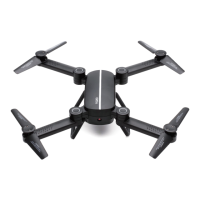
Describes the process of unfolding the aircraft's four arms to a 120-degree angle until a click sound is heard.
Explains how to identify and replace damaged blades using markings like 'A' and 'B' for stable flight.
Warns against flying in adverse weather like strong winds, thunderstorms, or heavy fog.
Instructs users to maintain a safe distance from the aircraft during flight to avoid injury.
Details the initial step of connecting the USB cable to the aircraft's lithium battery for charging.
Instructs immediate cessation of use if the battery is expanded, destroyed, or severely heated.
Recommends placing the aircraft and charger on the ground away from combustible materials.
Details inserting the aircraft's lithium battery into the remote control's battery compartment.
Explains how to install two 1.5V AA batteries into the remote control.
Details the process of powering the remote control and using the left rocker to search for frequency.
Explains how to complete frequency binding by moving control sticks and notes calibration can be repeated.
Describes taking off by moving the left and right control sticks outwards and then pushing up the left stick.
Explains taking off by holding the 'L2' button for a second after aircraft adjustment.
Instructs pressing the 'L2' and 'R2' buttons simultaneously to immediately stop flight.
 General
| Model | Q1012 |
|---|---|
| Category | Quadcopter |
| Camera | No |
| LED Lights | Yes |
| Headless Mode | Yes |
| One Key Takeoff/Landing | Yes |
| 3D Flips | Yes |
| Battery | 3.7V Li-Po |
| Speed Modes | 3 |

 To Next Page
