1
English
Note: Images may differ from your actual product�
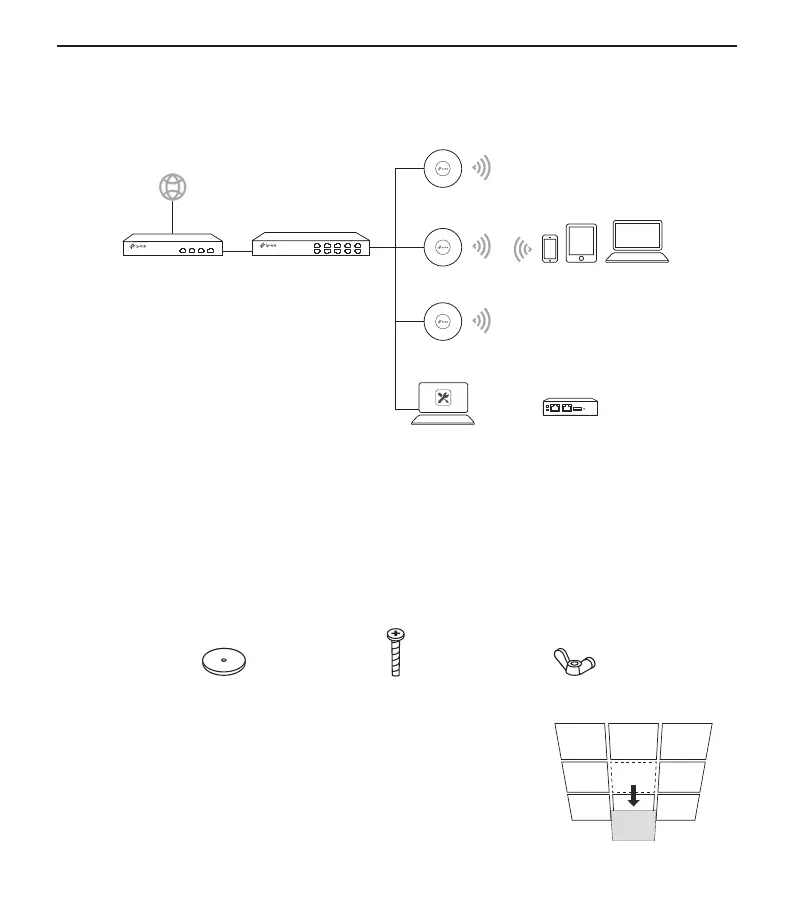
Network Topology
A typical network topology for the AP is shown below�
Router Switch
Internet
ClientsAP
Hardware Controller
AP
AP
Software Controller
Or
APs can be centrally configured and monitored via Controller� You can get the Controller from
https://www.tp-link.com or contact the sales staff�
Hardware Installation
■ Option 1: Ceiling Mounting
Follow the steps below to install the AP with the provided accessories:
Note: The mounting bracket and the accessories (quantity and size) may vary by product�
Washers Pan-head Screws Wing Nuts
1
Remove the ceiling tile�







 To Next Page