3
English
1
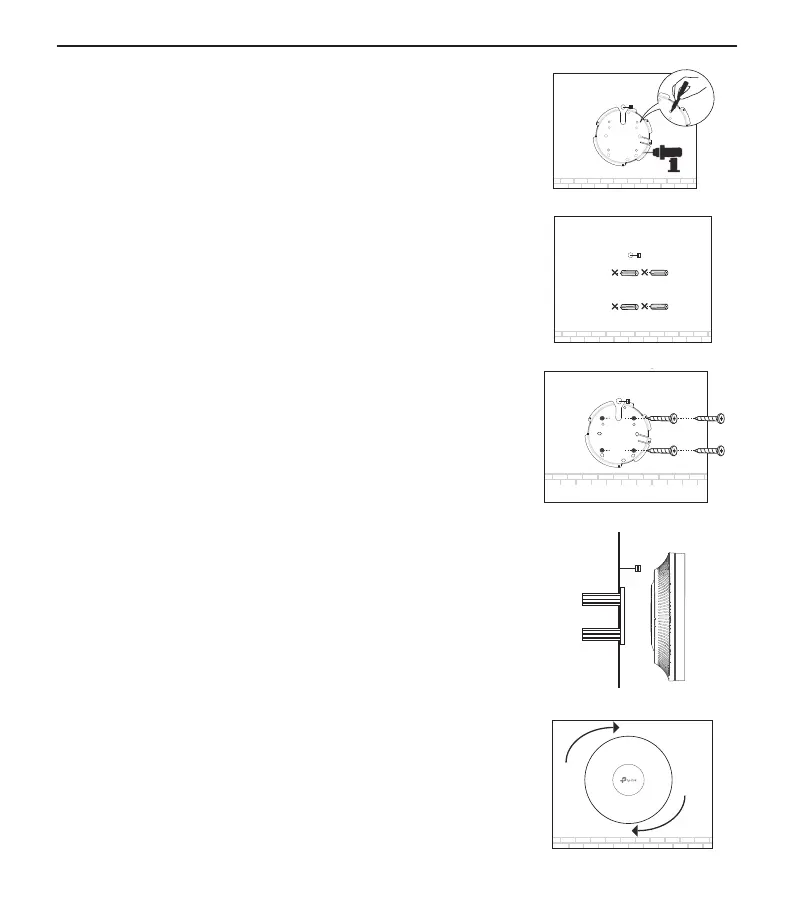
If your Ethernet cable feeds through the wall, position the
mounting bracket and feed the Ethernet cable� Mark positions
for the screw holes and then drill 6 mm diameter holes at the
marked positions�
2
Insert the plastic wall anchors into the 6 mm diameter holes�
3
Secure the mounting bracket to the wall by driving the self-
tapping screws into the anchors� Make sure that the shoulders
of the mounting bracket are on the outside�
4
Connect the Ethernet cable to the Ethernet port on the AP�
5
Attach the AP to the mounting bracket by aligning the arrow
mark on the AP with the arrow mark on the mounting bracket,
then rotate the AP until it is locked into place�







 To Next Page