4
Chapter 1
Get to Know Your Modem Router
LED Explanation
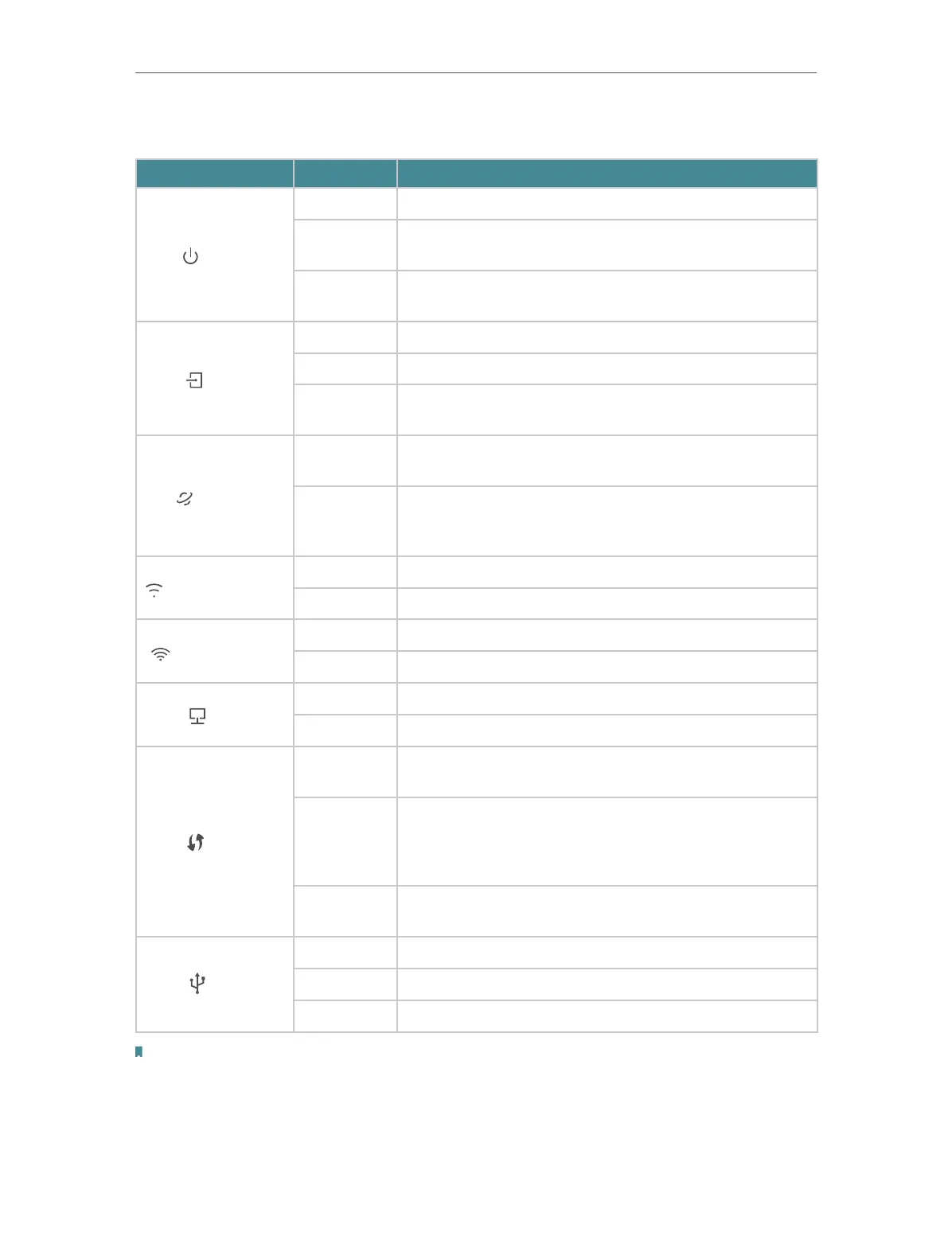
Name Status
Indication
Power
On System initialization is complete.
Flashing
System initializing or firmware upgrading is in progress.
Do not disconnect or power off the modem router.
Off
Power is off. Please ensure that the power adapter is
connected correctly.
ADSL
On ADSL synchronization is complete.
Flashing ADSL synchronization is in progress.
Off
ADSL synchronization failed. Please refer to Note 1 for
troubleshooting.
Internet
On
The network is available with a successful internet
connection.
Off
There is no successful internet connection or the
modem router is operating in Bridge mode. Please refer
to Note 2 for troubleshooting.
Wireless 2.4GHz
On The wireless 2.4GHz band is working properly.
Off The wireless 2.4GHz band is disabled.
Wireless 5GHz
On The wireless 5GHz band is working properly.
Off The wireless 5GHz band is disabled.
LAN
On At least one LAN port is connected.
Off No LAN port is connected.
WPS
On
A wireless device has been successfully added to the
network by WPS function.
Flashing
WPS handshaking is in process and will continue for
about 2 minutes. Please press the WPS button on other
wireless devices that you want to add to the network
while the LED is flashing.
Off
A wireless device has failed to be added to the network
by WPS function.
USB
On The USB device is identified and ready to use.
Flashing The USB device is being identified.
Off No USB device is plugged into the USB port.
Note:
1. If the ADSL LED is off, please check your internet connection first. Refer to Connect Your Modem Router for more information
about how to make internet connection correctly. If you have already made a right connection, please contact your ISP to make
sure your internet service is available now.













 To Next Page