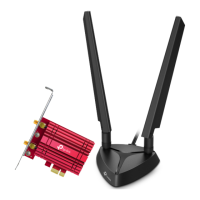
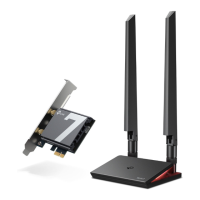
The TP-Link Archer TBE550E is a BE9300 Wi-Fi 7 Bluetooth PCIe Adapter designed to provide a smooth and high-performance wireless experience for desktop computers. It leverages the full potential of the 6 GHz band, offering exceptional bandwidth and congestion-free channels. Enhanced with 4096-QAM and 320MHz, the adapter aims to deliver astonishing wireless speeds, facilitating instant multi-stream media playback.
Function Description:
The Archer TBE550E serves as a dual-purpose adapter, providing both Wi-Fi and Bluetooth connectivity to a desktop computer via a PCI Express (PCIe) slot. It enables the computer to connect to wireless networks using the latest Wi-Fi 7 standard, as well as older Wi-Fi standards, and to pair with various Bluetooth devices.
Important Technical Specifications:
- Wireless Standards: Supports 5760 Mbps on 6 GHz, 2880 Mbps on 5 GHz, and 688 Mbps on 2.4 GHz. It is compatible with IEEE 802.11a/b/g/n/ac/ax/be standards.
- Antennas: Features 2× High-Performance Tri-Band Antennas, designed to optimize signal reception across all supported frequency bands.
- Wireless Security: Supports WPA, WPA2, and WPA3, including WPA-PSK/WPA2-PSK* for secure wireless connections.
- Dimensions (without the antenna base): 3.7 x 4.8 x 0.8 inches (95.2 x 120.8 x 21.5 mm).
- System Requirements: Requires Windows 11 (64-bit) only.
- Operating Temperature: 0°C to 40°C (32°F to 104°F).
- Storage Temperature: -40°C to 70°C (-40°F to 158°F).
- Operating Humidity: 10% to 90% non-condensing.
- Storage Humidity: 5% to 90% non-condensing.
- PCIe Interface: Designed for available PCIe slots (X1, X4, X8, or X16).
- Bluetooth Version: Supports Bluetooth 5.4, though certain features may be restricted on some computing systems and platforms, requiring driver updates for compatibility.
- Bandwidth: The 320 MHz bandwidth is exclusively available on the 6 GHz band. The availability of 320 MHz on 6 GHz and 160 MHz on 5 GHz may be subject to regional/country-specific regulatory restrictions.
- Network Speed: Actual network speed may be limited by factors such as the product's PCI Express Interface rate, Ethernet WAN or LAN port rate, network cable quality, internet service provider factors, operating system factors, and environmental conditions.
- WPA3: Use of WPA3 requires access points (APs) to also support the corresponding feature.
Usage Features:
- Easy Installation: The adapter is installed into an available PCIe slot on the computer's motherboard. A provided Bluetooth USB cable connects the adapter to an F_USB connector on the motherboard to enable Bluetooth functionality.
- Antenna System: Includes a magnetized antenna base with two high-performance tri-band antennas that connect to the adapter. The magnetized base allows for flexible placement to optimize signal reception. Users are advised to ensure a clear path between the antenna and the router for maximum performance.
- LED Indicator: The adapter features an LED that indicates its status.
- Breathing: No internet connection.
- Static: The adapter is working properly.
- Spectrum: Operating at 320MHz.
- Off: The adapter is not working properly.
- LED Button: A button on the antenna base allows users to:
- Single press to turn the LED on/off.
- Press and hold for approximately 2 seconds to change the color of the LED.
- Driver Installation: Drivers for both Wi-Fi and Bluetooth are provided on a Resource USB drive. Users are instructed to install them separately, waiting for one driver installation to complete before starting the other. Drivers can also be downloaded from the TP-Link support website.
- Wireless Network Connection: After driver installation, users can join wireless networks by selecting the desired Wi-Fi network from the taskbar icon and entering the password. Specific checks are provided for connecting to 6 GHz networks, including ensuring regulatory compliance, router support, Windows 11 OS, and successful Wi-Fi driver installation.
- Bluetooth Device Pairing: Users can pair Bluetooth devices by right-clicking the Bluetooth icon on the taskbar, selecting "Add a Bluetooth Device," and following on-screen instructions. It is crucial to ensure the Bluetooth device is enabled and discoverable.
- Low-Profile Bracket: The adapter comes with a low-profile bracket, allowing it to be installed in smaller computer cases if the standard bracket is not suitable.
Maintenance Features:
- Driver Updates: Users are encouraged to regularly check for and install the latest drivers from the TP-Link Download Center to ensure optimal performance and feature compatibility, especially for Bluetooth 5.4.
- Troubleshooting Guide: The manual includes a comprehensive troubleshooting section to address common issues:
- Adapter Detection (T1): Provides steps like checking secure seating in the PCIe slot, trying different slots, ensuring the latest drivers are used, and restarting the computer.
- Driver Installation Verification (T2): Guides users to check for Wi-Fi and Bluetooth icons on the taskbar to confirm successful driver installation.
- Wi-Fi Connection Issues (T3): Offers solutions such as verifying adapter detection and driver installation, disabling antivirus/firewall, checking slot seating, restarting the computer, and reinstalling drivers.
- Bluetooth Icon Not Appearing (T4): Advises users to enable Bluetooth in Windows settings, disable any other existing Bluetooth devices in Device Manager, and then reinstall the adapter.
- Hardware Version Identification (T5): Explains how to find the hardware version on the product label.
- LEDs Off on Antenna Base (T6): Provides steps to ensure the antenna base is connected, adapter is detected, drivers are installed, SMA male connectors are not short-circuited, Wi-Fi Radio signal is enabled, and the LED button is pressed.
- Operating System Update (T7): Directs users to the official Microsoft website for Windows 11 downloads.
- Driver Uninstallation: Instructions are provided for uninstalling both Wi-Fi and Bluetooth drivers via the Windows "Apps" settings.
- Safety Information: Emphasizes keeping the device away from water, fire, humidity, and hot environments. Users are warned against disassembling, repairing, or modifying the device and are advised to contact support for service. It also highlights the importance of using the device where wireless devices are allowed and mentions potential interference with medical devices due to electromagnetic fields.
- Environmental Considerations: The product bears the WEEE (Waste Electrical and Electronic Equipment) symbol, indicating that it should be handled for recycling or dismantling to minimize environmental impact.

 Need help?


 To Next Page
 General