11
Chapter 3 Use Your Adapter
3. 1. Install Drivers
1. Insert the provided Resource USB drive into your computer and go to My
Computer or This PC.
Note: You can also check the new release and download the driver at
https://www.tp-link.com/support/download/
2. Double-click the TP-Link CD to run the installation program.
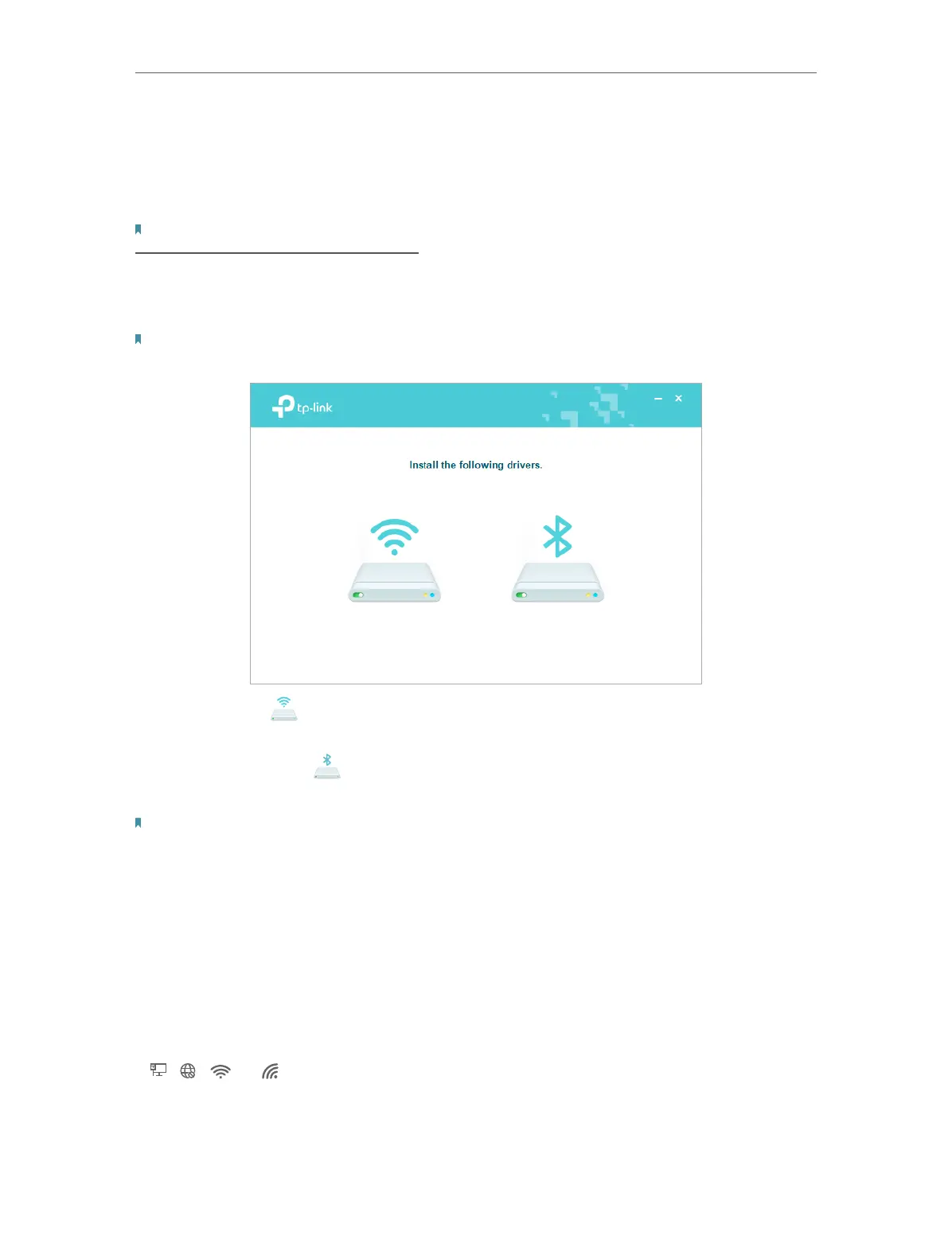
3. Install the Wi-Fi and Bluetooth drivers.
Note: DO NOT install the Bluetooth and Wi-Fi drivers simultaneously. If one driver is being installed,
please wait until it is finished, then install the other driver.
• Wi-Fi: Click and follow the on-screen instructions to complete the Wi-Fi
installation.
• Bluetooth: Click and follow the on-screen instructions to complete the
Bluetooth installation.
Note:
• To check if the drivers are installed successfully or not , refer to How to check if I have installed the
drivers successfully or not?
• If an unknown publisher message pops up, select Yes to continue.
• If Windows User Account Control requires admin credentials, type user name and password of your
Windows administrator account.
3. 2. Join a Wireless Network
1. Click the internet icon on the taskbar (the icon might look like one of these:
, , , or ).



 To Next Page