55
Chapter 13
NAT Forwarding
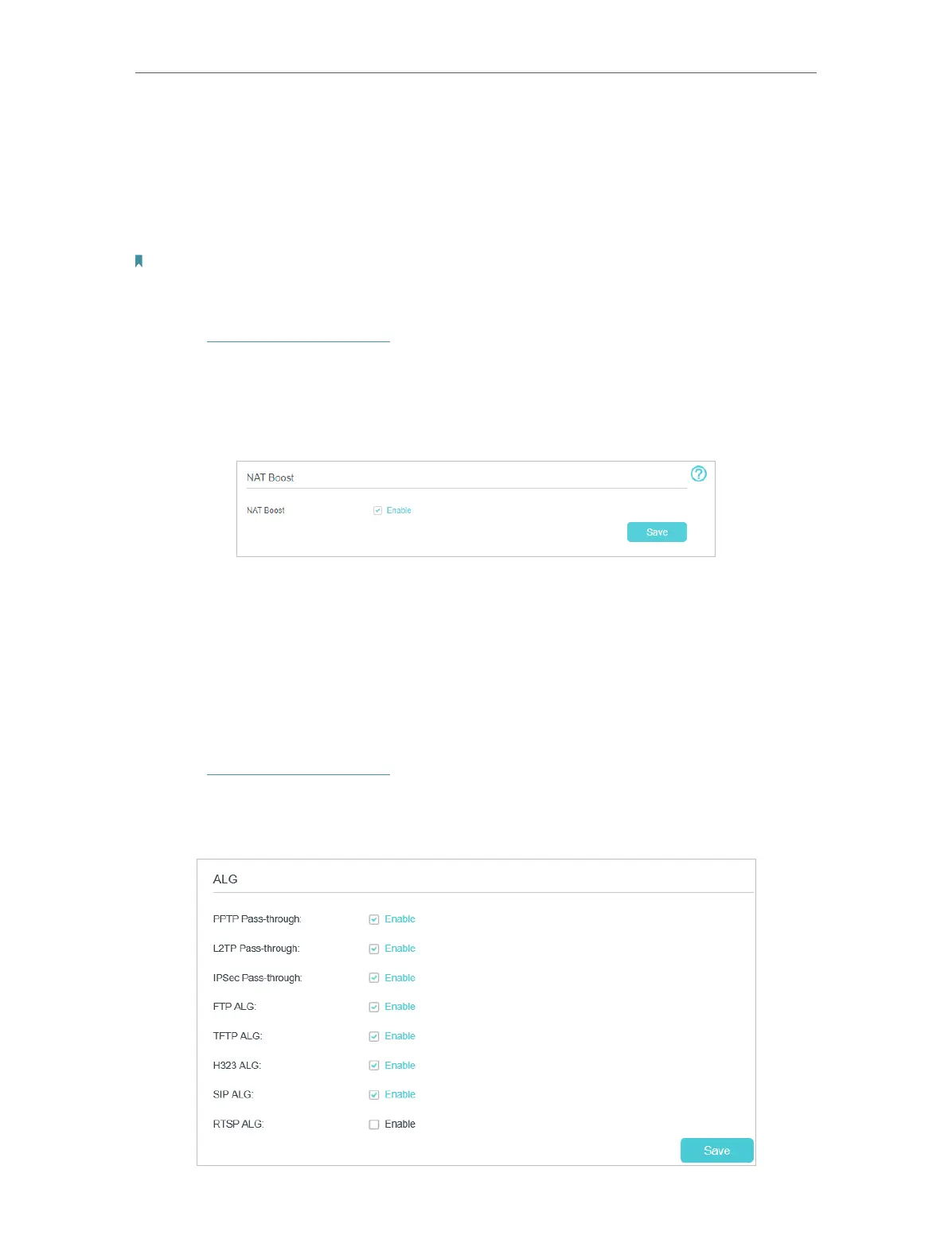
13. 1. Speed Up Internet Connections through NAT
Boost
NAT Boost is designed to speed up Internet connections. It ensures that the router has
the best throughput.
Note:
NAT Boost, QoS, and Traffic Monitor cannot be enabled simultaneously. When NAT Boost is enabled, QoS and Traffic
Monitor will be disabled automatically.
1. Visit http://tplinkmodem.net, and log in with your TP-Link ID or the password you
set for the router.
2. Go to Advanced > NAT Forwarding > NAT Boost.
3. Enable NAT Boost and click Save.
13. 2. Translate Address and Port by ALG
ALG (Application Layer Gateway) allows customized NAT (Network Address Translation)
traversal filters to be plugged into the gateway to support address and port translation
for certain application layer “control/data” protocols: FTP, TFTP, H323 etc. Enabling ALG
is recommended.
1. Visit http://tplinkmodem.net, and log in with your TP-Link ID or the password you
set for the router.
2. Go to Advanced > NAT Forwarding > ALG.













 To Next Page