Network Topology
Hardware Overview
1
Installation Steps
Quick Installation Guide
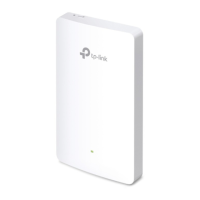
EAP225-Wall
AC1200 Wireless MU-MIMO Wall Plate Access Point
3
Front Panel & Rear Panel
Bottom View
Pre-Installation Checklist
2
RESET Button
With the device powered on, press and hold the button for 5 seconds to reset
the EAP to its factory defaults.
ETH1 & ETH2 Port
Connected to a client device to transmit data.
ETH3 (PoE OUT) Port
Connected to a client device to transmit data and supply power (PoE
Passthrough). The PoE OUT feature requires 802.3at PoE+ input and the
maximum output is 13W.
LED Indicator
On: Working normally/Initializing.
O: Working abnormally/Power o/LED is turned o.
Flashing:
Initialization: The LED ashes twice after initialization is complete.
Upgrade: The LED ashes once per second while upgrading.
Reset: The LED ashes ve times in quick session during the reset. The
EAP will then reboot.
ETH0 (PoE IN) Port
Connected to a PSE (Power Sourcing Equipment), such as a PoE switch,
for both data transmission and Power. The device supports 802.3at
inputs.
LED Button
Press the LED button to turn on/o the LED.
The EAP225-Wall can only be powered by a PSE device, such as a PoE switch.
Connect the PoE switch to the ETH0 (PoE IN) port with an Ethernet cable.
A DHCP server (typically a router) with DHCP function enabled is required to
assign IP addresses to the EAPs and clients in your local network.
Before installation, be sure that you have the following items:
1. A pre-installed wall junction box
2. An RJ45 plug
EAP225-Wall can be mounted into an 86mm wall junction box, a standard
EU wall junction box, or a standard US junction box. The junction box should
be pre-installed with a running-in-wall Ethernet cable connected to a PoE
switch.
Standard EU wall junction box86mm wall junction box
EAPEAPEAPPC
PoE Switch
Router
Internet
Clients
EAP Controller
EAP Controller
3. A Phillips screwdriver
4. A PoE switch
Standard US wall junction box
ETH1 ETH2
RESET
ETH3 (PoE OUT)
Note:
For simplicity, the 86mm wall junction box is used as an example below.
For security reasons, it is recommended not to install the EAP with the louver
downward.
Note: To power and connect an 802.3af device to the LAN, you must use
802.3 at PoE+ input.
1. Detach the faceplate of the junction box with a Phillips screwdriver.
LED
ETH0 (PoE IN)
LED Button

 Need help?
 General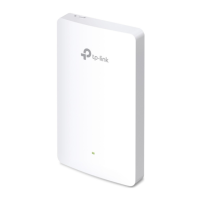




 To Next Page