TL-WR843ND 300Mbps Wireless AP/Client Router User Guide
- 40 -
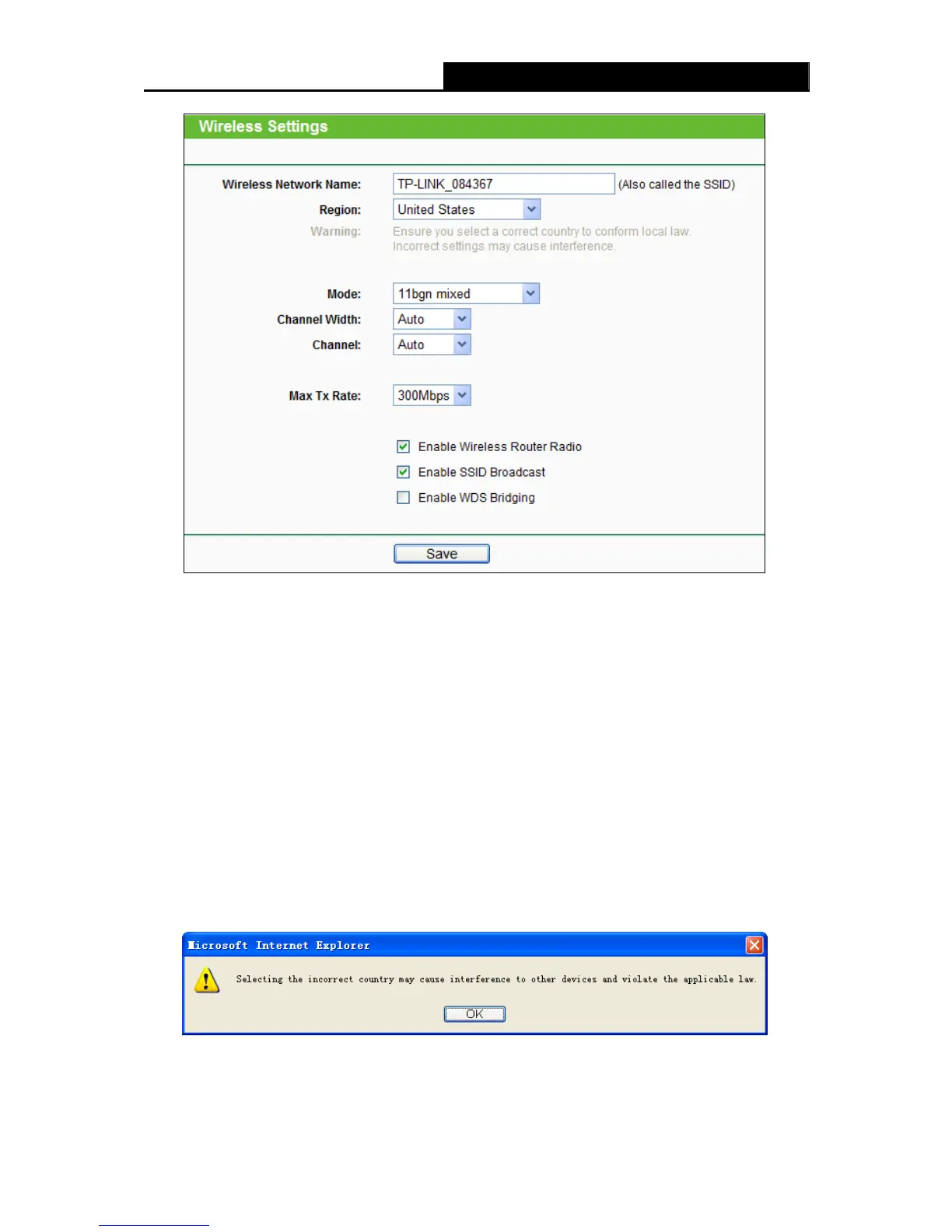
Figure 4-17 Wireless Settings
Wireless Network Name (also called the SSID) - Enter a value of up to 32 characters. The
same name of SSID (Service Set Identification) must be assigned to all wireless devices in
your network. Considering your wireless network security, the default SSID is set to be
TP-LINK_XXXXXXX (XXXXXX indicates the last unique six numbers of each Router’s MAC
address). This value is case-sensitive. For example, TEST is NOT the same as test.
Region - Select your region from the pull-down list. This field specifies the region where the
wireless function of the Router can be used. It may be illegal to use the wireless function of
the Router in a region other than one of those specified in this field. If your country or region
is not listed, please contact your local government agency for assistance.
When you select your local region from the pull-down list, click the Save button, then the
Note Dialog appears. Click OK.
Note Dialog
Note:
Limited by local law regulations, version for North America does not have region selection option.












 To Next Page