TL-WR843ND 300Mbps Wireless AP/Client Router User Guide
- 5 -
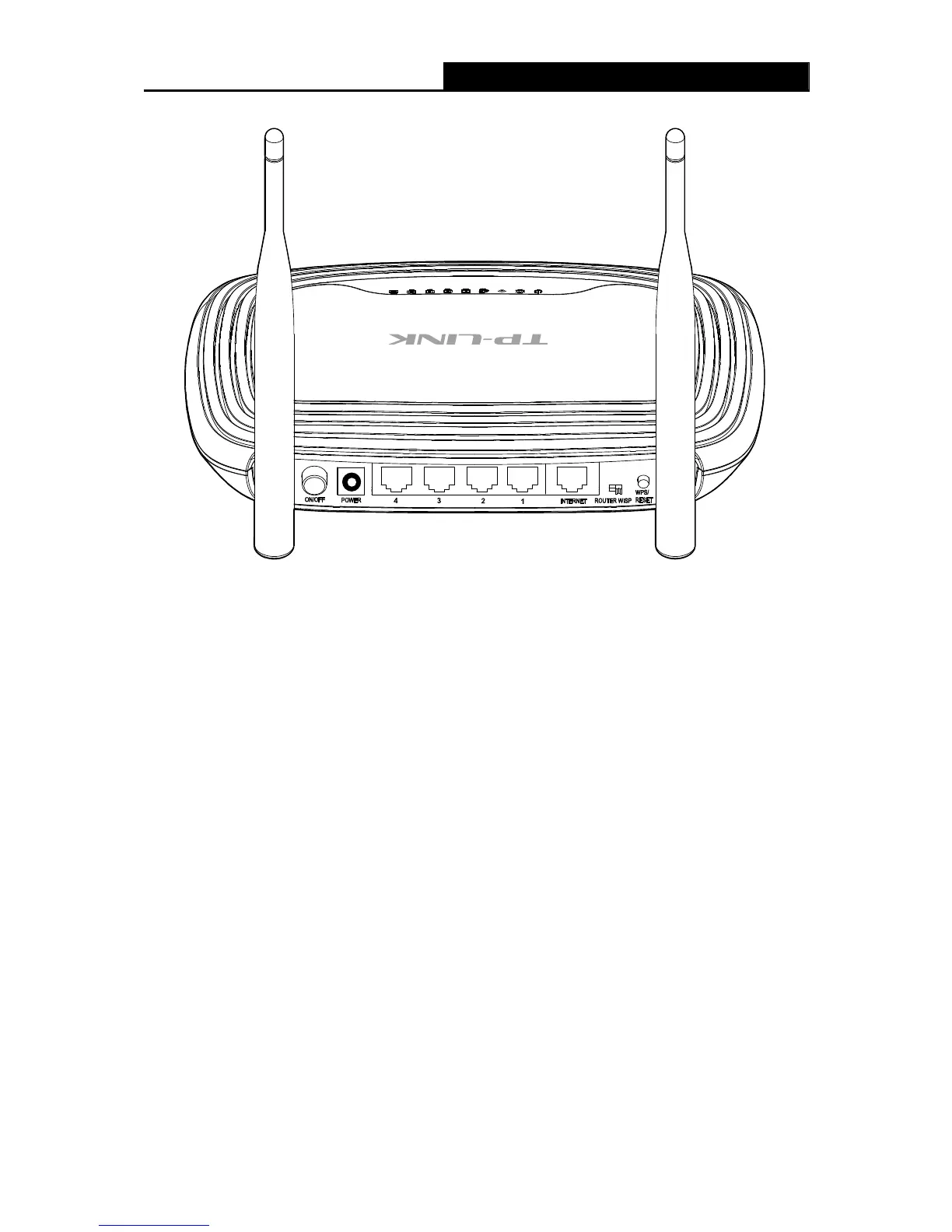
1.4.2 The Rear Panel
Figure 1-2 Rear Panel sketch
The following parts are located on the rear panel (View from left to right).
ON/OFF: The switch for the power.
POWER: The Power socket is where you will connect the power adapter. Please use the
power adapter provided with this TL-WR843ND 300Mbps Wireless AP/Client Router.
4,3,2,1 (LAN): These ports (4,3,2,1) connect the Router to the local PC(s).
INTERNET: This INTERNET port is where you will connect the DSL/cable Modem, or
Ethernet.
ROUTER WISP: This switch is used to select working mode.
WPS/RESET: This button is used for both WPS and Reset function. To use the WPS
function, press it for less than five seconds; to use the RESET function, press it for more
than five seconds.
Used as RESET button:
There are two ways to reset to the Router's factory defaults:
1) Use the Factory Defaults function on System Tools → Factory Defaults page in the
Router's Web-based Utility.
2) Use the WPS/RESET button: With the Router powered on, press and hold the
WPS/RESET button (more than 5 seconds) until the SYS LED becomes quick-flash from
slow-flash. Then release the button and wait the Router to reboot to its factory default












 To Next Page