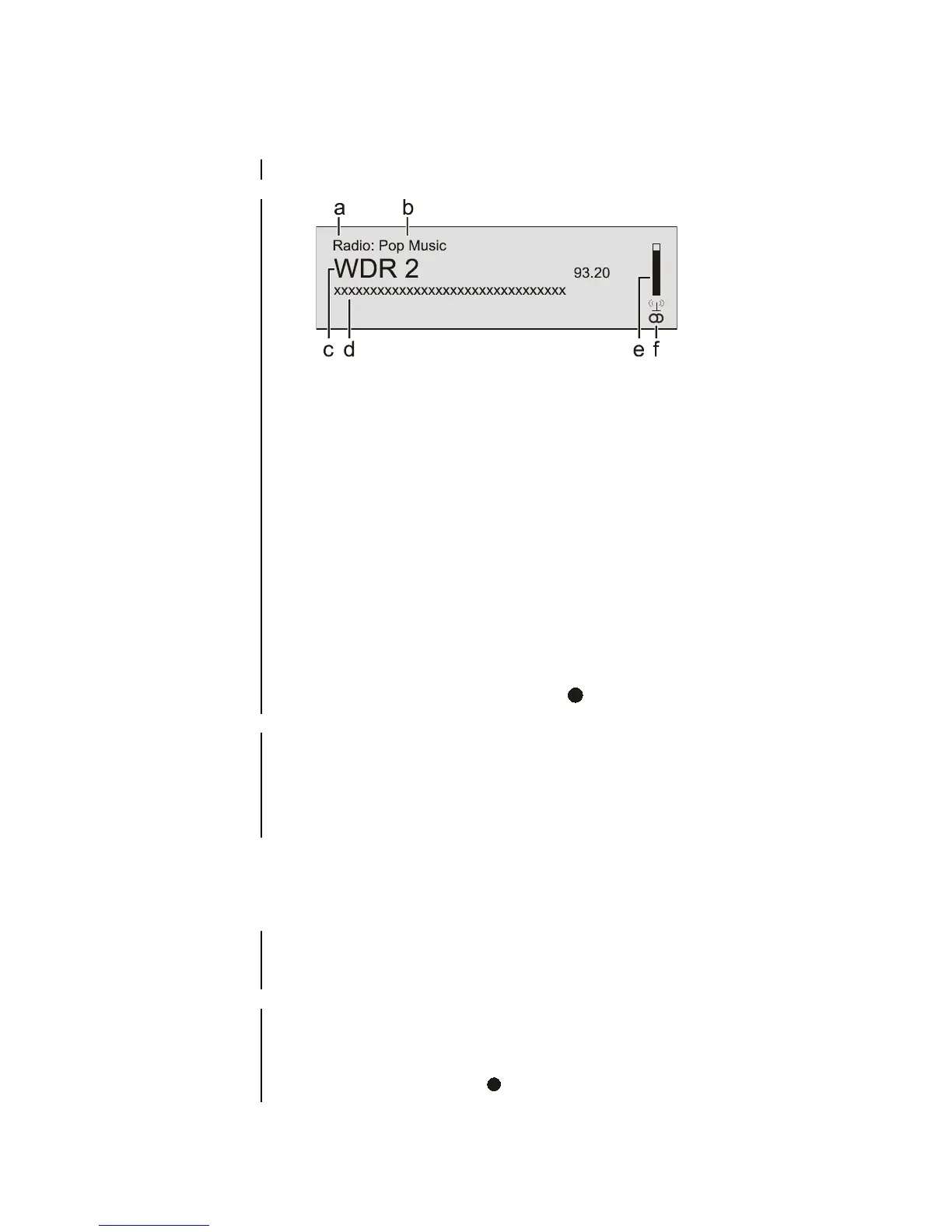
a) When you are listening to a radio station in radio mode, the message
'Radio' appears in the top line of the screen.
b) Here the music type or style is displayed, e.g. Pop Music.
This information is only displayed if the transmitting station broadcasts
it as part of the RDS system. If you are listening to a station which does
not support the RDS system, or only supports it in part, these
information fields remain empty.
c) The frequency and / or the station name is displayed in enlarged
form. If a station name is displayed, its frequency is shown at the
end of the line.
d) These lines display information which is broadcast by the station (e.g.
Radio text).
e) The field strength and therefore the reception quality to be
expected from the set transmitting station can be assessed from the
field strength.
f) Display of Stereo '
' / Mono' '
RDS functions
If the station being received is broadcasting relevant RDS data, the
following information will be displayed on the screen:
• Station name
• Radio text
• Program type (genre)
Manual adjustments
Holding one of the / buttons pressed in initiates a station
search in the upward or downward direction. The station search stops
automatically at the next station.
You can toggle the radio of the
between stereo and mono reception
by briefly pressing the button. The reception mode is shown on
the screen by the following symbols:
'
' (Mono) or '
' (Stereo):



 To Next Page