41
Menu point 1: PLAY A-B
Explanation:
In PLAY A-B mode two time markers are set on the
currently running CD. The player then repeats the pas-
sage between the two markers ad infinitum.
Procedure:
The first step is to search for the starting point of the
passage you wish to repeat (
/
buttons or
/
buttons).
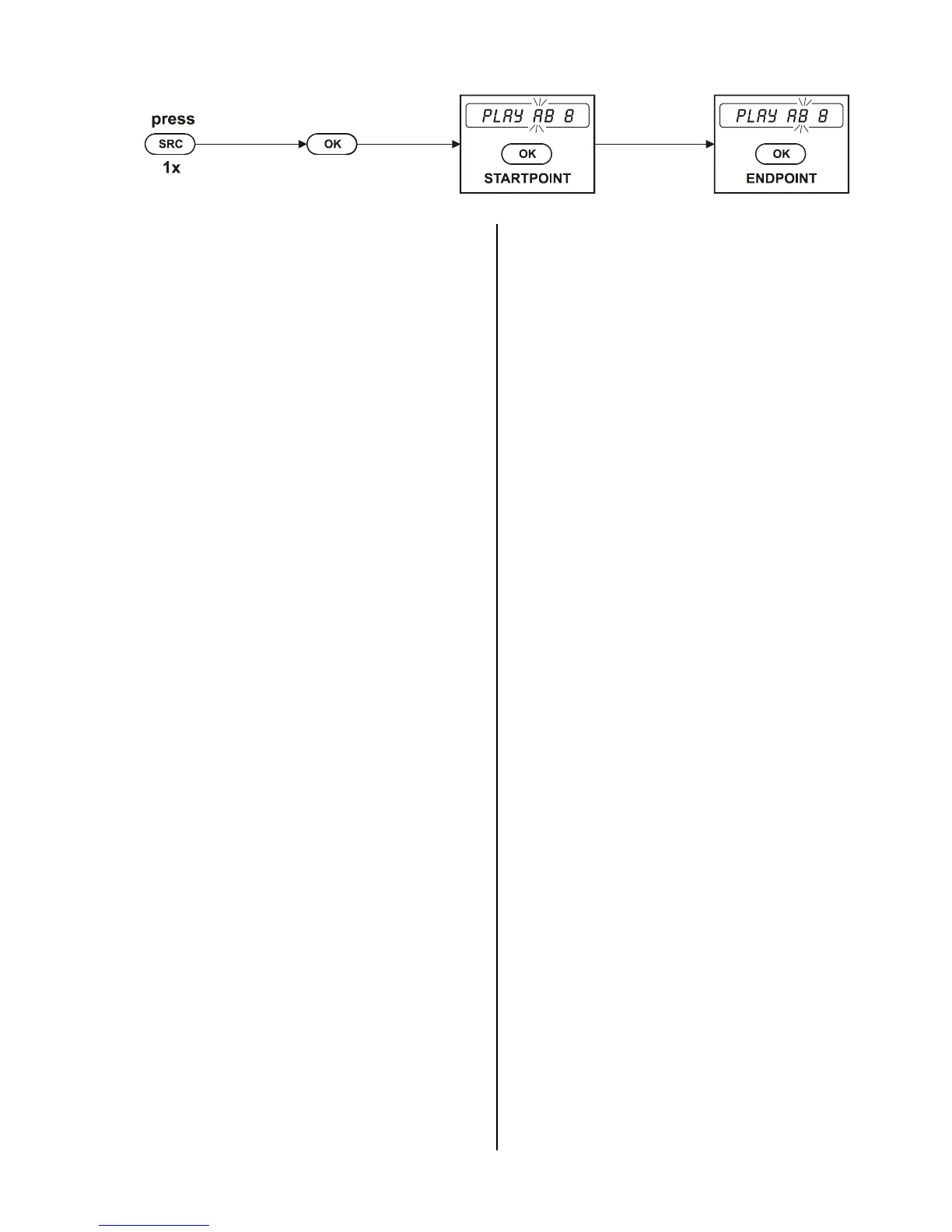
Now press the remote control buttons in the sequence
shown above.
The screen shows a flashing letter 'A' in front of the
current track number inviting you to set the start marker:
'PLAY AB 08'.
Press the
button briefly to set the start marker.
After a short period you will see a flashing letter 'B',
inviting you to set the end marker: press the
button again at the end of the passage you wish to re-
peat.
When you enter the end marker the screen displays the
message 'PLAY AB', and the machine repeats the pas-
sage between the two markers continuously.
The repetition can be interrupted at any time by pressing
the
button briefly.
Variation:
Search for the start of the sequence to be repeated in
normal playback mode, then switch the mechanism to
PAUSE mode. If you now activate PLAY A-B (
button) in the Special Functions menu, the CD starts
playing automatically. At this point you can set the start
and end markers by pressing the
button again
briefly.
Notes:
• To search for the start and the end of the sequence
you can use the
/
buttons.
• Activating the PLAY A-B mode ends the REPEAT
MIX or REPEAT TRACK mode of operation, and any
existing MEMO program is erased.



 To Next Page