This document is an Owner Manual for the TRANE NEW STYLUS Split System, 1-5 Tons Convertible Type, MCX Series 50/60 Hz. It provides general information, control operation details, system operation guidelines, safety precautions, maintenance instructions, and troubleshooting tips for the air conditioning unit.
Function Description:
The TRANE NEW STYLUS is a mini-split air conditioning system designed for cooling only (50 Hz and 60 Hz models) or cooling and heating modes (information in the manual applies to cooling only and cooling or heating modes, though the listed models are cooling only). These units are assembled, pressure tested, dehydrated, charged, and run-tested before shipment to ensure quality and performance. The MCX series offers flexibility in installation styles, including floor, low wall, and under ceiling, and can be controlled via an LCD wireless remote control or a wired control. For larger models (MCX 042, MCX 048, and MCX 060), only low wall and under ceiling installation styles are available.
Important Technical Specifications:
The manual lists specific model numbers for both 50 Hz and 60 Hz cooling-only units:
- 50 Hz Models (Cooling Only): MCX 512 GB, MCX 518 GB, MCX 524 GB, MCX 530 GB, MCX 536 GB, MCX 042 GB, MCX 048 GB, MCX 060 GB.
- 60 Hz Models (Cooling Only): MCX 512 G1, MCX 518 G1, MCX 524 G1, MCX 530 G1, MCX 536 G1, MCX 042 G1, MCX 048 G1, MCX 060 G1.
The system incorporates several features to ensure reliable operation:
- Watchdog: A circuit monitors the microprocessor's operation.
- Compressor Delay Protection: A time delay prevents rapid restarting of the compressor.
- Compressor Minimum on Time: Once started, the compressor operates for at least 24 seconds.
- Non-Volatile Memory (Auto Restart): In case of power interruption, the unit automatically resumes operation with previous settings (except time-related ones) once power is restored.
- Freeze Function: Stops the compressor if the indoor coil temperature drops below 0°C to prevent freezing.
- Defrost Function: Protects the system during heat mode operation in very low ambient temperatures.
- Compressor Status Indicator: Displays "C" on the unit to indicate compressor operation.
Error codes are displayed to indicate specific issues:
- Er: 01: Freeze protection (LED blinking)
- Er: 02: Defrost function (LED blinking)
- Er: 03: Compressor overload protection (LED blinking)
- Er: 04: Anti overheat protection (LED blinking)
- Er: 05: Low ambient protection (LED blinking)
- Er: 10: Room sensor error (LED blinking)
- Er: 11: Deice sensor error (LED blinking)
- Er: 12: Freeze sensor error (LED blinking)
Usage Features:
The unit's display panel features four lamps indicating operating status:
- FAN Lamp: Lights when the fan is operating.
- COOLING Lamp: Lights when the unit is in COOL or DRY mode.
- TIMER Lamp: Lights when the system is timer-controlled.
- Compressor Lamp: Lights when the compressor is operating.
A One Touch Control Switch (A) on the unit allows basic operation without the remote control.
Wireless Remote Control:
The remote control features numerous buttons for comprehensive control:
- POWER Button: Starts/stops unit operation.
- Temperature Setting Buttons (TEMP ^ / TEMP V): Adjusts the set temperature.
- FAN SPEED Button: Selects fan speed (auto, low, medium, high).
- MODE Button: Selects operation mode (FAN, COOL, DRY).
- LOUVER Button: Adjusts blade direction.
- SWEEP Button: Activates/inactivates sweep motor for air distribution.
- FRONT BLADE Button: Activates/inactivates front blade function.
- ON TIMER / OFF TIMER Buttons: Sets unit operation timers.
- CLOCK Button: Sets the present time.
- LIGHT Button: Turns on the LCD light.
- POWERCOOL Button: Accelerates cooling capacity for 20 minutes or until room temperature is below 18°C.
- ECONO Button: Saves energy by operating at low fan speed and raising temperature by 1°C from set temperature in COOL mode.
- SLEEP Button: Controls temperature while sleeping.
- SEND Button: Confirms operations or toggles temperature unit (°C/°F).
Digital Wired Control:
The wired control offers similar functionalities to the wireless remote, with dedicated buttons for:
- POWER Button: Starts/stops unit operation.
- Temperature Setting Buttons (TEMP ^ / TEMP V): Adjusts the set temperature.
- MENU Button: Selects modes or functions.
- MODE Button: Selects operation mode (FAN, COOL, DRY).
- FAN SPEED Button: Selects fan speed.
- TURBO Mode: Rapidly maximizes cooling capacity for 20 minutes or until room temperature is below 18°C.
- SWEEP Function: Distributes airflow.
- ECONO Mode: Energy-saving mode.
- CLOCK Setting: Sets the present time.
- ON TIMER / OFF TIMER Settings: Sets unit operation timers.
Operating Precautions:
- Installation must be performed by a qualified installer.
- Do not inspect or service the unit while operating; turn off power first.
- Keep the power cord away from sharp corners.
- Do not sit in the direct air path for long periods.
- Use only proper amperage fuses.
- Do not apply water directly to the unit for cleaning.
- Do not block return air grille or discharge grille.
- Avoid inserting objects into grilles.
- Ensure the air filter is properly installed.
- Do not use the air conditioner for preservation purposes (precision instruments, food, plants, animals, etc.).
- Do not use flammable sprays near the unit.
- Disconnect power before maintenance.
- Keep the power cord away from furniture with sharp corners.
- Turn off power if the unit will not be used for a long time.
Maintenance Features:
Regular maintenance is crucial for optimal performance and longevity. Always disconnect power before inspection or maintenance.
- Cleaning the Air Filter:
- Clean every two weeks during the cooling season.
- To remove: Push down and pull forward the return air grille, then remove the air filter frame.
- To clean: Wash dust from the filter with clean water or vacuum it.
- Dry completely before returning to its original position.
- Cautions: Do not wash in water over 40°C, do not expose to fire or direct sunlight.
- Cleaning the Front Panel:
- Wipe lightly with a soft cloth. For heavy dirt, use a soft cloth soaked in water or neutral detergent.
- Cautions: Do not use water over 50°C, benzine, gasoline, thinner, polishing compound, or machine oil, as these can cause discoloration, paint peeling, or deformation.
- Maintenance before Prolonged Idle Period:
- Operate the fan for about half a day to dry the inside of the unit.
- Stop the unit and disconnect power by turning off the safety breaker.
- Clean the air filter and return it.
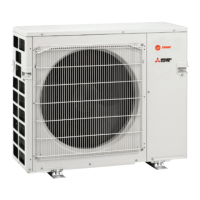
- Place a protective cover over the condensing unit.
- Outdoor unit internal components must be cleaned periodically by a qualified technician.

 Need help?
 General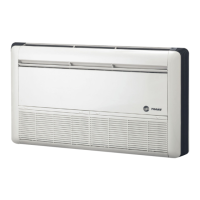


 To Next Page