3-1
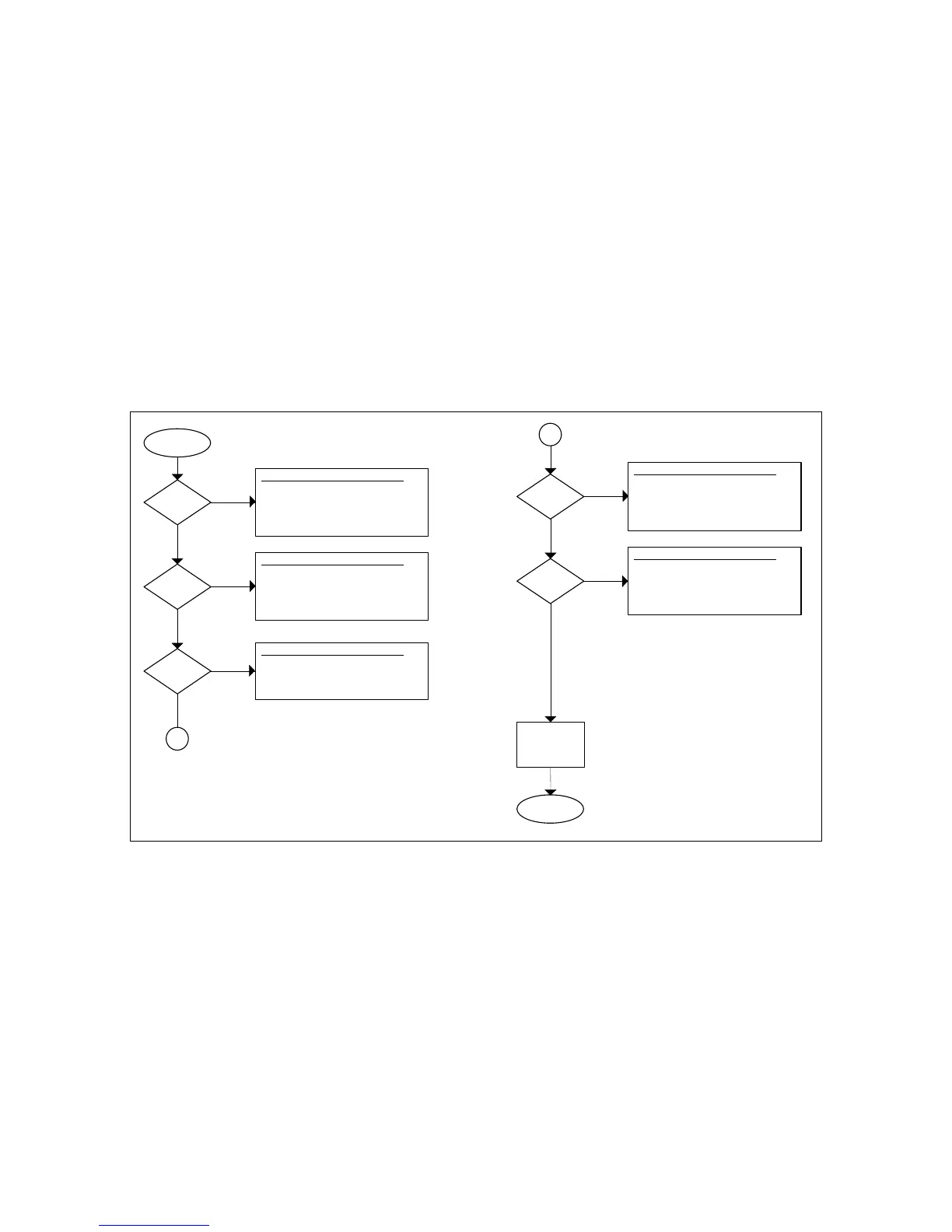
CHAPTER 3: GENERAL TROUBLSHOOTING FLOWCHART
START
Does
Scale Turn On
?
NO
YES
Try The Following In Order Of Appearance:
1. Replace AC Adapter.
2. Check the Display Cable.
3. Troubleshoot or Replace Main PCB.
NO
Try The Following In Order Of Appearance:
3. Replace Load Cell.
4. Replace Main PCB.
2. Check Load Cell Wiring.
Does
Scale Weigh
?
YES
NO
Try The Following In Order Of Appearance:
Do the
Keys Work
?
YES
1. Check Display Cable.
NO
Try The Following In Order Of Appearance:
1. Check for proper AC Adapter Voltage .Is the
Scale Stable
?
YES
2. Check environment.
NO
Try The Following In Order Of Appearance:
1. Check for platform obstruction (i.e. ovld stop).Is the
Scale Linear
?
YES
2. Replace load cell if zero offset count too high.
CALL
TRANSCELL
STOP
A
A
1.Try re-calibrating scale.
2. Troubleshoot or Replace Display PCB.
3. Troubleshoot or Replace Main PCB.
3. Troubleshoot or Replace Main PCB.
3. Troubleshoot or Replace Main PCB.


 To Next Page