7
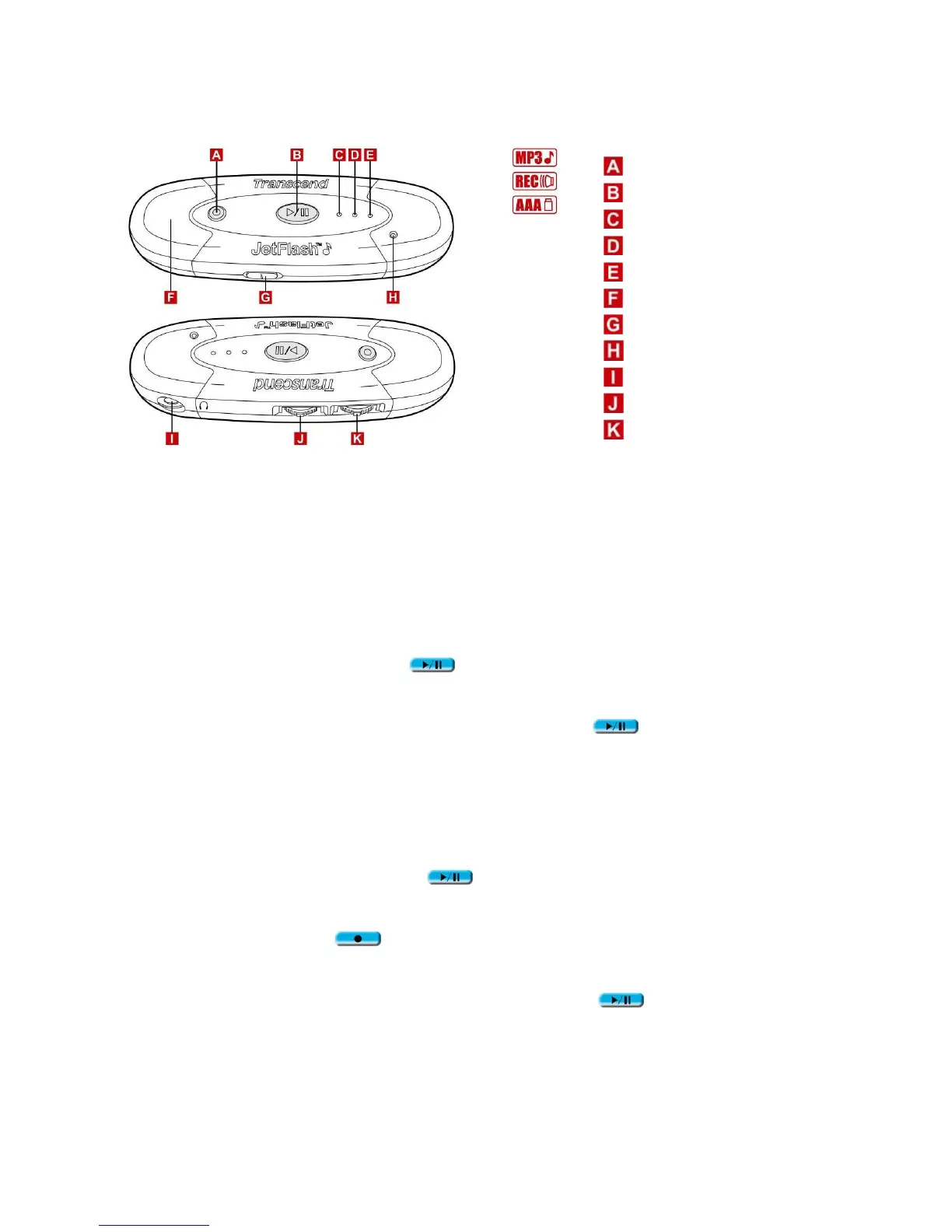
Product Overview
REC Button
PLAY/PAUSE Button
Record LED
Power/Play LED
Repeat LED
USB Connector Cover
HOLD Switch
Microphone
Earphone Jack
Track Control Wheel
Volume Control Wheel
Basic Operation
Enter MP3 Mode
1. Disconnect JetFlash from your computer.
2. Press and hold the PLAY/PAUSE
button for a few seconds to power on (enter MP3
mode). The Power/Play LED turns green.
To exit from MP3 mode, press and hold the PLAY/PAUSE
button for a few seconds
till the LED turns off.
Enter Record Mode
1. Disconnect JetFlash from your computer.
2. Press and hold the PLAY/PAUSE
button for a few seconds to power on (the
Power/Play LED turns green).
3. Press and hold the REC button for a few seconds to enter Record mode. The Record
LED turns red.
To resume MP3 mode, press and hold the PLAY/PAUSE button until the Record
LED turns off.












 To Next Page