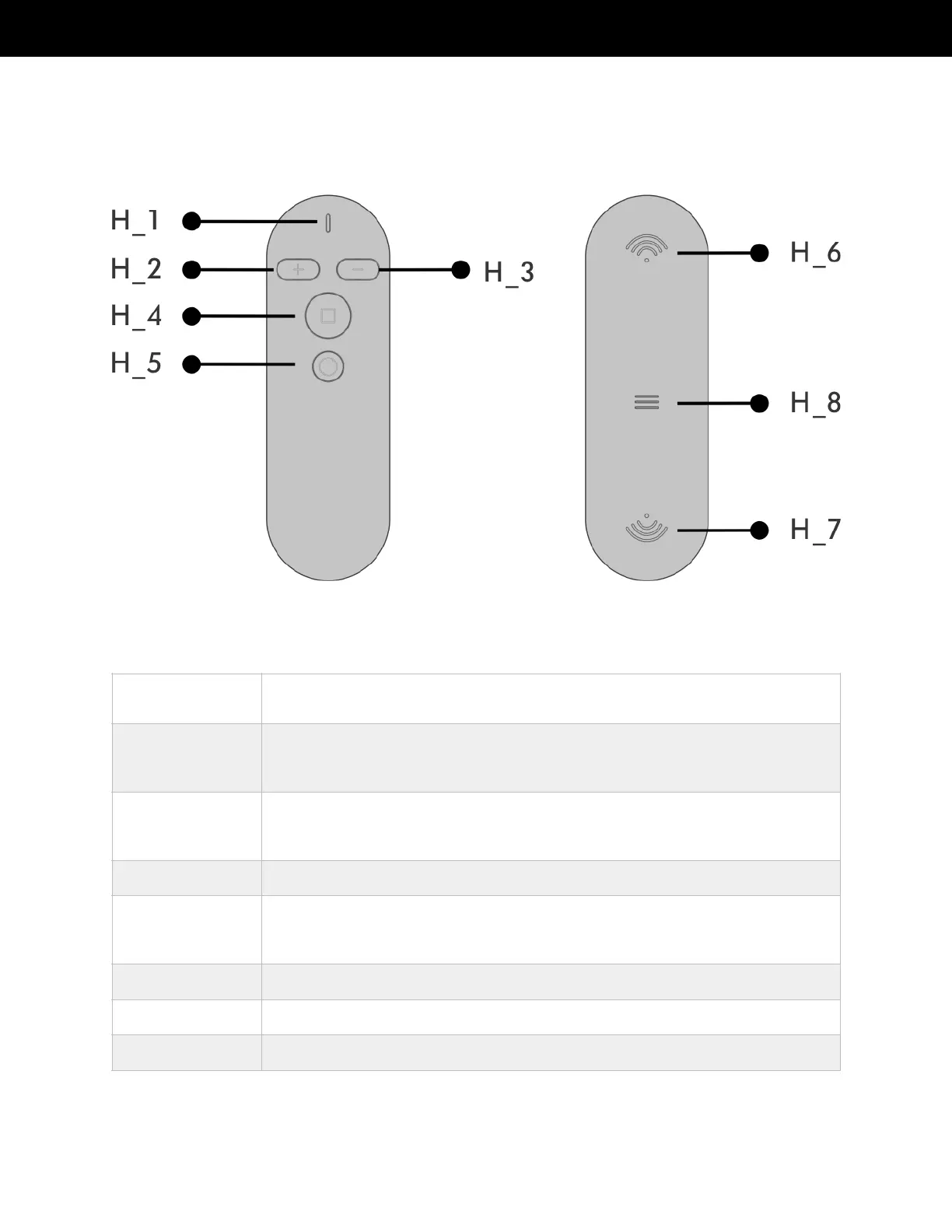
Status indicator light. Press the remote control button and the indicator light
turns on.
Acceleration button. Press the acceleration button, the speed value is first
rounded up by a multiple of 0.3 mph. When you press it again the speed is
incremented by 0.3 mph.
Deceleration button. Press the deceleration button and the speed value is first
rounded up by a multiple of 0.3 mph. When you press it again the speed is
decremented by 0.3 mph.
Start-stop composite button. Starts and stops the Treadly.
Mode switch button. Use to switch between manual control mode and automatic
control mode. Treadly’s remote control uses two batteries (1.5 V NO. 7 AAA
Alkaline battery).
Wireless transmission identification.
Wireless transmission identification.
The remote control is optional. Use it to control switching between the start, stop, acceleration,
deceleration, and motion modes.



 To Next Page