EasyManua.ls Logo

TREBLAB XR700 - Audio Playback and Call Features; Controlling Audio Playback; Managing Phone Calls

TREBLAB XR700
14 pages
Print Icon
To Next Page IconTo Next Page
To Previous Page IconTo Previous Page
Loading...
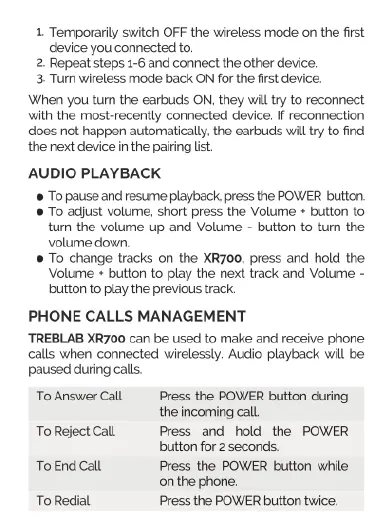
1
Temporarlly
switch
OFF
the
wireless
mode
on
the
first
device
you
connected
to,
2
Repeat
steps
1-6
and
connect
the
other
device.
3
Turn
wireless
mode
back
ON
for
the
first
device.
When
you
tum
the
earbuds
ON,
they
will
try
to
reconnect
with
the
most-recently
connected
device.
If
reconnection
does
not
happen
automatically.
the
earbuds
will try to
find
the next
device
in
the
pairing
list.
AUDIO
PLAYBACK
@
To
pause
and
resume
playback.
press
the
POWER
bution.
To
adjust
volume,
short
press
the
Volume
*
button
to
tum
the
volume
up
and
Volume
-
button
to
tum
the
volume
down.
To
change
tracks
on
the
XR700,
press
and
hold the
Volume
+
button
to
play
the
next track
and
Volume
-
button
to
play
the
previous
track.
PHONE
CALLS
MANAGEMENT
TREBLAB
XR700
can
be
used
to
make
and receive
phone
calls
when
connected
wirelessly.
Audio
playback
will
be
paused
during
calls.
To
Answer
Call
Press
the
POWER
button
during
the
incoming
call
To
Reject
Call
Press
and
hold
the
POWER
button
for
2
seconds.
ToEnd
Call
Press
the
POWER
button
while
onthe
phone.
To
Redial
Press
the
POWER
btton
twice.

Related product manuals